Block 1 - Watch Google Drive Folder
- Type / Role
- n8n-nodes-base.googleDrive - googleDrive
- Config choices
- Version 2


 Early Deal
This workflow is provided as-is. Please review and test before using in production.
️ Voice Note to Tweet: Turn Audio Ideas into X Posts with n8n A lean, 3 node automation that turns voice memos into tweets — so creators can capture ideas on the go and publish fast, without typi...
n8n-nodes-base.googledrive, n8n-nodes-base.httprequest, n8n-nodes-base.x
This workflow is cataloged by N8N Workflows and links back to its original n8n.io source page by Shelly-Ann Davy.
Original n8n.io sourceA lean, 3-node automation that turns voice memos into tweets — so creators can capture ideas on the go and publish fast, without typing.
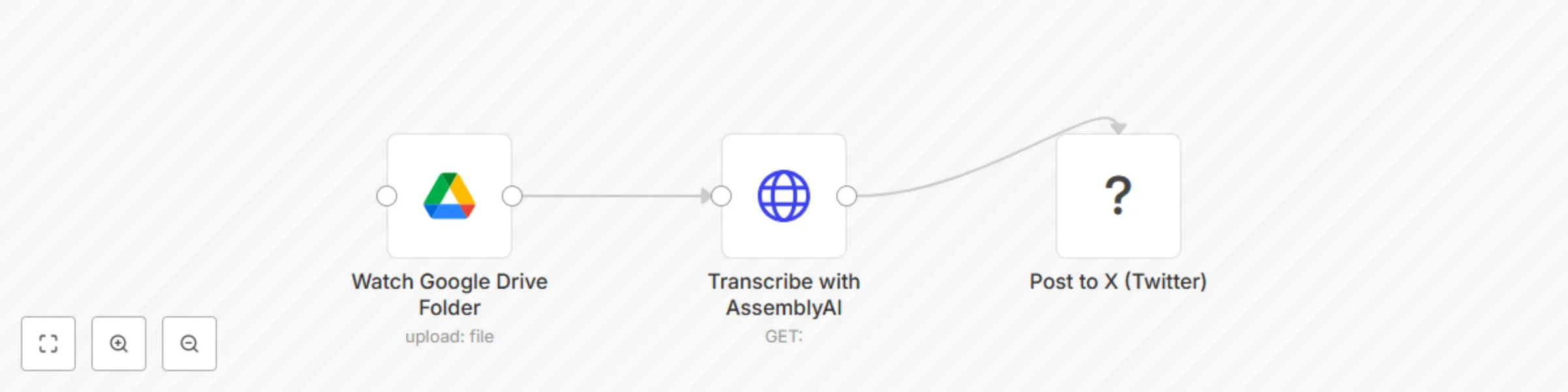
Capture inspiration the moment it strikes — even when you’re not at your desk. This 3-node workflow lets content creators, coaches, and solopreneurs turn voice memos into X (Twitter) posts automatically.
Just record a voice note, upload it to a Google Drive folder, and n8n will:
Voice Notes to Tweet> 🔁 Alternative: Use OpenAI’s Whisper API if preferred
{{GOOGLE_DRIVE_FOLDER_ID}}{{ASSEMBLYAI_API_KEY}}{{TWITTER_CREDENTIAL}}Now, every time you upload a .m4a, .mp3, or .wav file to your folder — it becomes a tweet.
Optional: Add a Slack approval step if you don’t want auto-posting.
> ⚠️ Note: X API v2 requires OAuth 2.0 and app approval.
| Enhancement | How |
|---|---|
| Add Approval Step | Insert Slack/Telegram node to approve before posting |
| Trim Long Transcripts | Use Function node to limit to 280 chars |
| Add Hashtags | Append #VoiceToTweet #ContentCreatorTips |
| Save to Archive | After posting, move file to “Processed” folder |
| Support iOS Voice Memos | Auto-convert .m4a → compatible format |
This catalog entry is organized from the workflow JSON. The node-level section below shows the executable blocks available for review before importing the template.
| Workflow | 🎙️ Convert voice notes to X posts with Google Drive and AssemblyAI |
|---|---|
| Complexity | beginner |
| Nodes | 3 |
| Categories | Social Media, AI Chatbot |
| Author | Shelly-Ann Davy |
| Published | 02 Sept 2025 |
Use the JSON export at /data/workflows/8184/8184.json as the source template for this automation.
Open n8n, import the downloaded JSON, and review each node before activating the workflow.
Replace placeholder credentials, API keys, webhook URLs, account IDs, and environment-specific values with your own settings.
Run the workflow manually or in a staging workspace, inspect node output, and confirm downstream systems receive the expected data.
Enable the workflow only after testing, then monitor executions, errors, and rate limits during the first production runs.
Review imported nodes carefully before activation. This catalog entry is intended to help you inspect the workflow structure, understand required services, and find related templates faster.
Node names, credentials, schedules, webhook paths, and external service limits may need adjustment for your workspace.
️ Voice Note to Tweet: Turn Audio Ideas into X Posts with n8n A lean, 3 node automation that turns voice memos into tweets — so creators can capture ideas on the go and publish fast, without typi...
Review the workflow JSON, configure any required credentials in n8n, and test the automation in a safe workspace before using it in production.
Yes. Use the block-by-block analysis and the downloadable JSON to inspect each node, then adjust credentials, prompts, schedules, filters, or destinations for your Social Media, AI Chatbot use case.