Convert Telegram voice messages to Google Docs with Whisper & GPT-4o tagging

Workflow preview

Workflow preview
100%
Convert Telegram voice messages to Google Docs with Whisper & GPT-4o tagging preview
Open on n8n.io

Important notice

This workflow is provided as-is. Please review and test before using in production.

1. Workflow Overview

This n8n template demonstrates how to automatically convert voice messages from Telegram into structured, searchable notes in Google Docs using AI transcription and intelligent tagging. Use cases a...

Best for

  • Internal Wiki automation workflows
  • AI Summarization automation workflows
  • intermediate n8n builders looking for reusable templates

Tools used

n8n-nodes-base.telegramtrigger, @n8n/n8n-nodes-langchain.openai, n8n-nodes-base.function, n8n-nodes-base.googledocs, n8n-nodes-base.telegram, n8n-nodes-base.if, n8n-nodes-base.set

Source and attribution

This workflow is cataloged by N8N Workflows and links back to its original n8n.io source page by Julian Reich .

Original n8n.io source

1.1 Workflow description

Title
Convert Telegram voice messages to Google Docs with Whisper & GPT-4o tagging
Workflow name
Convert Telegram voice messages to Google Docs with Whisper & GPT-4o tagging

This n8n template demonstrates how to automatically convert voice messages from Telegram into structured, searchable notes in Google Docs using AI transcription and intelligent tagging.

Use cases are many: Try capturing ideas on-the-go while walking, recording meeting insights hands-free, creating voice journals, or building a personal knowledge base from spoken thoughts!

Good to know

  • OpenAI Whisper transcription costs approximately $0.006 per minute of audio
  • ChatGPT tagging adds roughly $0.001-0.003 per message depending on length
  • The workflow supports both German and English voice recognition
  • Text messages are also supported - they bypass transcription and go directly to AI tagging
  • Perfect companion: Combine with the "Weekly AI Review" workflow for automated weekly summaries of all your notes!

How it works

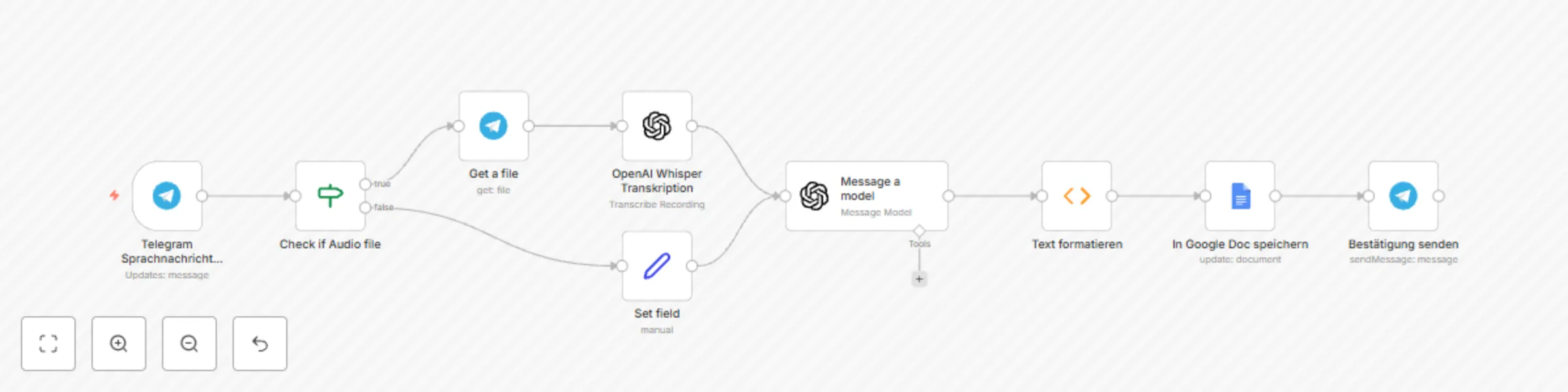
  • Telegram receives your voice message or text and triggers the workflow
  • An IF node intelligently detects whether you sent audio or text content
  • For voice messages: Telegram downloads the audio file and OpenAI Whisper transcribes it to text
  • For text messages: Content is passed directly to the next step
  • ChatGPT analyzes the content and generates up to 3 relevant keywords (Work, Ideas, Private, Health, etc.)
  • A function node formats everything with Swiss timestamps, message type indicators, and clean structure
  • The formatted entry gets automatically inserted into your Google Doc with date, keywords, and full content
  • Telegram sends you a confirmation with the transcribed/original text so you can verify accuracy

How to use

  • Simply send a voice message or text to your Telegram bot - the workflow handles everything automatically
  • The manual execution can be used for testing, but in production this runs on every message
  • Voice messages work best with clear speech in quiet environments for optimal transcription

Requirements

  • Telegram Bot Token and configured webhook
  • OpenAI API account for Whisper transcription and ChatGPT tagging
  • Google Docs API access for document writing
  • A dedicated Google Doc where all notes will be collected

Customising this workflow

  • Adjust the AI prompt to use different tagging categories relevant to your workflow (e.g., project names, priorities, emotions)
  • Add multiple Google Docs for different contexts (work vs. private notes)
  • Include additional processing like sentiment analysis or automatic task extraction
  • Connect to other apps like Notion, Obsidian, or your preferred note-taking system

And don't forget to also implement the complimentary workflow Weekly AI Review!

1.2 Logical Blocks

This catalog entry is organized from the workflow JSON. The node-level section below shows the executable blocks available for review before importing the template.

2. Block-by-Block Analysis

Block 1 - Telegram Sprachnachricht Empfang

Type / Role
n8n-nodes-base.telegramTrigger - telegramTrigger
Config choices
Version 1.2

Block 2 - OpenAI Whisper Transkription

Type / Role
@n8n/n8n-nodes-langchain.openAi - openAi
Config choices
Version 1.8

Block 3 - Text formatieren

Type / Role
n8n-nodes-base.function - function
Config choices
Version 1

Block 4 - In Google Doc speichern

Type / Role
n8n-nodes-base.googleDocs - googleDocs
Config choices
Version 2

Block 5 - Bestätigung senden

Type / Role
n8n-nodes-base.telegram - telegram
Config choices
Version 1.2

Block 6 - Get a file

Type / Role
n8n-nodes-base.telegram - telegram
Config choices
Version 1.2

Block 7 - Message a model

Type / Role
@n8n/n8n-nodes-langchain.openAi - openAi
Config choices
Version 1.8

Block 8 - Check if Audio file

Type / Role
n8n-nodes-base.if - if
Config choices
Version 2.2

Block 9 - Set field

Type / Role
n8n-nodes-base.set - set
Config choices
Version 3.4

3. Summary Table

Workflow Convert Telegram voice messages to Google Docs with Whisper & GPT-4o tagging
Complexity intermediate
Nodes 9
Categories Internal Wiki, AI Summarization
Author Julian Reich
Published 01 Sept 2025

4. Reproducing the Workflow from Scratch

  1. 1. Download the workflow JSON

    Use the JSON export at /data/workflows/8117/8117.json as the source template for this automation.

  2. 2. Import the template into n8n

    Open n8n, import the downloaded JSON, and review each node before activating the workflow.

  3. 3. Configure credentials and variables

    Replace placeholder credentials, API keys, webhook URLs, account IDs, and environment-specific values with your own settings.

  4. 4. Test with sample data

    Run the workflow manually or in a staging workspace, inspect node output, and confirm downstream systems receive the expected data.

  5. 5. Activate and monitor

    Enable the workflow only after testing, then monitor executions, errors, and rate limits during the first production runs.

5. General Notes & Resources

Review imported nodes carefully before activation. This catalog entry is intended to help you inspect the workflow structure, understand required services, and find related templates faster.

Node names, credentials, schedules, webhook paths, and external service limits may need adjustment for your workspace.

Frequently asked questions

What does Convert Telegram voice messages to Google Docs with Whisper & GPT-4o tagging do?

This n8n template demonstrates how to automatically convert voice messages from Telegram into structured, searchable notes in Google Docs using AI transcription and intelligent tagging. Use cases a...

What do I need before importing this workflow?

Review the workflow JSON, configure any required credentials in n8n, and test the automation in a safe workspace before using it in production.

Can I customize this workflow?

Yes. Use the block-by-block analysis and the downloadable JSON to inspect each node, then adjust credentials, prompts, schedules, filters, or destinations for your Internal Wiki, AI Summarization use case.