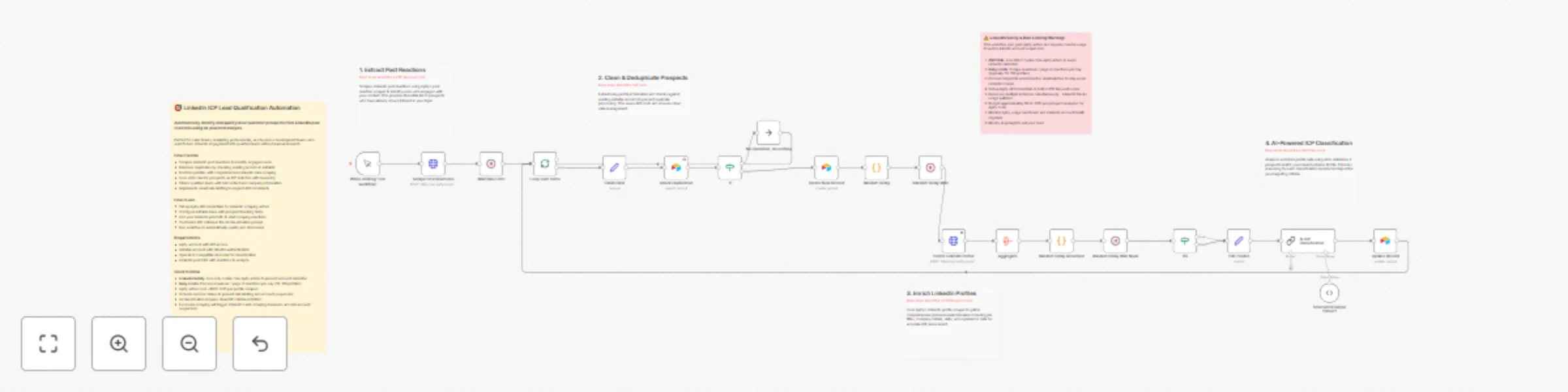
Convert LinkedIn post reactions into qualified leads with AI and Apify

Workflow preview

Workflow preview
100%
Convert LinkedIn post reactions into qualified leads with AI and Apify preview
Open on n8n.io

Important notice

This workflow is provided as-is. Please review and test before using in production.

1. Workflow Overview

LinkedIn ICP Lead Qualification Automation Automatically identify and qualify ideal customer prospects from LinkedIn post reactions using AI powered profile analysis and intelligent data enrichm...

Best for

  • Lead Generation automation workflows
  • AI Summarization automation workflows
  • advanced n8n builders looking for reusable templates

Tools used

n8n-nodes-base.if, n8n-nodes-base.set, @n8n/n8n-nodes-langchain.outputparserstructured, n8n-nodes-base.manualtrigger, n8n-nodes-base.aggregate, n8n-nodes-base.noop, n8n-nodes-base.airtable, n8n-nodes-base.splitinbatches

Source and attribution

This workflow is cataloged by N8N Workflows and links back to its original n8n.io source page by Anna Bui.

Original n8n.io source

1.1 Workflow description

Title
Convert LinkedIn post reactions into qualified leads with AI and Apify
Workflow name
Convert LinkedIn post reactions into qualified leads with AI and Apify

🎯 LinkedIn ICP Lead Qualification Automation

Automatically identify and qualify ideal customer prospects from LinkedIn post reactions using AI-powered profile analysis and intelligent data enrichment.

Perfect for sales teams and marketing professionals who want to convert LinkedIn engagement into qualified leads without manual research. This workflow transforms post reactions into actionable prospect data with AI-driven ICP classification.

Good to know

  • LinkedIn Safety: Only use cookie-free Apify actors to avoid account detection and suspension risks
  • Daily Processing Limits: Scrape maximum 1 page of reactions per day (50-100 profiles) to stay under LinkedIn's radar
  • Apify actors cost approximately $0.01-0.05 per profile scraped - budget accordingly for daily processing
  • Includes intelligent rate limiting to prevent API restrictions and maintain LinkedIn account safety
  • AI classification requires clear definition of your Ideal Customer Profile criteria
  • Processing too many profiles or running too frequently will trigger LinkedIn's anti-scraping measures
  • Always monitor your LinkedIn account health and Apify usage patterns for any warning signs

How it works

  • Scrapes LinkedIn post reactions using Apify's specialized actor to identify engaged users
  • Extracts and cleans profile data including names, job titles, and LinkedIn URLs
  • Checks against existing Airtable records to prevent duplicate processing and save costs
  • Creates new prospect records with basic information for tracking purposes
  • Enriches profiles with comprehensive LinkedIn data including company details and experience
  • Aggregates and formats profile data for AI analysis and classification
  • Uses AI to analyze prospects against your ICP criteria with detailed reasoning
  • Updates records with ICP classification results and extracted email addresses
  • Implements smart batching and delays to respect API rate limits throughout the process

How to use

  • IMPORTANT: Select cookie-free Apify actors only to avoid LinkedIn account suspension
  • Set up Apify API credentials in both HTTP Request nodes for safe LinkedIn scraping
  • Configure Airtable OAuth2 authentication and select your prospect tracking base
  • Replace the LinkedIn post URL with your target post in the initial scraper node
  • Daily Usage: Process only 1 page of reactions per day (typically 50-100 profiles) maximum
  • Customize the AI classification prompt with your specific ICP criteria and job titles
  • Test with a small batch first to verify setup and monitor both API costs and LinkedIn account health
  • Schedule workflow to run daily rather than processing large batches to maintain account safety

Requirements

  • Apify account with API access and sufficient credits for profile scraping
  • Airtable account with OAuth2 authentication configured
  • OpenAI or compatible AI model credentials for prospect classification
  • LinkedIn post URL with reactions to analyze (minimum 10+ reactions recommended)
  • Clear definition of your Ideal Customer Profile criteria for accurate AI classification

Customising this workflow

  • Safety First: Always verify Apify actors are cookie-free before configuring to protect your LinkedIn account
  • Modify ICP classification criteria in the AI prompt to match your specific target customer profile
  • Set up daily scheduling (not hourly/frequent) to respect LinkedIn's usage patterns and avoid detection
  • Adjust rate limiting delays based on your comfort level with LinkedIn scraping frequency
  • Add additional data fields to Airtable schema for storing custom prospect information
  • Integrate with CRM systems like HubSpot or Salesforce for automatic lead import
  • Set up Slack notifications for new qualified prospects or daily summary reports
  • Create email marketing sequences in tools like Mailchimp for nurturing qualified leads
  • Add lead scoring based on company size, industry, or engagement level for prioritization
  • Consider rotating between different LinkedIn posts to diversify your prospect sources while maintaining daily limits

1.2 Logical Blocks

This catalog entry is organized from the workflow JSON. The node-level section below shows the executable blocks available for review before importing the template.

2. Block-by-Block Analysis

Block 1 - If3

Type / Role
n8n-nodes-base.if - if
Config choices
Version 2.2

Block 2 - Edit Fields1

Type / Role
n8n-nodes-base.set - set
Config choices
Version 3.4

Block 3 - Structured Output Parser1

Type / Role
@n8n/n8n-nodes-langchain.outputParserStructured - outputParserStructured
Config choices
Version 1.2

Block 4 - When clicking ‘Test workflow’

Type / Role
n8n-nodes-base.manualTrigger - manualTrigger
Config choices
Version 1

Block 5 - Aggregate

Type / Role
n8n-nodes-base.aggregate - aggregate
Config choices
Version 1

Block 6 - If

Type / Role
n8n-nodes-base.if - if
Config choices
Version 2.2

Block 7 - No Operation, do nothing

Type / Role
n8n-nodes-base.noOp - noOp
Config choices
Version 1

Block 8 - Check Duplication

Type / Role
n8n-nodes-base.airtable - airtable
Config choices
Version 2.1

Block 9 - Clean Data

Type / Role
n8n-nodes-base.set - set
Config choices
Version 3.4

Block 10 - Loop Over Items

Type / Role
n8n-nodes-base.splitInBatches - splitInBatches
Config choices
Version 3

Block 11 - Wait Rate Limit

Type / Role
n8n-nodes-base.wait - wait
Config choices
Version 1.1

Block 12 - Create New Record

Type / Role
n8n-nodes-base.airtable - airtable
Config choices
Version 2.1

Block 13 - Random Delay

Type / Role
n8n-nodes-base.code - code
Config choices
Version 2

Block 14 - Random Delay Wait

Type / Role
n8n-nodes-base.wait - wait
Config choices
Version 1.1

Block 15 - Random Delay Generator

Type / Role
n8n-nodes-base.code - code
Config choices
Version 2

Block 16 - Random Delay Wait Node

Type / Role
n8n-nodes-base.wait - wait
Config choices
Version 1.1

Block 17 - Update Record

Type / Role
n8n-nodes-base.airtable - airtable
Config choices
Version 2.1

Block 18 - AI ICP Classification

Type / Role
@n8n/n8n-nodes-langchain.chainLlm - chainLlm
Config choices
Version 1.6

Block 19 - Scrape Post Reactions

Type / Role
n8n-nodes-base.httpRequest - httpRequest
Config choices
Version 4.2

Block 20 - Enrich LinkedIn Profile

Type / Role
n8n-nodes-base.httpRequest - httpRequest
Config choices
Version 4.2

Block 21 - Sticky Note1

Type / Role
n8n-nodes-base.stickyNote - stickyNote
Config choices
Version 1

Block 22 - Sticky Note

Type / Role
n8n-nodes-base.stickyNote - stickyNote
Config choices
Version 1

Block 23 - Sticky Note2

Type / Role
n8n-nodes-base.stickyNote - stickyNote
Config choices
Version 1

Block 24 - Sticky Note3

Type / Role
n8n-nodes-base.stickyNote - stickyNote
Config choices
Version 1

Showing the first 24 of 26 workflow blocks. Download the JSON for the full node graph.

3. Summary Table

Workflow Convert LinkedIn post reactions into qualified leads with AI and Apify
Complexity advanced
Nodes 26
Categories Lead Generation, AI Summarization
Author Anna Bui
Published 06 Aug 2025

4. Reproducing the Workflow from Scratch

  1. 1. Download the workflow JSON

    Use the JSON export at /data/workflows/7034/7034.json as the source template for this automation.

  2. 2. Import the template into n8n

    Open n8n, import the downloaded JSON, and review each node before activating the workflow.

  3. 3. Configure credentials and variables

    Replace placeholder credentials, API keys, webhook URLs, account IDs, and environment-specific values with your own settings.

  4. 4. Test with sample data

    Run the workflow manually or in a staging workspace, inspect node output, and confirm downstream systems receive the expected data.

  5. 5. Activate and monitor

    Enable the workflow only after testing, then monitor executions, errors, and rate limits during the first production runs.

5. General Notes & Resources

Review imported nodes carefully before activation. This catalog entry is intended to help you inspect the workflow structure, understand required services, and find related templates faster.

Node names, credentials, schedules, webhook paths, and external service limits may need adjustment for your workspace.

Frequently asked questions

What does Convert LinkedIn post reactions into qualified leads with AI and Apify do?

LinkedIn ICP Lead Qualification Automation Automatically identify and qualify ideal customer prospects from LinkedIn post reactions using AI powered profile analysis and intelligent data enrichm...

What do I need before importing this workflow?

Review the workflow JSON, configure any required credentials in n8n, and test the automation in a safe workspace before using it in production.

Can I customize this workflow?

Yes. Use the block-by-block analysis and the downloadable JSON to inspect each node, then adjust credentials, prompts, schedules, filters, or destinations for your Lead Generation, AI Summarization use case.