Convert CDP network topology to Lucidchart prompts with AWX and Gemini AI
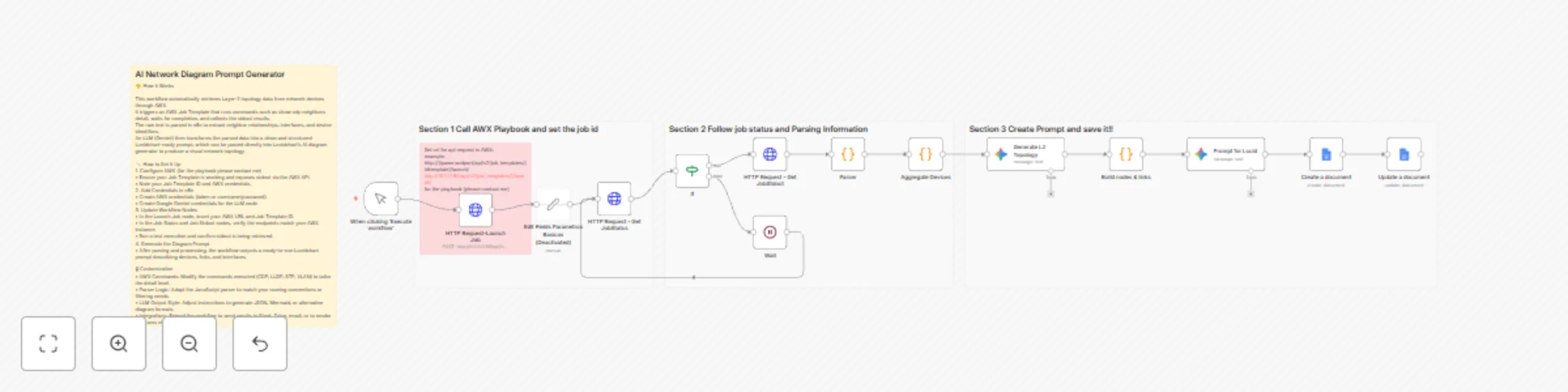
Workflow preview

$20/month : Unlimited workflows
2500 executions/month

THE #1 IN WEB SCRAPING
Scrape any website without limits
HOSTINGER  Early Deal
DISCOUNT 20% Try free
Early DealDISCOUNT 20%
Self-hosted n8n
Unlimited workflows - from $4.99/mo

#1 hub for scraping, AI & automation
6000+ actors - $5 credits/mo
Important notice
This workflow is provided as-is. Please review and test before using in production.
Overview
AI NETWORK DIAGRAM PROMPT GENERATOR
Template Description
This workflow automates the creation of network diagram prompts using AI. It retrieves Layer-2 topology data from AWX, parses device relationships, and generates a clean, structured prompt ready for Lucidchart’s AI diagram generator.
How It Works
The workflow triggers an AWX Job Template that runs commands such as show cdp neighbors detail. After the job completes, n8n fetches the stdout, extracts neighbor relationships through a JavaScript parser, and sends the structured data to an LLM (Gemini). The LLM transforms the topology into a formatted prompt you can paste directly into Lucidchart to instantly generate a visual network diagram.
Setup Steps
- Configure AWX:
- Ensure your Job Template runs the required network commands and produces stdout.
- Obtain your AWX base URL, credentials, and Job Template ID.
- Add Credentials in n8n:
- Create AWX API credentials.
- Add Google Gemini credentials for the LLM node.
- Update Workflow Nodes:
- Insert your AWX URL and Job Template ID in the “Launch Job” node.
- Verify endpoints in the “Job Status” and “Job Stdout” nodes.
- Run the workflow:
- After execution, copy the generated Lucidchart prompt and paste it into Lucidchart’s AI to produce the network diagram.