Conversational VK bot with GPT-4 mini & Whisper voice transcription

Workflow preview

Workflow preview
100%
Conversational VK bot with GPT-4 mini & Whisper voice transcription preview
Open on n8n.io

Important notice

This workflow is provided as-is. Please review and test before using in production.

1. Workflow Overview

How it works This workflow powers an intelligent, conversational AI bot for VK that can understand and respond to both text and voice messages . The bot uses an AI agent with built in memory, allow...

Best for

  • Support Chatbot automation workflows
  • AI Chatbot automation workflows
  • advanced n8n builders looking for reusable templates

Tools used

@n8n/n8n-nodes-langchain.lmchatopenai, @n8n/n8n-nodes-langchain.memorybufferwindow, n8n-nodes-base.webhook, @n8n/n8n-nodes-langchain.openai, @n8n/n8n-nodes-langchain.agent, n8n-nodes-base.httprequest, n8n-nodes-base.set, n8n-nodes-base.filter

Source and attribution

This workflow is cataloged by N8N Workflows and links back to its original n8n.io source page by Konstantin.

Original n8n.io source

1.1 Workflow description

Title
Conversational VK bot with GPT-4 mini & Whisper voice transcription
Workflow name
Conversational VK bot with GPT-4 mini & Whisper voice transcription

How it works

This workflow powers an intelligent, conversational AI bot for VK that can understand and respond to both text and voice messages. The bot uses an AI agent with built-in memory, allowing it to remember the conversation history for each unique user (or in each chat) and answer follow-up questions. It's a complete solution for creating an engaging, automated assistant within your VK group.

Step-by-step

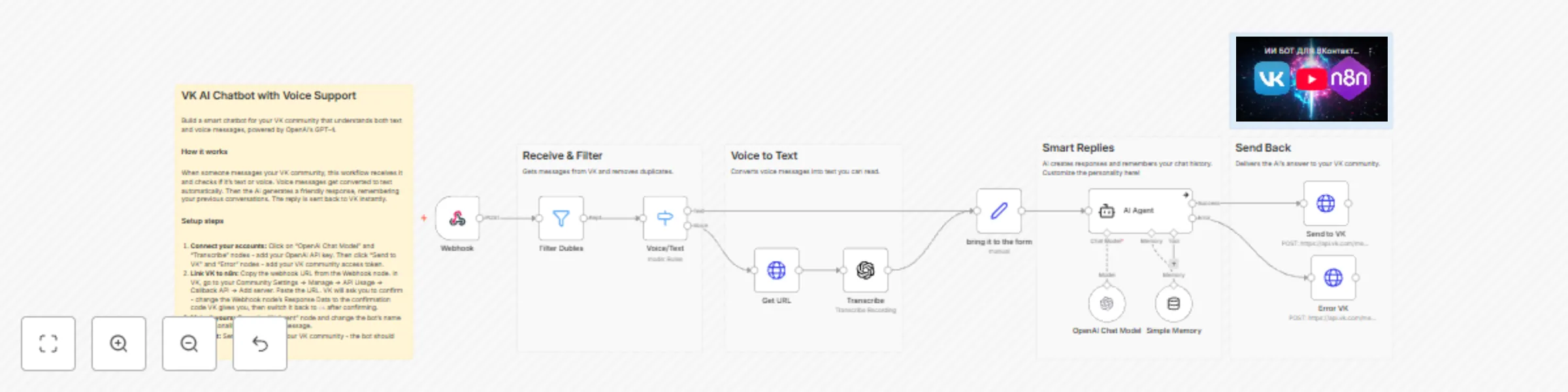
  • VK Webhook (Trigger): The workflow starts when the Webhook node receives a new message from your VK group.
  • Duplicate Filtering: The data immediately passes through the Filter Dubles node, which checks for the x-retry-counter header. This is a crucial step to prevent processing duplicate retry requests sent by the VK API.
  • Voice or Text Routing: A Voice/Text (Switch) node checks if the message contains text (message.text) or a voice attachment (audio_message.link_mp3).
  • Voice Transcription: If it's a voice note, the Get URL (HTTP Request) node downloads the audio file. The file is then passed to the Transcribe (OpenAI) node, which uses the Whisper model to convert the audio to text.
  • Input Unification: Both the original text (from the 'Text' path) and the newly transcribed text (from the 'Voice' path) are routed to the Set Prompt node. This node standardizes the input into a single prompt variable.
  • AI Agent Processing: The prompt variable is passed to the AI Agent. This agent is powered by an OpenAI Chat Model and uses Simple Memory to retain conversation history, using the VK peer_id as the sessionKey. This allows it to maintain a separate history for both private messages and group chats.
  • Response Generation: The successful AI response is passed to the Send to VK (HTTP Request) node, which sends the message back to the user.
  • Error Handling: The AI Agent node has error handling enabled (onError). If it fails, the flow is redirected to the Error (HTTP Request) node, which sends a fallback message to the user.

Set up steps

Estimated set up time: 10 minutes

  1. Add your OpenAI credentials to the OpenAI Chat Model and Transcribe nodes.
  2. Add your VK group's API Bearer Token credentials to the two HTTP Request nodes named Send to VK and Error.
  3. Webhook Setup (Important!): This is a two-stage process: confirmation and operation.
    • Copy the Production Webhook URL from the Webhook node.
    • Stage A: Confirm Address (One-time)
      • In the Webhook node settings, set Response Mode to On Received.
      • In Options -> Response Data, temporarily paste the confirmation string that VK provides.
      • Activate the workflow (toggle "Active" in the top-right).
      • Paste the URL into your VK group's Callback API settings (Management -> API -> Callback API) and click "Confirm".
    • Stage B: Operational Mode (Permanent)
      • Return to the Webhook node.
      • Set Response Mode to Immediate.
      • In Options -> Response Data, type the word ok (lowercase).
      • Save and reactivate the workflow. The bot is now live.
  4. (Optional) Customize the system prompt in the AI Agent node to define your bot's name and personality.

1.2 Logical Blocks

This catalog entry is organized from the workflow JSON. The node-level section below shows the executable blocks available for review before importing the template.

2. Block-by-Block Analysis

Block 1 - OpenAI Chat Model

Type / Role
@n8n/n8n-nodes-langchain.lmChatOpenAi - lmChatOpenAi
Config choices
Version 1.2

Block 2 - Simple Memory

Type / Role
@n8n/n8n-nodes-langchain.memoryBufferWindow - memoryBufferWindow
Config choices
Version 1.3

Block 3 - Webhook

Type / Role
n8n-nodes-base.webhook - webhook
Config choices
Version 2

Block 4 - Transcribe

Type / Role
@n8n/n8n-nodes-langchain.openAi - openAi
Config choices
Version 1.6

Block 5 - AI Agent

Type / Role
@n8n/n8n-nodes-langchain.agent - agent
Config choices
Version 1.7

Block 6 - Send to VK

Type / Role
n8n-nodes-base.httpRequest - httpRequest
Config choices
Version 4.2

Block 7 - Get URL

Type / Role
n8n-nodes-base.httpRequest - httpRequest
Config choices
Version 4.2

Block 8 - bring it to the form

Type / Role
n8n-nodes-base.set - set
Config choices
Version 3.4

Block 9 - Filter Dubles

Type / Role
n8n-nodes-base.filter - filter
Config choices
Version 2.2

Block 10 - Voice/Text

Type / Role
n8n-nodes-base.switch - switch
Config choices
Version 3.2

Block 11 - Sticky Note

Type / Role
n8n-nodes-base.stickyNote - stickyNote
Config choices
Version 1

Block 12 - Sticky Note1

Type / Role
n8n-nodes-base.stickyNote - stickyNote
Config choices
Version 1

Block 13 - Sticky Note2

Type / Role
n8n-nodes-base.stickyNote - stickyNote
Config choices
Version 1

Block 14 - Sticky Note3

Type / Role
n8n-nodes-base.stickyNote - stickyNote
Config choices
Version 1

Block 15 - Sticky Note4

Type / Role
n8n-nodes-base.stickyNote - stickyNote
Config choices
Version 1

Block 16 - Error VK

Type / Role
n8n-nodes-base.httpRequest - httpRequest
Config choices
Version 4.2

Block 17 - Sticky Note5

Type / Role
n8n-nodes-base.stickyNote - stickyNote
Config choices
Version 1

3. Summary Table

Workflow Conversational VK bot with GPT-4 mini & Whisper voice transcription
Complexity advanced
Nodes 17
Categories Support Chatbot, AI Chatbot
Author Konstantin
Published 06 Nov 2025

4. Reproducing the Workflow from Scratch

  1. 1. Download the workflow JSON

    Use the JSON export at /data/workflows/10579/10579.json as the source template for this automation.

  2. 2. Import the template into n8n

    Open n8n, import the downloaded JSON, and review each node before activating the workflow.

  3. 3. Configure credentials and variables

    Replace placeholder credentials, API keys, webhook URLs, account IDs, and environment-specific values with your own settings.

  4. 4. Test with sample data

    Run the workflow manually or in a staging workspace, inspect node output, and confirm downstream systems receive the expected data.

  5. 5. Activate and monitor

    Enable the workflow only after testing, then monitor executions, errors, and rate limits during the first production runs.

5. General Notes & Resources

Review imported nodes carefully before activation. This catalog entry is intended to help you inspect the workflow structure, understand required services, and find related templates faster.

Node names, credentials, schedules, webhook paths, and external service limits may need adjustment for your workspace.

Frequently asked questions

What does Conversational VK bot with GPT-4 mini & Whisper voice transcription do?

How it works This workflow powers an intelligent, conversational AI bot for VK that can understand and respond to both text and voice messages . The bot uses an AI agent with built in memory, allow...

What do I need before importing this workflow?

Review the workflow JSON, configure any required credentials in n8n, and test the automation in a safe workspace before using it in production.

Can I customize this workflow?

Yes. Use the block-by-block analysis and the downloadable JSON to inspect each node, then adjust credentials, prompts, schedules, filters, or destinations for your Support Chatbot, AI Chatbot use case.