Comparing data with the Compare Datasets node
Workflow preview

$20/month : Unlimited workflows
2500 executions/month

THE #1 IN WEB SCRAPING
Scrape any website without limits
HOSTINGER  Early Deal
DISCOUNT 20% Try free
Early DealDISCOUNT 20%
Self-hosted n8n
Unlimited workflows - from $4.99/mo

#1 hub for scraping, AI & automation
6000+ actors - $5 credits/mo
Important notice
This workflow is provided as-is. Please review and test before using in production.
Overview
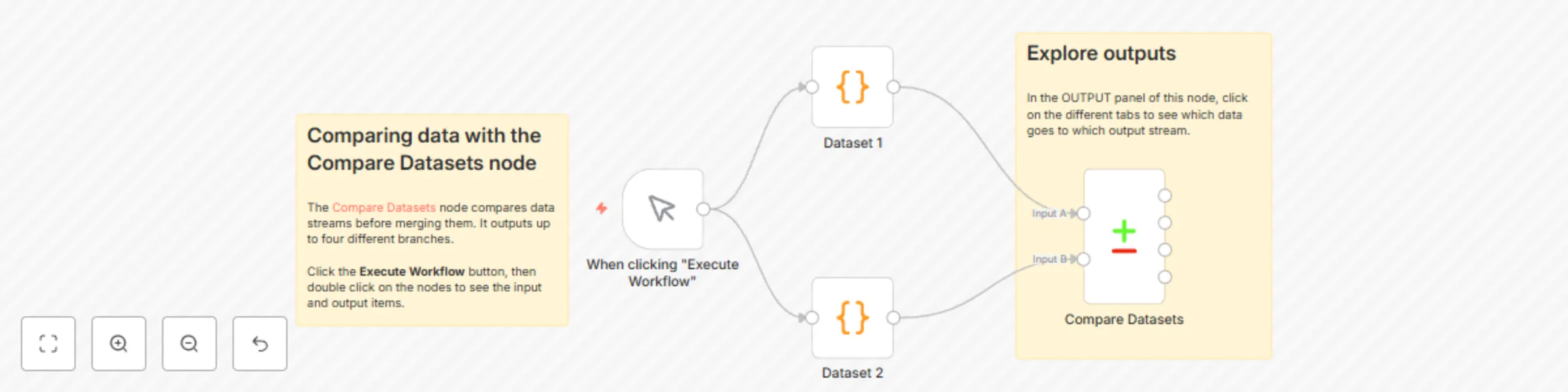
This workflow is designed to compare two datasets (Dataset 1 and Dataset 2) based on a common field, "fruit," and provide insights into the differences. Here are the steps:
- Manual Trigger: The workflow begins when a user clicks "Execute Workflow."
- Dataset 1: This node generates the first dataset containing information about fruits, such as apple, orange, grape, strawberry, and banana, along with their colors.
- Dataset 2: This node generates the second dataset, also containing information about fruits, but with some variations in color. For example, it includes a "kiwi" with the color "mostly green."
- Compare Datasets: The "Compare Datasets" node takes both datasets and compares them based on the "fruit" field. It identifies any differences or matches between the two datasets.
In summary, this workflow is used to compare two datasets of fruits and their colors, identify differences, and provide guidance on how to explore the comparison results.