Company knowledge base agent (RAG)

Workflow preview

Workflow preview
100%
Company knowledge base agent (RAG) preview
Open on n8n.io

Important notice

This workflow is provided as-is. Please review and test before using in production.

1. Workflow Overview

Turn your docs into an AI powered internal or public facing assistant. This chatbot workflow uses RAG (Retrieval Augmented Generation) with Supabase vector search to answer employee or customer que...

Best for

  • Internal Wiki automation workflows
  • AI RAG automation workflows
  • advanced n8n builders looking for reusable templates

Tools used

n8n-nodes-base.set, @n8n/n8n-nodes-langchain.vectorstoresupabase, @n8n/n8n-nodes-langchain.documentdefaultdataloader, @n8n/n8n-nodes-langchain.textsplitterrecursivecharactertextsplitter, @n8n/n8n-nodes-langchain.embeddingsopenai, n8n-nodes-base.googledrivetrigger, n8n-nodes-base.googledrive, n8n-nodes-base.stickynote

Source and attribution

This workflow is cataloged by N8N Workflows and links back to its original n8n.io source page by Abdul Mir.

Original n8n.io source

1.1 Workflow description

Title
Company knowledge base agent (RAG)
Workflow name
Company knowledge base agent (RAG)

Overview

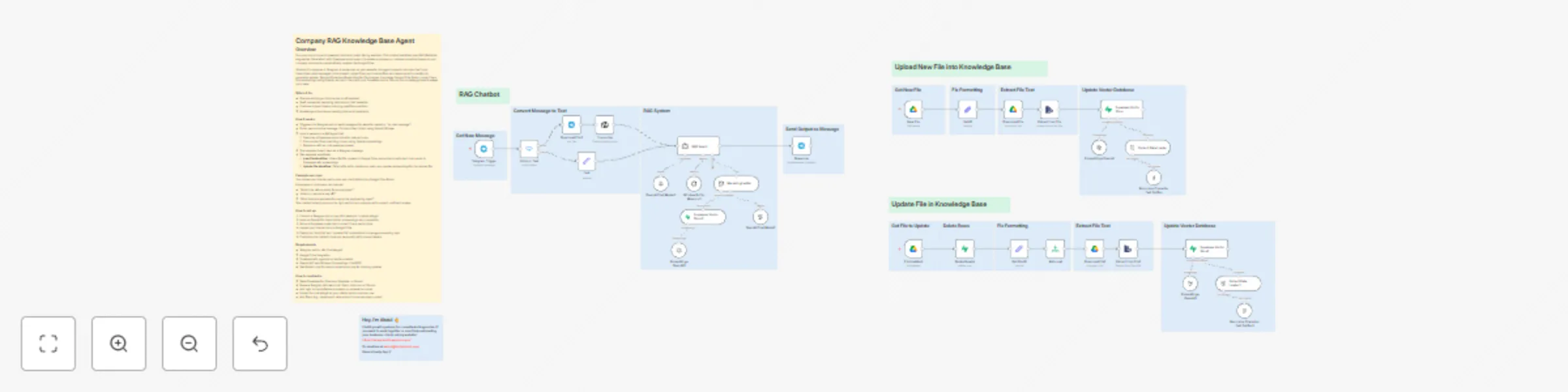
Turn your docs into an AI-powered internal or public-facing assistant. This chatbot workflow uses RAG (Retrieval-Augmented Generation) with Supabase vector search to answer employee or customer questions based on your company documents—automatically updated via Google Drive.

Whether it’s deployed in Telegram or embedded on your website, this agent supports voice and text input, transcribes voice messages, pulls relevant context from your internal files, and responds with a helpful, AI-generated answer. Two additional workflows listen for file changes in a shared Google Drive folder, convert them into embeddings using OpenAI, and sync them with your Supabase vector DB—so your knowledge base is always up to date.

Who’s it for

  • Startups building an internal ops or HR assistant
  • SaaS companies deploying help bots on their websites
  • Customer support teams reducing repetitive questions
  • Knowledge-driven teams needing internal AI assistants

How it works

  • Triggered via Telegram bot (or easily swapped for website chatbot or “on chat message”)
  • If user sends a voice message, it’s transcribed to text using OpenAI Whisper
  • Input is passed to a RAG agent that:
    • Searches a Supabase vector store for relevant docs
    • Pulls context from matching chunks using OpenAI embeddings
    • Responds with an LLM-powered answer
  • The response is sent back as a Telegram message
  • Two separate workflows:
    • New File Workflow: Listens for file uploads in Google Drive, extracts and splits text, then sends to Supabase with embeddings
    • Update File Workflow: Detects file edits, deletes old rows, and updates embeddings for the revised file

Example use case

> You upload your internal policy docs and client FAQs into a Google Drive folder.
>
> Employees or customers can now ask:
> - “What’s the refund policy for annual plans?”
> - “How do I request a day off?”
> - “What tools are approved for use by the engineering team?”
>
> The chatbot instantly pulls up the right section and responds with a smart, confident answer.

How to set up

  1. Connect a Telegram bot or use n8n’s webchat / chatbot widget
  2. Hook up OpenAI for transcription, embeddings, and completion
  3. Set up a Supabase project and connect it as a vector store
  4. Upload your internal docs to Google Drive
  5. Deploy the “Add File” and “Update File” automations to manage embedding sync
  6. Customize the chatbot’s tone and personality with prompt tweaks

Requirements

  • Telegram bot (or n8n Chat widget)
  • Google Drive integration
  • Supabase with pgvector or similar enabled
  • OpenAI API key (Whisper, Embeddings, ChatGPT)
  • Two folders: one for raw documents and one for tracking updates

How to customize

  • Swap Supabase for Pinecone, Weaviate, or Qdrant
  • Replace Telegram with web chat, Slack, Intercom, or Discord
  • Add logic to handle fallback answers or escalate to human
  • Embed the chat widget on your site for public customer use
  • Add filters (e.g. department, date, author) to narrow down context

1.2 Logical Blocks

This catalog entry is organized from the workflow JSON. The node-level section below shows the executable blocks available for review before importing the template.

2. Block-by-Block Analysis

Block 1 - Set ID

Type / Role
n8n-nodes-base.set - set
Config choices
Version 3.4

Block 2 - Supabase Vector Store

Type / Role
@n8n/n8n-nodes-langchain.vectorStoreSupabase - vectorStoreSupabase
Config choices
Version 1

Block 3 - Default Data Loader

Type / Role
@n8n/n8n-nodes-langchain.documentDefaultDataLoader - documentDefaultDataLoader
Config choices
Version 1

Block 4 - Recursive Character Text Splitter

Type / Role
@n8n/n8n-nodes-langchain.textSplitterRecursiveCharacterTextSplitter - textSplitterRecursiveCharacterTextSplitter
Config choices
Version 1

Block 5 - Embeddings OpenAI

Type / Role
@n8n/n8n-nodes-langchain.embeddingsOpenAi - embeddingsOpenAi
Config choices
Version 1.1

Block 6 - New File

Type / Role
n8n-nodes-base.googleDriveTrigger - googleDriveTrigger
Config choices
Version 1

Block 7 - Download File

Type / Role
n8n-nodes-base.googleDrive - googleDrive
Config choices
Version 3

Block 8 - Sticky Note

Type / Role
n8n-nodes-base.stickyNote - stickyNote
Config choices
Version 1

Block 9 - Extract from File

Type / Role
n8n-nodes-base.extractFromFile - extractFromFile
Config choices
Version 1

Block 10 - Sticky Note4

Type / Role
n8n-nodes-base.stickyNote - stickyNote
Config choices
Version 1

Block 11 - Sticky Note5

Type / Role
n8n-nodes-base.stickyNote - stickyNote
Config choices
Version 1

Block 12 - Sticky Note6

Type / Role
n8n-nodes-base.stickyNote - stickyNote
Config choices
Version 1

Block 13 - File Updated

Type / Role
n8n-nodes-base.googleDriveTrigger - googleDriveTrigger
Config choices
Version 1

Block 14 - Delete Row(s)

Type / Role
n8n-nodes-base.supabase - supabase
Config choices
Version 1

Block 15 - Get FIle ID

Type / Role
n8n-nodes-base.set - set
Config choices
Version 3.4

Block 16 - Reformat

Type / Role
n8n-nodes-base.limit - limit
Config choices
Version 1

Block 17 - Download File1

Type / Role
n8n-nodes-base.googleDrive - googleDrive
Config choices
Version 3

Block 18 - Sticky Note1

Type / Role
n8n-nodes-base.stickyNote - stickyNote
Config choices
Version 1

Block 19 - Sticky Note7

Type / Role
n8n-nodes-base.stickyNote - stickyNote
Config choices
Version 1

Block 20 - Sticky Note8

Type / Role
n8n-nodes-base.stickyNote - stickyNote
Config choices
Version 1

Block 21 - Sticky Note9

Type / Role
n8n-nodes-base.stickyNote - stickyNote
Config choices
Version 1

Block 22 - Sticky Note10

Type / Role
n8n-nodes-base.stickyNote - stickyNote
Config choices
Version 1

Block 23 - Recursive Character Text Splitter1

Type / Role
@n8n/n8n-nodes-langchain.textSplitterRecursiveCharacterTextSplitter - textSplitterRecursiveCharacterTextSplitter
Config choices
Version 1

Block 24 - Extract from File1

Type / Role
n8n-nodes-base.extractFromFile - extractFromFile
Config choices
Version 1

Showing the first 24 of 49 workflow blocks. Download the JSON for the full node graph.

3. Summary Table

Workflow Company knowledge base agent (RAG)
Complexity advanced
Nodes 49
Categories Internal Wiki, AI RAG
Author Abdul Mir
Published 27 Jul 2025

4. Reproducing the Workflow from Scratch

  1. 1. Download the workflow JSON

    Use the JSON export at /data/workflows/6538/6538.json as the source template for this automation.

  2. 2. Import the template into n8n

    Open n8n, import the downloaded JSON, and review each node before activating the workflow.

  3. 3. Configure credentials and variables

    Replace placeholder credentials, API keys, webhook URLs, account IDs, and environment-specific values with your own settings.

  4. 4. Test with sample data

    Run the workflow manually or in a staging workspace, inspect node output, and confirm downstream systems receive the expected data.

  5. 5. Activate and monitor

    Enable the workflow only after testing, then monitor executions, errors, and rate limits during the first production runs.

5. General Notes & Resources

Review imported nodes carefully before activation. This catalog entry is intended to help you inspect the workflow structure, understand required services, and find related templates faster.

Node names, credentials, schedules, webhook paths, and external service limits may need adjustment for your workspace.

Frequently asked questions

What does Company knowledge base agent (RAG) do?

Turn your docs into an AI powered internal or public facing assistant. This chatbot workflow uses RAG (Retrieval Augmented Generation) with Supabase vector search to answer employee or customer que...

What do I need before importing this workflow?

Review the workflow JSON, configure any required credentials in n8n, and test the automation in a safe workspace before using it in production.

Can I customize this workflow?

Yes. Use the block-by-block analysis and the downloadable JSON to inspect each node, then adjust credentials, prompts, schedules, filters, or destinations for your Internal Wiki, AI RAG use case.