Community questions monitor with OpenRouter AI, Reddit & forum scraping

Workflow preview

Workflow preview
100%
Community questions monitor with OpenRouter AI, Reddit & forum scraping preview
Open on n8n.io

Important notice

This workflow is provided as-is. Please review and test before using in production.

1. Workflow Overview

What problem does this solve? Earlier this year, as I got more involved with n8n, I committed to helping users on our community forums and the n8n subreddit. The volume of questions was growing, an...

Best for

  • Market Research automation workflows
  • AI Summarization automation workflows
  • advanced n8n builders looking for reusable templates

Tools used

n8n-nodes-base.manualtrigger, @n8n/n8n-nodes-langchain.outputparserstructured, n8n-nodes-base.httprequest, n8n-nodes-base.html, n8n-nodes-base.scheduletrigger, @n8n/n8n-nodes-langchain.textclassifier, n8n-nodes-base.reddit, @n8n/n8n-nodes-langchain.lmchatopenrouter

Source and attribution

This workflow is cataloged by N8N Workflows and links back to its original n8n.io source page by Julian Kaiser.

Original n8n.io source

1.1 Workflow description

Title
Community questions monitor with OpenRouter AI, Reddit & forum scraping
Workflow name
Community questions monitor with OpenRouter AI, Reddit & forum scraping

What problem does this solve?

Earlier this year, as I got more involved with n8n, I committed to helping users on our community forums and the n8n subreddit. The volume of questions was growing, and I found it was a real challenge to keep up and make sure no one was left without an answer. I needed a way to quickly see what people were struggling with, without spending hours just searching for new posts.

So, I built this workflow. It acts as my personal AI research assistant.

Twice a day, it automatically scans Reddit and the n8n forums for me. It finds relevant questions, summarizes the key points using AI, and sends me a digest with direct links to each post. This allows me to jump straight into the conversations that matter and provide support effectively.

While I built this for n8n support, you can adapt it to monitor any community, track product feedback, or stay on top of any topic you care about. It transforms noisy forums into an actionable intelligence report delivered right to your inbox.

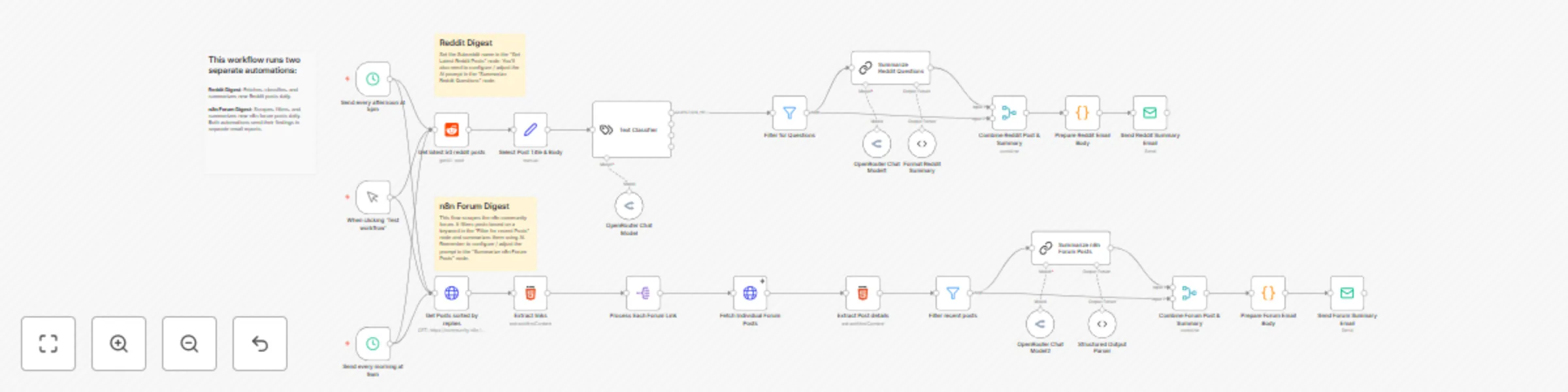
How it works

Here’s the technical breakdown of my two-part system:

  1. AI Reddit Digest (Daily at 9AM / 5 PM):

    • Fetches the latest 50 posts from a specified subreddit.
    • Uses an AI Text Classifier to categorize each post (e.g., QUESTION, JOB_POST).
    • Isolates the posts classified as questions and uses an AI model to generate a concise summary for each.
    • Formats the original post link and its new summary into an email-friendly format and sends the digest.
  2. AI n8n Forum Digest (Daily at 9AM / 5 PM):

    • Scrapes the n8n community forum to get a list of the latest post links.
    • Processes each link individually, fetching the full post content.
    • Filters these posts to keep only those containing a specific keyword (e.g., "2025").
    • Summarizes the filtered posts using an AI model.
    • Combines the original post link with its AI summary and sends it in a separate email report.

Set up steps

This workflow is quite powerful and requires a few configurations. Setup should take about 15 minutes.

  1. Add Credentials: First, add your credentials for your AI provider (like OpenRouter) and your email service (like Gmail or SMTP) in the Credentials section of your n8n instance.
  2. Configure Reddit Digest:
    • In the Get latest 50 reddit posts node, enter the name of the Subreddit you want to follow.
    • Fine-tune the AI's behavior by editing the prompt in the Summarize Reddit Questions node.
    • (Optional) Add more examples to the Text Classifier node to improve its accuracy.
  3. Configure n8n Forum Digest:
    • In the Filter 2025 posts node, change the keyword to track topics you're interested in.
    • Edit the prompt in the Summarize n8n Forum Posts node to guide the AI's summary style.
  4. Activate Workflow: Once configured, just set the workflow to Active. It will run automatically on schedule. You can also trigger it manually with the When clicking 'Test workflow' node.

1.2 Logical Blocks

This catalog entry is organized from the workflow JSON. The node-level section below shows the executable blocks available for review before importing the template.

2. Block-by-Block Analysis

Block 1 - When clicking ‘Test workflow’

Type / Role
n8n-nodes-base.manualTrigger - manualTrigger
Config choices
Version 1

Block 2 - Structured Output Parser

Type / Role
@n8n/n8n-nodes-langchain.outputParserStructured - outputParserStructured
Config choices
Version 1.2

Block 3 - Get Posts sorted by replies

Type / Role
n8n-nodes-base.httpRequest - httpRequest
Config choices
Version 4.2

Block 4 - Extract links

Type / Role
n8n-nodes-base.html - html
Config choices
Version 1.2

Block 5 - Extract Post details

Type / Role
n8n-nodes-base.html - html
Config choices
Version 1.2

Block 6 - Send every morning at 9am

Type / Role
n8n-nodes-base.scheduleTrigger - scheduleTrigger
Config choices
Version 1.2

Block 7 - Text Classifier

Type / Role
@n8n/n8n-nodes-langchain.textClassifier - textClassifier
Config choices
Version 1

Block 8 - Get latest 50 reddit posts

Type / Role
n8n-nodes-base.reddit - reddit
Config choices
Version 1

Block 9 - Send every afternoon at 5pm

Type / Role
n8n-nodes-base.scheduleTrigger - scheduleTrigger
Config choices
Version 1.2

Block 10 - OpenRouter Chat Model

Type / Role
@n8n/n8n-nodes-langchain.lmChatOpenRouter - lmChatOpenRouter
Config choices
Version 1

Block 11 - OpenRouter Chat Model1

Type / Role
@n8n/n8n-nodes-langchain.lmChatOpenRouter - lmChatOpenRouter
Config choices
Version 1

Block 12 - OpenRouter Chat Model2

Type / Role
@n8n/n8n-nodes-langchain.lmChatOpenRouter - lmChatOpenRouter
Config choices
Version 1

Block 13 - Select Post Title & Body

Type / Role
n8n-nodes-base.set - set
Config choices
Version 3.4

Block 14 - Filter for Questions

Type / Role
n8n-nodes-base.filter - filter
Config choices
Version 2.2

Block 15 - Summarize Reddit Questions

Type / Role
@n8n/n8n-nodes-langchain.chainLlm - chainLlm
Config choices
Version 1.5

Block 16 - Format Reddit Summary

Type / Role
@n8n/n8n-nodes-langchain.outputParserStructured - outputParserStructured
Config choices
Version 1.2

Block 17 - Combine Reddit Post & Summary

Type / Role
n8n-nodes-base.merge - merge
Config choices
Version 3

Block 18 - Prepare Reddit Email Body

Type / Role
n8n-nodes-base.code - code
Config choices
Version 2

Block 19 - Send Reddit Summary Email

Type / Role
n8n-nodes-base.emailSend - emailSend
Config choices
Version 2.1

Block 20 - Process Each Forum Link

Type / Role
n8n-nodes-base.splitOut - splitOut
Config choices
Version 1

Block 21 - Fetch Individual Forum Posts

Type / Role
n8n-nodes-base.httpRequest - httpRequest
Config choices
Version 4.2

Block 22 - Summarize n8n Forum Posts

Type / Role
@n8n/n8n-nodes-langchain.chainLlm - chainLlm
Config choices
Version 1.5

Block 23 - Combine Forum Post & Summary

Type / Role
n8n-nodes-base.merge - merge
Config choices
Version 3

Block 24 - Prepare Forum Email Body

Type / Role
n8n-nodes-base.code - code
Config choices
Version 2

Showing the first 24 of 29 workflow blocks. Download the JSON for the full node graph.

3. Summary Table

Workflow Community questions monitor with OpenRouter AI, Reddit & forum scraping
Complexity advanced
Nodes 29
Categories Market Research, AI Summarization
Author Julian Kaiser
Published 28 Jul 2025

4. Reproducing the Workflow from Scratch

  1. 1. Download the workflow JSON

    Use the JSON export at /data/workflows/6592/6592.json as the source template for this automation.

  2. 2. Import the template into n8n

    Open n8n, import the downloaded JSON, and review each node before activating the workflow.

  3. 3. Configure credentials and variables

    Replace placeholder credentials, API keys, webhook URLs, account IDs, and environment-specific values with your own settings.

  4. 4. Test with sample data

    Run the workflow manually or in a staging workspace, inspect node output, and confirm downstream systems receive the expected data.

  5. 5. Activate and monitor

    Enable the workflow only after testing, then monitor executions, errors, and rate limits during the first production runs.

5. General Notes & Resources

Review imported nodes carefully before activation. This catalog entry is intended to help you inspect the workflow structure, understand required services, and find related templates faster.

Node names, credentials, schedules, webhook paths, and external service limits may need adjustment for your workspace.

Frequently asked questions

What does Community questions monitor with OpenRouter AI, Reddit & forum scraping do?

What problem does this solve? Earlier this year, as I got more involved with n8n, I committed to helping users on our community forums and the n8n subreddit. The volume of questions was growing, an...

What do I need before importing this workflow?

Review the workflow JSON, configure any required credentials in n8n, and test the automation in a safe workspace before using it in production.

Can I customize this workflow?

Yes. Use the block-by-block analysis and the downloadable JSON to inspect each node, then adjust credentials, prompts, schedules, filters, or destinations for your Market Research, AI Summarization use case.