Collect conference feedback with Forms and log to Excel OneDrive with Outlook notifications

Workflow preview

Workflow preview
100%
Collect conference feedback with Forms and log to Excel OneDrive with Outlook notifications preview
Open on n8n.io

Important notice

This workflow is provided as-is. Please review and test before using in production.

1. Workflow Overview

Conference Feedback Collection and OneDrive Logging Workflow This n8n workflow is designed to collect feedback through a web form, log the responses into an Excel file stored in Microsoft OneDrive,...

Best for

  • Market Research automation workflows
  • intermediate n8n builders looking for reusable templates

Tools used

n8n-nodes-base.formtrigger, n8n-nodes-base.set, n8n-nodes-base.microsoftonedrive, n8n-nodes-base.code, n8n-nodes-base.if, n8n-nodes-base.microsoftexcel, n8n-nodes-base.noop, n8n-nodes-base.microsoftoutlook

Source and attribution

This workflow is cataloged by N8N Workflows and links back to its original n8n.io source page by Akhil Varma Gadiraju.

Original n8n.io source

1.1 Workflow description

Title
Collect conference feedback with Forms and log to Excel OneDrive with Outlook notifications
Workflow name
Collect conference feedback with Forms and log to Excel OneDrive with Outlook notifications

Conference Feedback Collection and OneDrive Logging Workflow

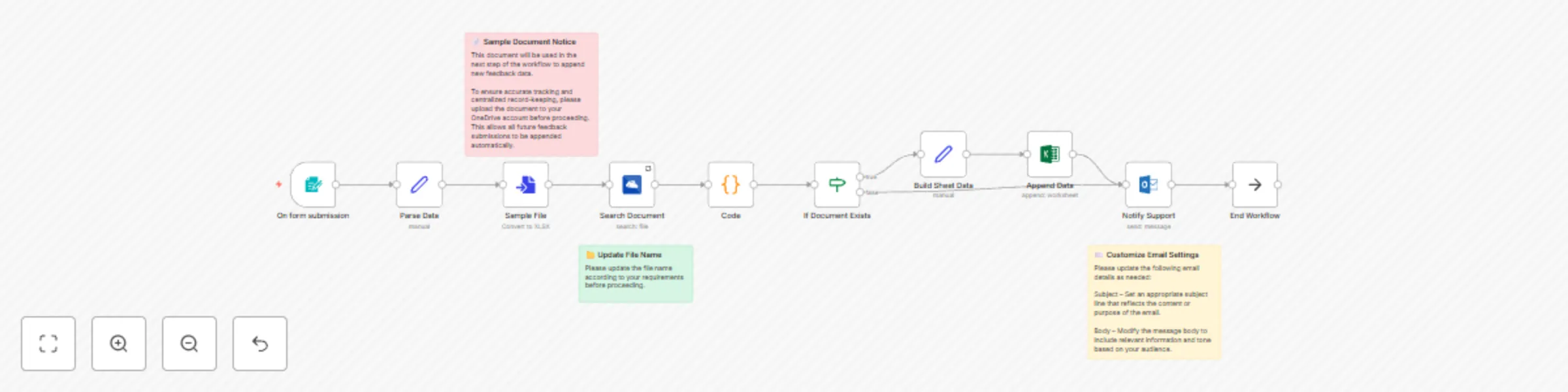
This n8n workflow is designed to collect feedback through a web form, log the responses into an Excel file stored in Microsoft OneDrive, and notify the support team via email.


๐Ÿงญ Overall Goal

To collect user feedback from a web form, structure the data, log it into a OneDrive Excel file, and notify support via Outlook email.


๐Ÿ”„ Workflow Breakdown

1. Form Submission (On form submission)

  • Node Type: formTrigger
  • Purpose: Captures user feedback via a web form.
  • Form Fields:
    • Full Name (Required)
    • Email (Required)
    • Company Name
    • Job Title
    • How did you hear about the conference? (Required)
    • Overall experience rating (Required)
    • Favorite sessions/speakers
    • Relevance to interests/work (Required)
    • Networking opportunities (Required)
    • Suggestions for improvement
    • Future topics/speakers
    • Willingness to attend again (Required)
    • Additional comments
    • Contact permission (Required)
  • Access URL: /webhook/feedback (or /webhook-test/feedback during testing)

2. Parse Data (Set)

  • Purpose: Renames form fields to snake_case.
  • Output: Structured JSON with renamed fields.

3. Sample File (Convert to File)

  • Purpose: Generates a file name reference for search.
  • Filename: test-n8n-feedback-form-data.xlsx

4. Search Document (Microsoft OneDrive)

  • Purpose: Searches OneDrive for the specified Excel file.
  • Query: test-n8n-feedback-form-data.xlsx

5. Extract File ID (Code)

  • Purpose: Extracts the ID of the file from the search result.
  • Output: { "id": "someFileId" } or { "id": null }

6. Check File Existence (If)

  • Purpose: Branch logic based on file existence.
  • Condition: If id exists.

7. Build Sheet Data (Set)

  • Purpose: Prepares the data to match the Excel column headers.
  • Only Runs If: File was found.

8. Append Data to Excel (Microsoft Excel)

  • Purpose: Appends the new feedback as a row.
  • Workbook ID: {{ $('Code').item.json.id }}
  • Worksheet Name: Sheet1
  • Mode: Auto-map from input fields

9. Notify Support (Microsoft Outlook)

  • Purpose: Sends a notification email with key feedback details.
  • To: [email protected]
  • Subject: "New Feedback Submission Received"
  • Body: Includes key details from submission

10. End Workflow (NoOp)

  • Purpose: Marks logical end of the workflow.

๐Ÿ“ Sticky Notes

  • โœ… Upload Target Excel File First: Ensure the Excel file exists in OneDrive.
  • ๐Ÿ“ Filename Consistency: Filename should match in "Sample File" and "Search Document" nodes.
  • ๐Ÿ“ง Customize Email Content: Update "Notify Support" node with your desired message and recipient.

๐Ÿ”ง Customization Guide

๐Ÿงพ Form Customization

  • Change form title, description, fields, or path.

๐Ÿงช Parsing Logic

  • Update field mappings if form labels change.

๐Ÿ“ Excel File Settings

  • Filename must match your actual OneDrive file.
  • Worksheet name and column headers must match in "Build Sheet Data".

๐Ÿ“ฌ Email Settings

  • Update subject and body using variables like {{ $('Parse Data').item.json.full_name }}.

โ— Error Handling Tips

  • Adjust email content based on file presence.
  • Add an "Error Trigger" for advanced error management.

๐Ÿ” Alternatives and Extensions

  • Use Google Sheets, Airtable, or databases instead of OneDrive/Excel.
  • Add Slack or SMS notifications.

๐Ÿ“Œ Use Cases

  • Post-event Feedback
  • CSAT Surveys
  • Employee Feedback
  • Bug Reporting
  • Lead Capture
  • Contact Forms
  • Webinar Registration

๐Ÿ” Required Credentials

1. Microsoft OneDrive (OAuth2)

  • Used by: "Search Document"
  • Credential Name: Microsoft Drive account

2. Microsoft Excel (OAuth2)

  • Used by: "Append Data"
  • Credential Name: Microsoft Excel account

3. Microsoft Outlook (OAuth2)

  • Used by: "Notify Support"
  • Credential Name: Outlook 0Auth2

โค๏ธ Made with n8n by Akhil

1.2 Logical Blocks

This catalog entry is organized from the workflow JSON. The node-level section below shows the executable blocks available for review before importing the template.

2. Block-by-Block Analysis

Block 1 - On form submission

Type / Role
n8n-nodes-base.formTrigger - formTrigger
Config choices
Version 2.2

Block 2 - Parse Data

Type / Role
n8n-nodes-base.set - set
Config choices
Version 3.4

Block 3 - Search Document

Type / Role
n8n-nodes-base.microsoftOneDrive - microsoftOneDrive
Config choices
Version 1

Block 4 - Build Sheet Data

Type / Role
n8n-nodes-base.set - set
Config choices
Version 3.4

Block 5 - Code

Type / Role
n8n-nodes-base.code - code
Config choices
Version 2

Block 6 - If Document Exists

Type / Role
n8n-nodes-base.if - if
Config choices
Version 2.2

Block 7 - Append Data

Type / Role
n8n-nodes-base.microsoftExcel - microsoftExcel
Config choices
Version 2.1

Block 8 - End Workflow

Type / Role
n8n-nodes-base.noOp - noOp
Config choices
Version 1

Block 9 - Notify Support

Type / Role
n8n-nodes-base.microsoftOutlook - microsoftOutlook
Config choices
Version 2

Block 10 - Sticky Note

Type / Role
n8n-nodes-base.stickyNote - stickyNote
Config choices
Version 1

Block 11 - Sample File

Type / Role
n8n-nodes-base.convertToFile - convertToFile
Config choices
Version 1.1

Block 12 - Sticky Note1

Type / Role
n8n-nodes-base.stickyNote - stickyNote
Config choices
Version 1

Block 13 - Sticky Note2

Type / Role
n8n-nodes-base.stickyNote - stickyNote
Config choices
Version 1

3. Summary Table

Workflow Collect conference feedback with Forms and log to Excel OneDrive with Outlook notifications
Complexity intermediate
Nodes 13
Categories Market Research
Author Akhil Varma Gadiraju
Published 26 May 2025

4. Reproducing the Workflow from Scratch

  1. 1. Download the workflow JSON

    Use the JSON export at /data/workflows/4389/4389.json as the source template for this automation.

  2. 2. Import the template into n8n

    Open n8n, import the downloaded JSON, and review each node before activating the workflow.

  3. 3. Configure credentials and variables

    Replace placeholder credentials, API keys, webhook URLs, account IDs, and environment-specific values with your own settings.

  4. 4. Test with sample data

    Run the workflow manually or in a staging workspace, inspect node output, and confirm downstream systems receive the expected data.

  5. 5. Activate and monitor

    Enable the workflow only after testing, then monitor executions, errors, and rate limits during the first production runs.

5. General Notes & Resources

Review imported nodes carefully before activation. This catalog entry is intended to help you inspect the workflow structure, understand required services, and find related templates faster.

Node names, credentials, schedules, webhook paths, and external service limits may need adjustment for your workspace.

Frequently asked questions

What does Collect conference feedback with Forms and log to Excel OneDrive with Outlook notifications do?

Conference Feedback Collection and OneDrive Logging Workflow This n8n workflow is designed to collect feedback through a web form, log the responses into an Excel file stored in Microsoft OneDrive,...

What do I need before importing this workflow?

Review the workflow JSON, configure any required credentials in n8n, and test the automation in a safe workspace before using it in production.

Can I customize this workflow?

Yes. Use the block-by-block analysis and the downloadable JSON to inspect each node, then adjust credentials, prompts, schedules, filters, or destinations for your Market Research use case.