Block 1 - n8n Form Trigger
- Type / Role
- n8n-nodes-base.formTrigger - formTrigger
- Config choices
- Version 2


 Early Deal
This workflow is provided as-is. Please review and test before using in production.
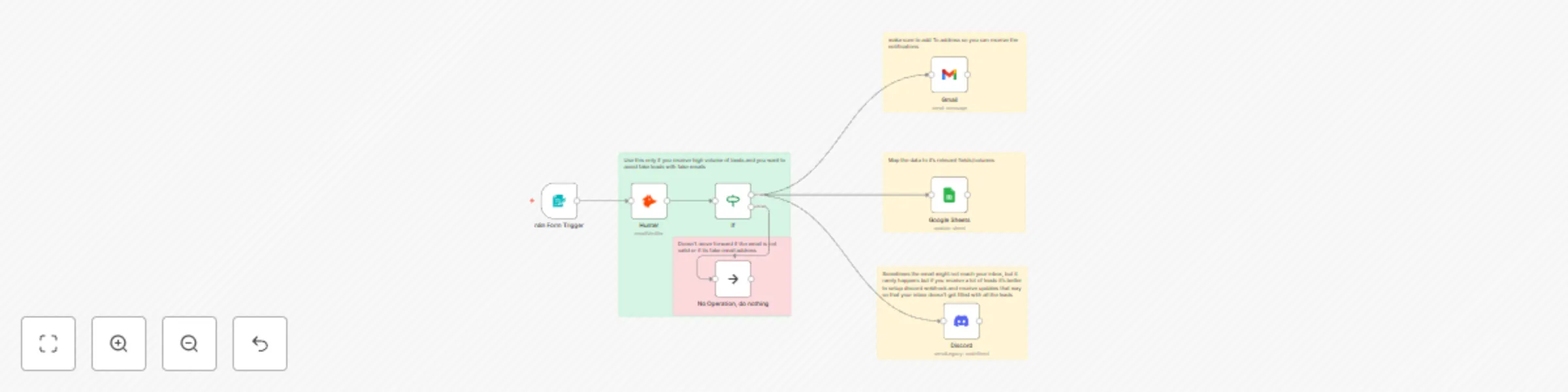
Product Introduction: You can create a form on n8n through which you can collect leads from interested user's. You can also verify each user's email address to validate whether it's a valid email t...
n8n-nodes-base.formtrigger, n8n-nodes-base.googlesheets, n8n-nodes-base.gmail, n8n-nodes-base.discord, n8n-nodes-base.stickynote, n8n-nodes-base.if, n8n-nodes-base.hunter, n8n-nodes-base.noop
This workflow is cataloged by N8N Workflows and links back to its original n8n.io source page by Dheeraj.
Original n8n.io sourceProduct Introduction: You can create a form on n8n through which you can collect leads from interested user's.
You can also verify each user's email address to validate whether it's a valid email to make sure it lands on their inbox(suitable for those who have newletter / want's to send bulk email)
The leads with valid email will then get saved as a leads with the relevant field data to gmail, google sheets and discord(through webhook). You can add/remove any integration you feel like.
Setup Guide:
Create Your Form: Begin by logging into your n8n account and navigating to the workflow editor. You can then customize your form fields to gather relevant information from your prospects, such as name, email address, and any additional data you require.
Email Verification: After collecting the lead data, add an Email Verification node to validate each user's email address. This crucial step ensures that only genuine and deliverable email addresses are included in your lead database, maximizing the effectiveness of your outreach efforts. We have used hunter.io service in this, you can change it to any other service you need.
Save Leads: Next, incorporate nodes to save your verified leads to various platforms for streamlined management. Utilize the Gmail node to store lead information directly in your Gmail account, ensuring easy access and organization. Additionally, leverage the Google Sheets node to archive lead data in a spreadsheet for comprehensive tracking and analysis.
Integrate with Discord: For real-time notifications and collaboration, integrate n8n with Discord using the Webhook node. Configure the webhook to send lead information to your designated Discord channel, enabling your team to stay informed and coordinate effectively.
Customize Integrations: Tailor your workflow by adding or removing integrations based on your specific requirements. Whether you prefer to connect with additional platforms or streamline your workflow further, n8n offers unparalleled flexibility to adapt to your business needs.
Experience the simplicity and efficiency of n8n to revolutionize your lead generation strategy and propel your success to new heights.
This catalog entry is organized from the workflow JSON. The node-level section below shows the executable blocks available for review before importing the template.
| Workflow | Collect and enrich form leads to Gmail, Google Sheets and Discord |
|---|---|
| Complexity | intermediate |
| Nodes | 12 |
| Categories | Lead Generation |
| Author | Dheeraj |
| Published | 17 Feb 2024 |
Use the JSON export at /data/workflows/2103/2103.json as the source template for this automation.
Open n8n, import the downloaded JSON, and review each node before activating the workflow.
Replace placeholder credentials, API keys, webhook URLs, account IDs, and environment-specific values with your own settings.
Run the workflow manually or in a staging workspace, inspect node output, and confirm downstream systems receive the expected data.
Enable the workflow only after testing, then monitor executions, errors, and rate limits during the first production runs.
Review imported nodes carefully before activation. This catalog entry is intended to help you inspect the workflow structure, understand required services, and find related templates faster.
Node names, credentials, schedules, webhook paths, and external service limits may need adjustment for your workspace.
Product Introduction: You can create a form on n8n through which you can collect leads from interested user's. You can also verify each user's email address to validate whether it's a valid email t...
Review the workflow JSON, configure any required credentials in n8n, and test the automation in a safe workspace before using it in production.
Yes. Use the block-by-block analysis and the downloadable JSON to inspect each node, then adjust credentials, prompts, schedules, filters, or destinations for your Lead Generation use case.