Block 1 - Sticky Note
- Type / Role
- n8n-nodes-base.stickyNote - stickyNote
- Config choices
- Version 1


 Early Deal
This workflow is provided as-is. Please review and test before using in production.
Description Streamline AI focused SEO research by automatically analyzing URLs stored in Google Sheets, extracting semantic signals from each webpage, and generating high quality topic clusters ...
n8n-nodes-base.stickynote, n8n-nodes-base.googlesheets, n8n-nodes-base.splitinbatches, n8n-nodes-base.httprequest, n8n-nodes-base.html, n8n-nodes-base.set, @n8n/n8n-nodes-langchain.lmchatopenai, @n8n/n8n-nodes-langchain.memorybufferwindow
This workflow is cataloged by N8N Workflows and links back to its original n8n.io source page by Rahul Joshi.
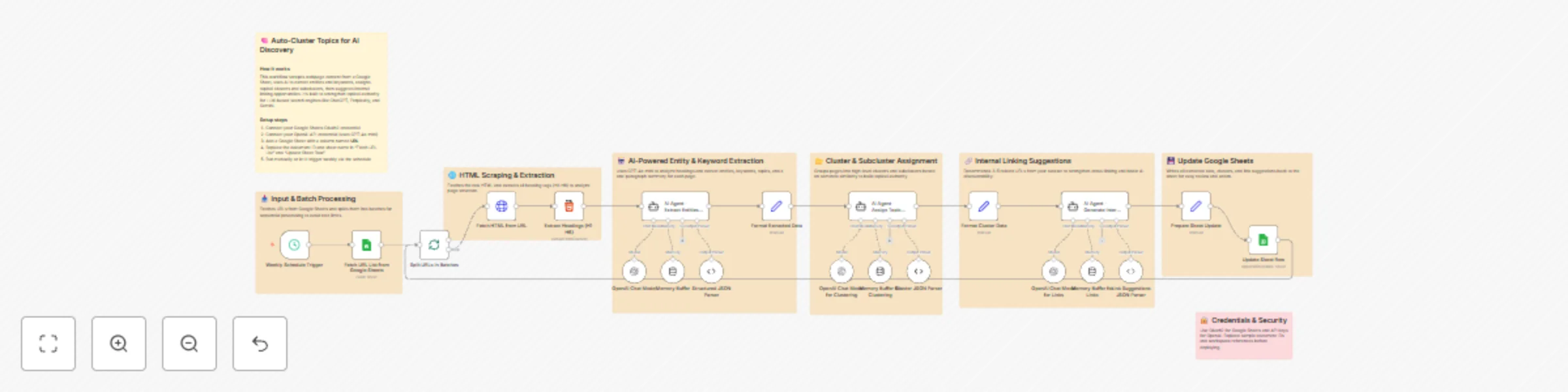
Original n8n.io sourceStreamline AI-focused SEO research by automatically analyzing URLs stored in Google Sheets, extracting semantic signals from each webpage, and generating high-quality topic clusters for AI discovery. 🤖🔍 This automation fetches URLs weekly, scrapes headings (H1–H6), extracts entities, keywords, topics, and summaries using GPT-4o-mini, and classifies each page into clusters and subclusters optimized for LLM search visibility. It also generates internal linking suggestions for better topical authority and writes all results back into Google Sheets. Perfect for content strategists, SEO teams, and AI-search optimization workflows. 📈🧩
1️⃣ Triggers weekly to process URLs stored in Google Sheets. 📅 2️⃣ Fetches all URL records from the configured sheet. 📥 3️⃣ Processes URLs in batches to avoid API overload. 🔁 4️⃣ Extracts webpage HTML and pulls semantic headings (H1–H6). 📰 5️⃣ Sends headings + URL context to GPT-4o-mini for structured extraction of: — title — entities — keywords — topics — summary 6️⃣ Generates high-level cluster + subcluster labels for each page. 🧠 7️⃣ Recommends 3–5 internal linking URLs to strengthen topical authority. 🔗 8️⃣ Updates Google Sheets with all extracted fields + status flags. 📊 9️⃣ Repeats the process until all URLs are analyzed. 🔄
✅ Automates topical clustering for AI search optimization ✅ Extracts entities, keywords, and topics with high semantic accuracy ✅ Strengthens internal linking strategies using AI suggestions ✅ Eliminates manual scraping and analysis work ✅ Enables scalable content audits for large URL datasets ✅ Enhances visibility in AI-driven search systems and answer engines
This catalog entry is organized from the workflow JSON. The node-level section below shows the executable blocks available for review before importing the template.
Showing the first 24 of 29 workflow blocks. Download the JSON for the full node graph.
| Workflow | Cluster webpage topics from Google Sheets to Google Sheets for AI discovery |
|---|---|
| Complexity | advanced |
| Nodes | 29 |
| Categories | Market Research, AI Summarization |
| Author | Rahul Joshi |
| Published | 21 Nov 2025 |
Use the JSON export at /data/workflows/11075/11075.json as the source template for this automation.
Open n8n, import the downloaded JSON, and review each node before activating the workflow.
Replace placeholder credentials, API keys, webhook URLs, account IDs, and environment-specific values with your own settings.
Run the workflow manually or in a staging workspace, inspect node output, and confirm downstream systems receive the expected data.
Enable the workflow only after testing, then monitor executions, errors, and rate limits during the first production runs.
Review imported nodes carefully before activation. This catalog entry is intended to help you inspect the workflow structure, understand required services, and find related templates faster.
Node names, credentials, schedules, webhook paths, and external service limits may need adjustment for your workspace.
Description Streamline AI focused SEO research by automatically analyzing URLs stored in Google Sheets, extracting semantic signals from each webpage, and generating high quality topic clusters ...
Review the workflow JSON, configure any required credentials in n8n, and test the automation in a safe workspace before using it in production.
Yes. Use the block-by-block analysis and the downloadable JSON to inspect each node, then adjust credentials, prompts, schedules, filters, or destinations for your Market Research, AI Summarization use case.