Block 1 - ⏰ Run Every Hour
- Type / Role
- n8n-nodes-base.scheduleTrigger - scheduleTrigger
- Config choices
- Version 1.1


 Early Deal
This workflow is provided as-is. Please review and test before using in production.
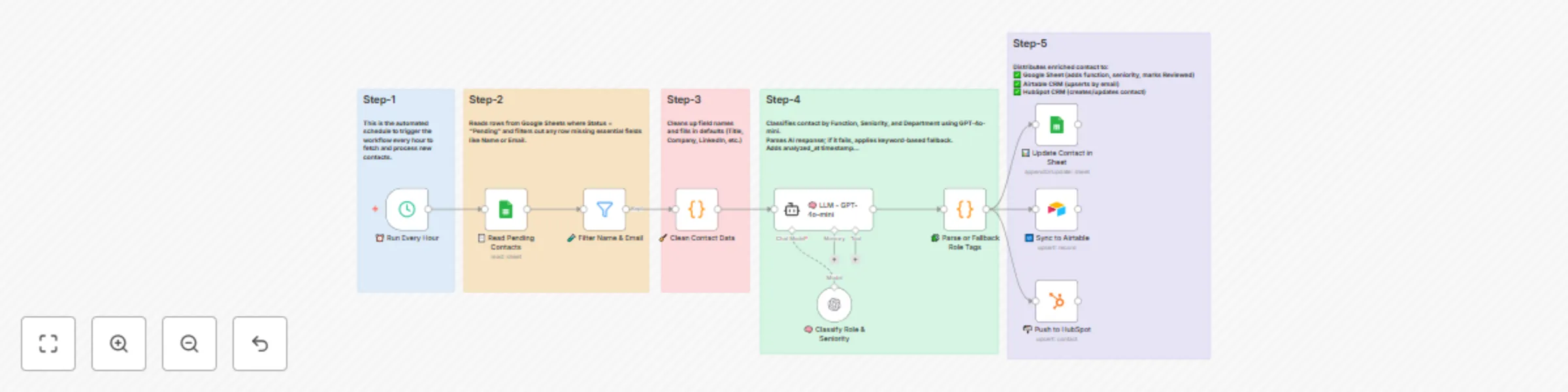
How it works This workflow enhances contact intelligence by retrieving new or updated contact data, enriching it using AI and external APIs, and then updating your CRM or contact management system ...
n8n-nodes-base.scheduletrigger, n8n-nodes-base.googlesheets, n8n-nodes-base.filter, n8n-nodes-base.code, @n8n/n8n-nodes-langchain.agent, @n8n/n8n-nodes-langchain.lmchatopenai, n8n-nodes-base.airtable, n8n-nodes-base.hubspot
This workflow is cataloged by N8N Workflows and links back to its original n8n.io source page by Avkash Kakdiya.
Original n8n.io sourceThis workflow enhances contact intelligence by retrieving new or updated contact data, enriching it using AI and external APIs, and then updating your CRM or contact management system with intelligent insights. It automates the process of gathering, enriching, and organizing contact information to improve targeting, personalization, and engagement.
1. Trigger & Input
The workflow is triggered by a scheduler or webhook event.
It reads a new contact entry (or an updated one) from your source, such as a spreadsheet or form.
Basic fields like name, email, and company are used as the starting point for enrichment.
2. Contact Lookup & Parsing
The contact's domain or company is extracted and used to perform a lookup via an external data source.
Data such as company details, job title, or LinkedIn profile is retrieved.
Parsed and cleaned to remove duplicates, missing values, or invalid results.
3. AI Enrichment
The enriched contact is passed through an AI model (such as GPT or another NLP service).
The model analyzes job role, seniority, and inferred interests based on available data.
Insights like intent, persona category, or engagement score are generated.
4. Validation & Tagging
The AI-enriched data is validated to ensure consistency and accuracy.
Tags and segments (e.g., "Decision Maker", "Technical Buyer", etc.) are assigned based on rules or AI inference.
This enables smart filtering, targeting, and routing later in your CRM or campaigns.
5. Output & Integration
The system also:
Sends a Slack/Email alert with a summary.
Updates the original contact entry with a "Processed" or "Enriched" status.
Triggers next steps, such as personalized outreach or nurture sequences.
Enhances Contact Profiles with AI-generated insights and third-party data.
Improves Segmentation & Targeting through smart tags and persona classification.
Automates Manual Research, saving time and improving accuracy.
Easily Extendable by adding more AI models, data sources, or CRM integrations.
This catalog entry is organized from the workflow JSON. The node-level section below shows the executable blocks available for review before importing the template.
| Workflow | Classify & enrich contacts with GPT-4o-mini for Google Sheets, Airtable, and HubSpot |
|---|---|
| Complexity | advanced |
| Nodes | 15 |
| Categories | Lead Generation, AI Summarization |
| Author | Avkash Kakdiya |
| Published | 07 Aug 2025 |
Use the JSON export at /data/workflows/7128/7128.json as the source template for this automation.
Open n8n, import the downloaded JSON, and review each node before activating the workflow.
Replace placeholder credentials, API keys, webhook URLs, account IDs, and environment-specific values with your own settings.
Run the workflow manually or in a staging workspace, inspect node output, and confirm downstream systems receive the expected data.
Enable the workflow only after testing, then monitor executions, errors, and rate limits during the first production runs.
Review imported nodes carefully before activation. This catalog entry is intended to help you inspect the workflow structure, understand required services, and find related templates faster.
Node names, credentials, schedules, webhook paths, and external service limits may need adjustment for your workspace.
How it works This workflow enhances contact intelligence by retrieving new or updated contact data, enriching it using AI and external APIs, and then updating your CRM or contact management system ...
Review the workflow JSON, configure any required credentials in n8n, and test the automation in a safe workspace before using it in production.
Yes. Use the block-by-block analysis and the downloadable JSON to inspect each node, then adjust credentials, prompts, schedules, filters, or destinations for your Lead Generation, AI Summarization use case.