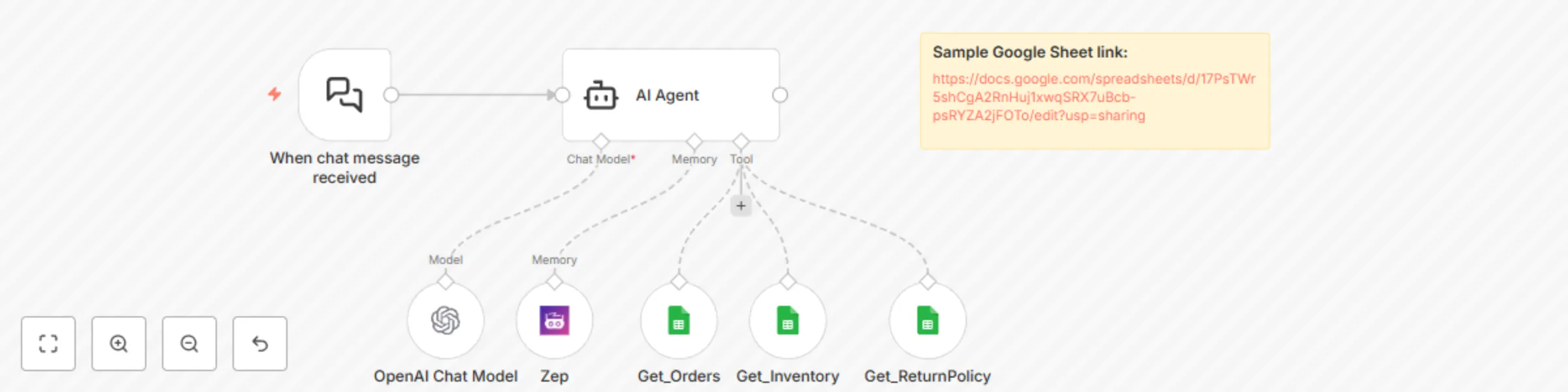
Build a personalized shopping assistant with Zep Memory, GPT-4 and Google Sheets

Workflow preview

Workflow preview
100%
Build a personalized shopping assistant with Zep Memory, GPT-4 and Google Sheets preview
Open on n8n.io

Important notice

This workflow is provided as-is. Please review and test before using in production.

1. Workflow Overview

What problem does this workflow solve? Most e commerce chatbots are transactional; they answer one question at a time and forget your context right after. This workflow changes that. It introduce...

Best for

  • Support Chatbot automation workflows
  • Multimodal AI automation workflows
  • intermediate n8n builders looking for reusable templates

Tools used

@n8n/n8n-nodes-langchain.agent, @n8n/n8n-nodes-langchain.lmchatopenai, @n8n/n8n-nodes-langchain.chattrigger, n8n-nodes-base.stickynote, @n8n/n8n-nodes-langchain.memoryzep, n8n-nodes-base.googlesheetstool

Source and attribution

This workflow is cataloged by N8N Workflows and links back to its original n8n.io source page by InfyOm Technologies.

Original n8n.io source

1.1 Workflow description

Title
Build a personalized shopping assistant with Zep Memory, GPT-4 and Google Sheets
Workflow name
Build a personalized shopping assistant with Zep Memory, GPT-4 and Google Sheets

βœ… What problem does this workflow solve?

Most e-commerce chatbots are transactional; they answer one question at a time and forget your context right after. This workflow changes that. It introduces a smart, memory-enabled shopping assistant that remembers user preferences, past orders, and previous queries to offer deeply personalized, natural conversations.


βš™οΈ What does this workflow do?

  1. Accepts real-time chat messages from users.
  2. Uses Zep Memory to store and recall personalized context.
  3. Integrates with:
    • πŸ›’ Product Inventory
    • πŸ“¦ Order History
    • πŸ“œ Return Policy
  4. Answers complex queries based on historical context.
  5. Provides:
    • Personalized product recommendations
    • Context-aware order lookups
    • Seamless return processing
    • Policy discussions with minimal user input

🧠 Why Context & Memory Matter

Traditional bots:

  • ❌ Forget what the user said 2 messages ago
  • ❌ Ask repetitive questions (name, order ID, etc.)
  • ❌ Can’t personalize beyond basic filters

With Zep-powered memory, your bot:

  • βœ… Remembers preferences (e.g., favorite categories, past questions)
  • βœ… Builds persistent context across sessions
  • βœ… Gives dynamic, user-specific replies (e.g., "You ordered this last week…")
  • βœ… Offers a frictionless support experience

πŸ”§ Setup Instructions

🧠 Zep Memory Setup

  • Create a Zep instance and connect it via the Zep Memory node.
  • It will automatically store user conversations and summarize facts.

πŸ’¬ Chat Trigger

  • Use the "When chat message received" trigger to initiate the conversation workflow.

πŸ€– AI Agent Configuration

  • Connect:
    • Chat Model β†’ OpenAI GPT-4 or GPT-3.5
    • Memory β†’ Zep
    • Tools:
      • Get_Orders – Fetch user order history from Google Sheets
      • Get_Inventory – Recommend products based on stock and preferences
      • Get_ReturnPolicy – Answer policy-related questions

πŸ“„ Google Sheets

  • Store orders, inventory, and return policies in structured sheets.
  • Use read access nodes to fetch data dynamically during conversations.

🧠 How it Works – Step-by-Step

  1. Chat Trigger – User sends a message.
  2. AI Agent (w/ Zep Memory):
    • Reads past interactions to build context.
    • Pulls memory facts (e.g., "User prefers men's sneakers").
  3. Uses External Tools:
    • Looks up orders, return policies, or available products.
  4. Generates Personalized Response using OpenAI.
  5. Reply Sent Back to the user through chat.

🧩 What the Bot Can Do

  • πŸ› Suggest products based on past browsing or purchase behavior.
  • πŸ“¦ Check order status and history without requiring the user to provide order IDs.
  • πŸ“ƒ Explain return policies in detail, adapting answers based on context.
  • πŸ€– Engage in more human-like conversations across multiple sessions.

πŸ‘€ Who can use this?

This is ideal for:

  • πŸ›’ E-commerce store owners
  • πŸ€– Product-focused AI startups
  • πŸ“¦ Customer service teams
  • 🧠 Developers building intelligent commerce bots

If you're building a chatbot that goes beyond canned responses, this memory-first shopping assistant is the upgrade you need.


πŸ›  Customization Ideas

  • Connect with Shopify, WooCommerce, or Notion instead of Google Sheets.
  • Add payment processing or shipping tracking integrations.
  • Customize the memory expiration or fact-summarization rules in Zep.
  • Integrate with voice AI to make it work as a phone-based shopping assistant.

πŸš€ Ready to Launch?

Just connect:

  • βœ… OpenAI Chat Model
  • βœ… Zep Memory Engine
  • βœ… Your Product/Order/Policy Sheets

And you’re ready to deliver truly personalized shopping conversations.

1.2 Logical Blocks

This catalog entry is organized from the workflow JSON. The node-level section below shows the executable blocks available for review before importing the template.

2. Block-by-Block Analysis

Block 1 - AI Agent

Type / Role
@n8n/n8n-nodes-langchain.agent - agent
Config choices
Version 2

Block 2 - OpenAI Chat Model

Type / Role
@n8n/n8n-nodes-langchain.lmChatOpenAi - lmChatOpenAi
Config choices
Version 1.2

Block 3 - When chat message received

Type / Role
@n8n/n8n-nodes-langchain.chatTrigger - chatTrigger
Config choices
Version 1.1

Block 4 - Sticky Note

Type / Role
n8n-nodes-base.stickyNote - stickyNote
Config choices
Version 1

Block 5 - Zep

Type / Role
@n8n/n8n-nodes-langchain.memoryZep - memoryZep
Config choices
Version 1.3

Block 6 - Get_Orders

Type / Role
n8n-nodes-base.googleSheetsTool - googleSheetsTool
Config choices
Version 4.6

Block 7 - Get_Inventory

Type / Role
n8n-nodes-base.googleSheetsTool - googleSheetsTool
Config choices
Version 4.6

Block 8 - Get_ReturnPolicy

Type / Role
n8n-nodes-base.googleSheetsTool - googleSheetsTool
Config choices
Version 4.6

3. Summary Table

Workflow Build a personalized shopping assistant with Zep Memory, GPT-4 and Google Sheets
Complexity intermediate
Nodes 8
Categories Support Chatbot, Multimodal AI
Author InfyOm Technologies
Published 14 Aug 2025

4. Reproducing the Workflow from Scratch

  1. 1. Download the workflow JSON

    Use the JSON export at /data/workflows/7363/7363.json as the source template for this automation.

  2. 2. Import the template into n8n

    Open n8n, import the downloaded JSON, and review each node before activating the workflow.

  3. 3. Configure credentials and variables

    Replace placeholder credentials, API keys, webhook URLs, account IDs, and environment-specific values with your own settings.

  4. 4. Test with sample data

    Run the workflow manually or in a staging workspace, inspect node output, and confirm downstream systems receive the expected data.

  5. 5. Activate and monitor

    Enable the workflow only after testing, then monitor executions, errors, and rate limits during the first production runs.

5. General Notes & Resources

Review imported nodes carefully before activation. This catalog entry is intended to help you inspect the workflow structure, understand required services, and find related templates faster.

Node names, credentials, schedules, webhook paths, and external service limits may need adjustment for your workspace.

Frequently asked questions

What does Build a personalized shopping assistant with Zep Memory, GPT-4 and Google Sheets do?

What problem does this workflow solve? Most e commerce chatbots are transactional; they answer one question at a time and forget your context right after. This workflow changes that. It introduce...

What do I need before importing this workflow?

Review the workflow JSON, configure any required credentials in n8n, and test the automation in a safe workspace before using it in production.

Can I customize this workflow?

Yes. Use the block-by-block analysis and the downloadable JSON to inspect each node, then adjust credentials, prompts, schedules, filters, or destinations for your Support Chatbot, Multimodal AI use case.