Build a PDF-based RAG system with OpenAI, Pinecone and Cohere reranking

Workflow preview

Workflow preview
100%
Build a PDF-based RAG system with OpenAI, Pinecone and Cohere reranking preview
Open on n8n.io

Important notice

This workflow is provided as-is. Please review and test before using in production.

1. Workflow Overview

This workflow contains community nodes that are only compatible with the self hosted version of n8n. This workflow provides a complete, ready to use template for a Retrieval Augmented Generation (R...

Best for

  • Internal Wiki automation workflows
  • AI RAG automation workflows
  • intermediate n8n builders looking for reusable templates

Tools used

n8n-nodes-base.formtrigger, @n8n/n8n-nodes-langchain.vectorstorepinecone, @n8n/n8n-nodes-langchain.embeddingsopenai, @n8n/n8n-nodes-langchain.documentdefaultdataloader, @n8n/n8n-nodes-langchain.textsplitterrecursivecharactertextsplitter, n8n-nodes-base.stickynote, @n8n/n8n-nodes-langchain.agent, @n8n/n8n-nodes-langchain.chattrigger

Source and attribution

This workflow is cataloged by N8N Workflows and links back to its original n8n.io source page by Aji Prakoso.

Original n8n.io source

1.1 Workflow description

Title
Build a PDF-based RAG system with OpenAI, Pinecone and Cohere reranking
Workflow name
Build a PDF-based RAG system with OpenAI, Pinecone and Cohere reranking

This workflow contains community nodes that are only compatible with the self-hosted version of n8n.

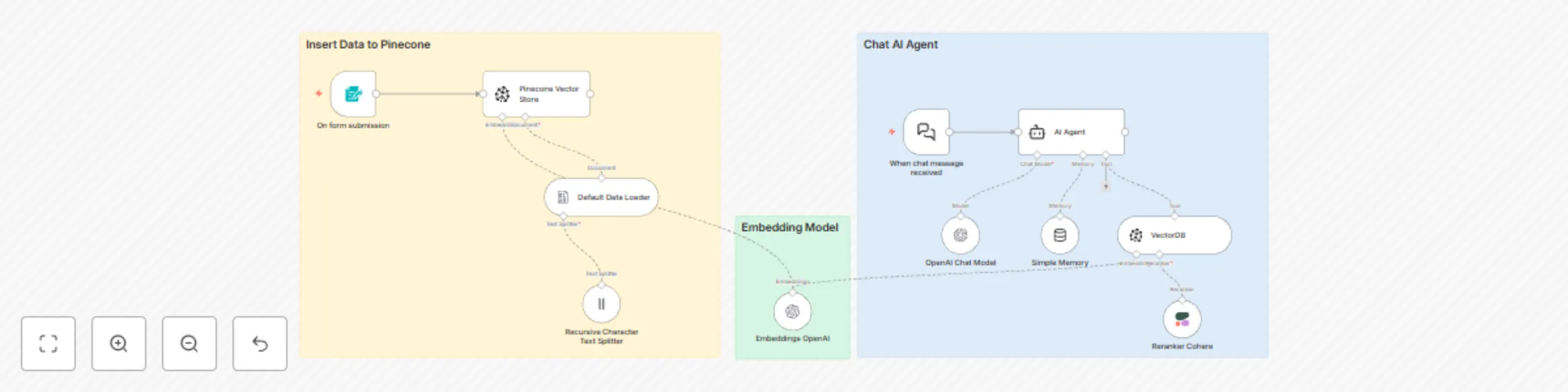
This workflow provides a complete, ready-to-use template for a Retrieval-Augmented Generation (RAG) system. It allows you to build a powerful AI chatbot that can answer questions based on the content of PDF documents you provide, using a modern and powerful stack for optimal performance.

Good to know

  • Costs: This workflow uses paid services (OpenAI, Pinecone, Cohere). Costs will be incurred based on your usage. Please review the pricing pages for each service to understand the potential expenses.
  • Video Tutorial (Bahasa Indonesia): For a step-by-step guide on how this workflow functions, you can watch the accompanying video tutorial here: N8N Tutorial: Membangun Chatbot RAG dengan Pinecone, OpenAI, & Cohere

How it works

This workflow operates in two distinct stages:

1. Data Ingestion & Indexing:

  • It begins when a .pdf file is uploaded via the n8n Form Trigger.
  • The Default Data Loader node processes the PDF, and the Recursive Character Text Splitter breaks down the content into smaller, manageable chunks.
  • The Embeddings OpenAI node converts these text chunks into vector embeddings (numerical representations).
  • Finally, the Pinecone Vector Store node takes these embeddings and stores (upserts) them into your specified Pinecone index, creating a searchable knowledge base.

2. Conversational AI Agent:

  • A user sends a message through the Chat Trigger.
  • The AI Agent receives the message and uses its VectorDB tool to search the Pinecone index for relevant information.
  • The Reranker Cohere node refines these search results, ensuring only the most relevant context is selected.
  • The user's original question and the refined context are sent to the OpenAI Chat Model (gpt-4.1), which generates a helpful, context-aware answer.
  • The Simple Memory node maintains conversation history, allowing for natural, multi-turn dialogues.

How to use

Using this workflow is a two-step process:

  1. Populate the Knowledge Base: First, you need to add documents. Trigger the workflow by using the Form Trigger and uploading a PDF file. Wait for the execution to complete. You can do this for multiple documents.
  2. Start Chatting: Once your data has been ingested, open the Chat Trigger's interface and start asking questions related to the content of your uploaded documents.

The Form Trigger is just an example. Feel free to replace it with other triggers, such as a node that watches a Google Drive or Dropbox folder for new files.

Requirements

To run this workflow, you will need active accounts and API keys for the following services.

  • OpenAI Account & API Key:
    • Function: Powers text embedding and the final chat generation. Required for the Embeddings OpenAI and OpenAI Chat Model nodes.
  • Pinecone Account & API Key:
    • Function: Used to store and retrieve your vector knowledge base. Required for the Pinecone Vector Store and VectorDB nodes. You also need to provide your Pinecone Environment.
  • Cohere Account & API Key:
    • Function: Improves the accuracy of your chatbot by re-ranking search results for relevance. Required for the Reranker Cohere node.

Customising this workflow

This template is a great starting point. Here are a few ways you can customize it:

  • Change the AI Personality: Edit the System Message in the AI Agent node to change the bot's behavior, tone, or instructions.
  • Use Different Models: You can easily swap the OpenAI model for another one (e.g., gpt-3.5-turbo for lower costs) in the OpenAI Chat Model node.
  • Adjust Retrieval: In the VectorDB tool node, you can modify the Top K parameter to retrieve more or fewer document chunks to use as context.
  • Automate Ingestion: Replace the manual Form Trigger with an automated one, like a node that triggers whenever a new file is added to a specific cloud storage folder.

1.2 Logical Blocks

This catalog entry is organized from the workflow JSON. The node-level section below shows the executable blocks available for review before importing the template.

2. Block-by-Block Analysis

Block 1 - On form submission

Type / Role
n8n-nodes-base.formTrigger - formTrigger
Config choices
Version 2.2

Block 2 - Pinecone Vector Store

Type / Role
@n8n/n8n-nodes-langchain.vectorStorePinecone - vectorStorePinecone
Config choices
Version 1.3

Block 3 - Embeddings OpenAI

Type / Role
@n8n/n8n-nodes-langchain.embeddingsOpenAi - embeddingsOpenAi
Config choices
Version 1.2

Block 4 - Default Data Loader

Type / Role
@n8n/n8n-nodes-langchain.documentDefaultDataLoader - documentDefaultDataLoader
Config choices
Version 1.1

Block 5 - Recursive Character Text Splitter

Type / Role
@n8n/n8n-nodes-langchain.textSplitterRecursiveCharacterTextSplitter - textSplitterRecursiveCharacterTextSplitter
Config choices
Version 1

Block 6 - Sticky Note

Type / Role
n8n-nodes-base.stickyNote - stickyNote
Config choices
Version 1

Block 7 - AI Agent

Type / Role
@n8n/n8n-nodes-langchain.agent - agent
Config choices
Version 2

Block 8 - When chat message received

Type / Role
@n8n/n8n-nodes-langchain.chatTrigger - chatTrigger
Config choices
Version 1.1

Block 9 - OpenAI Chat Model

Type / Role
@n8n/n8n-nodes-langchain.lmChatOpenAi - lmChatOpenAi
Config choices
Version 1.2

Block 10 - Simple Memory

Type / Role
@n8n/n8n-nodes-langchain.memoryBufferWindow - memoryBufferWindow
Config choices
Version 1.3

Block 11 - VectorDB

Type / Role
@n8n/n8n-nodes-langchain.vectorStorePinecone - vectorStorePinecone
Config choices
Version 1.3

Block 12 - Sticky Note1

Type / Role
n8n-nodes-base.stickyNote - stickyNote
Config choices
Version 1

Block 13 - Sticky Note2

Type / Role
n8n-nodes-base.stickyNote - stickyNote
Config choices
Version 1

Block 14 - Reranker Cohere

Type / Role
@n8n/n8n-nodes-langchain.rerankerCohere - rerankerCohere
Config choices
Version 1

3. Summary Table

Workflow Build a PDF-based RAG system with OpenAI, Pinecone and Cohere reranking
Complexity intermediate
Nodes 14
Categories Internal Wiki, AI RAG
Author Aji Prakoso
Published 07 Jul 2025

4. Reproducing the Workflow from Scratch

  1. 1. Download the workflow JSON

    Use the JSON export at /data/workflows/5734/5734.json as the source template for this automation.

  2. 2. Import the template into n8n

    Open n8n, import the downloaded JSON, and review each node before activating the workflow.

  3. 3. Configure credentials and variables

    Replace placeholder credentials, API keys, webhook URLs, account IDs, and environment-specific values with your own settings.

  4. 4. Test with sample data

    Run the workflow manually or in a staging workspace, inspect node output, and confirm downstream systems receive the expected data.

  5. 5. Activate and monitor

    Enable the workflow only after testing, then monitor executions, errors, and rate limits during the first production runs.

5. General Notes & Resources

Review imported nodes carefully before activation. This catalog entry is intended to help you inspect the workflow structure, understand required services, and find related templates faster.

Node names, credentials, schedules, webhook paths, and external service limits may need adjustment for your workspace.

Frequently asked questions

What does Build a PDF-based RAG system with OpenAI, Pinecone and Cohere reranking do?

This workflow contains community nodes that are only compatible with the self hosted version of n8n. This workflow provides a complete, ready to use template for a Retrieval Augmented Generation (R...

What do I need before importing this workflow?

Review the workflow JSON, configure any required credentials in n8n, and test the automation in a safe workspace before using it in production.

Can I customize this workflow?

Yes. Use the block-by-block analysis and the downloadable JSON to inspect each node, then adjust credentials, prompts, schedules, filters, or destinations for your Internal Wiki, AI RAG use case.