Build a PDF-based RAG system with OpenAI, Pinecone and Cohere reranking
*This workflow contains community nodes that are only compatible with the self-hosted version of n8n.*
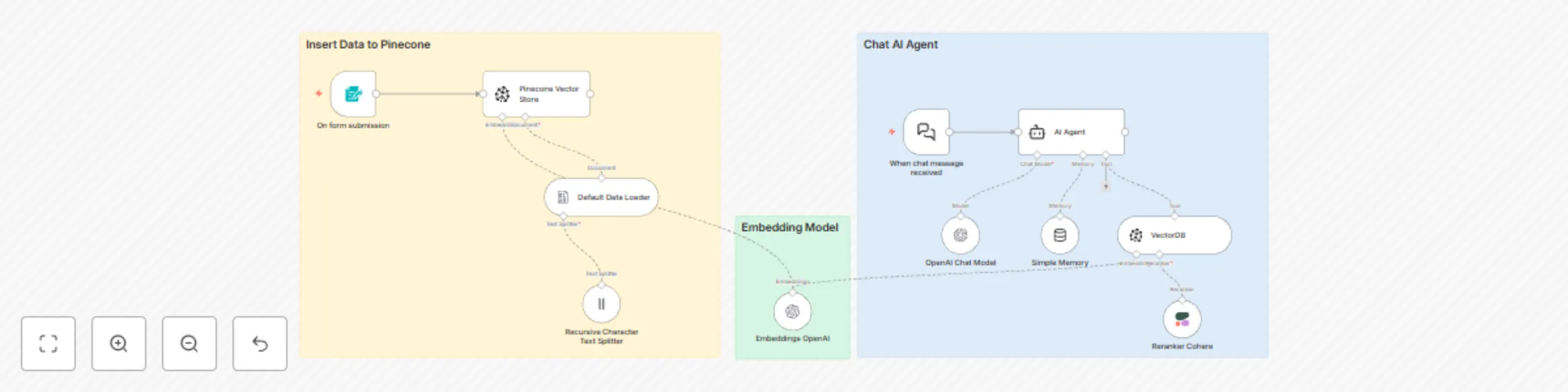
This workflow provides a complete, ready-to-use template for a **Retrieval-Augmented Generation (RAG)** system. It allows you to build a powerful AI chatbot that can answer questions based on the content of PDF documents you provide, using a modern and powerful stack for optimal performance.
### Good to know
* **Costs:** This workflow uses paid services (OpenAI, Pinecone, Cohere). Costs will be incurred based on your usage. Please review the pricing pages for each service to understand the potential expenses.
* **Video Tutorial (Bahasa Indonesia):** For a step-by-step guide on how this workflow functions, you can watch the accompanying video tutorial here: [N8N Tutorial: Membangun Chatbot RAG dengan Pinecone, OpenAI, & Cohere](https://www.youtube.com/watch?v=pmp96hT8604&t=2s)
### How it works
This workflow operates in two distinct stages:
**1. Data Ingestion & Indexing:**
* It begins when a **.pdf** file is uploaded via the n8n **Form Trigger**.
* The **Default Data Loader** node processes the PDF, and the **Recursive Character Text Splitter** breaks down the content into smaller, manageable chunks.
* The **Embeddings OpenAI** node converts these text chunks into vector embeddings (numerical representations).
* Finally, the **Pinecone Vector Store** node takes these embeddings and stores (upserts) them into your specified Pinecone index, creating a searchable knowledge base.
**2. Conversational AI Agent:**
* A user sends a message through the **Chat Trigger**.
* The **AI Agent** receives the message and uses its **VectorDB** tool to search the Pinecone index for relevant information.
* The **Reranker Cohere** node refines these search results, ensuring only the most relevant context is selected.
* The user's original question and the refined context are sent to the **OpenAI Chat Model** (`gpt-4.1`), which generates a helpful, context-aware answer.
* The **Simple Memory** node maintains conversation history, allowing for natural, multi-turn dialogues.
### How to use
Using this workflow is a two-step process:
1. **Populate the Knowledge Base:** First, you need to add documents. Trigger the workflow by using the **Form Trigger** and uploading a PDF file. Wait for the execution to complete. You can do this for multiple documents.
2. **Start Chatting:** Once your data has been ingested, open the **Chat Trigger**'s interface and start asking questions related to the content of your uploaded documents.
The Form Trigger is just an example. Feel free to replace it with other triggers, such as a node that watches a Google Drive or Dropbox folder for new files.
### Requirements
To run this workflow, you will need active accounts and API keys for the following services.
* **OpenAI Account & API Key:**
* **Function:** Powers text embedding and the final chat generation. Required for the `Embeddings OpenAI` and `OpenAI Chat Model` nodes.
* **Pinecone Account & API Key:**
* **Function:** Used to store and retrieve your vector knowledge base. Required for the `Pinecone Vector Store` and `VectorDB` nodes. You also need to provide your Pinecone **Environment**.
* **Cohere Account & API Key:**
* **Function:** Improves the accuracy of your chatbot by re-ranking search results for relevance. Required for the `Reranker Cohere` node.
### Customising this workflow
This template is a great starting point. Here are a few ways you can customize it:
* **Change the AI Personality:** Edit the **System Message** in the `AI Agent` node to change the bot's behavior, tone, or instructions.
* **Use Different Models:** You can easily swap the OpenAI model for another one (e.g., `gpt-3.5-turbo` for lower costs) in the `OpenAI Chat Model` node.
* **Adjust Retrieval:** In the `VectorDB` tool node, you can modify the `Top K` parameter to retrieve more or fewer document chunks to use as context.
* **Automate Ingestion:** Replace the manual `Form Trigger` with an automated one, like a node that triggers whenever a new file is added to a specific cloud storage folder.