Block 1 - Sticky Note - Introduction
- Type / Role
- n8n-nodes-base.stickyNote - stickyNote
- Config choices
- Version 1


 Early Deal
This workflow is provided as-is. Please review and test before using in production.
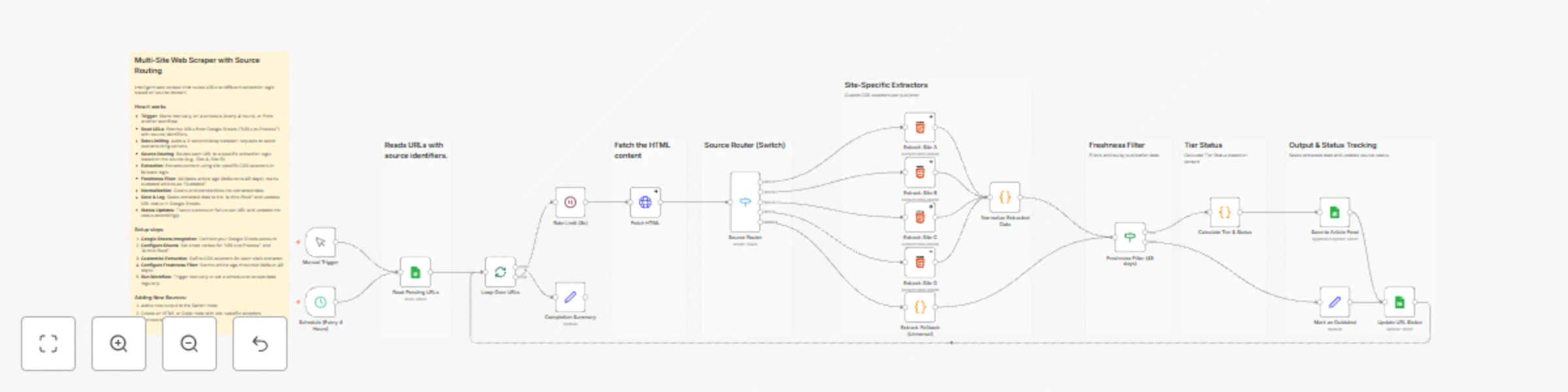
An intelligent web scraping workflow that automatically routes URLs to site specific extraction logic, normalizes data across multiple sources, and filters content by freshness to build a unified a...
n8n-nodes-base.stickynote, n8n-nodes-base.manualtrigger, n8n-nodes-base.scheduletrigger, n8n-nodes-base.googlesheets, n8n-nodes-base.splitinbatches, n8n-nodes-base.wait, n8n-nodes-base.httprequest, n8n-nodes-base.switch
This workflow is cataloged by N8N Workflows and links back to its original n8n.io source page by Omer Fayyaz.
Original n8n.io sourceThis template is designed for content aggregators, news monitoring services, content marketers, SEO professionals, researchers, and anyone who needs to collect and normalize articles from multiple websites. It's perfect for organizations that need to monitor competitor content, aggregate industry news, build content databases, track publication trends, or create unified article feeds without manually scraping each site or writing custom scrapers for every source.
This workflow creates a unified article aggregation system that reads URLs from Google Sheets, routes them to site-specific extractors, normalizes the data, filters by freshness, and saves results to a feed. The system:
Key Innovation: Source-Based Routing - Unlike generic scrapers that use one-size-fits-all extraction, this workflow uses intelligent routing to apply site-specific CSS selectors. This dramatically improves extraction accuracy while maintaining a universal fallback for unknown sources, making it both precise and extensible.
URL, Source, StatusURL column, source identifiers (e.g., "Site A", "Site B") in Source column, and "Pending" in Status columnTitle, Description, Author, datePublished, imageUrl, canonicalUrl, source, sourceUrl, tier, freshnessStatus, extractedAt{{ $('Loop Over URLs').item.json.Source }} equals your source name// WordPress sites
title: "h1.entry-title, .post-title"
author: ".author-name, .byline a"
date: "time.entry-date, time[datetime]"
// Modern CMS
title: "h1.article__title, article h1"
author: ".article__byline a, a[rel='author']"
date: "time[datetime], meta[property='article:published_time']"
cutoffDate.setDate(cutoffDate.getDate() - 45) to your desired number of daysThis catalog entry is organized from the workflow JSON. The node-level section below shows the executable blocks available for review before importing the template.
Showing the first 24 of 27 workflow blocks. Download the JSON for the full node graph.
| Workflow | Build a multi-site content aggregator with Google Sheets & custom extraction logic |
|---|---|
| Complexity | advanced |
| Nodes | 27 |
| Categories | Market Research |
| Author | Omer Fayyaz |
| Published | 25 Nov 2025 |
Use the JSON export at /data/workflows/11224/11224.json as the source template for this automation.
Open n8n, import the downloaded JSON, and review each node before activating the workflow.
Replace placeholder credentials, API keys, webhook URLs, account IDs, and environment-specific values with your own settings.
Run the workflow manually or in a staging workspace, inspect node output, and confirm downstream systems receive the expected data.
Enable the workflow only after testing, then monitor executions, errors, and rate limits during the first production runs.
Review imported nodes carefully before activation. This catalog entry is intended to help you inspect the workflow structure, understand required services, and find related templates faster.
Node names, credentials, schedules, webhook paths, and external service limits may need adjustment for your workspace.
An intelligent web scraping workflow that automatically routes URLs to site specific extraction logic, normalizes data across multiple sources, and filters content by freshness to build a unified a...
Review the workflow JSON, configure any required credentials in n8n, and test the automation in a safe workspace before using it in production.
Yes. Use the block-by-block analysis and the downloadable JSON to inspect each node, then adjust credentials, prompts, schedules, filters, or destinations for your Market Research use case.