Build a cost-efficient Lookio RAG chatbot with GPT-4.1 models for knowledge Q&A

Workflow preview

Workflow preview
100%
Build a cost-efficient Lookio RAG chatbot with GPT-4.1 models for knowledge Q&A preview
Open on n8n.io

1. Workflow Overview

This template provides a high performance, cost optimized alternative to standard AI Agents for building RAG (Retrieval Augmented Generation) chatbots. Instead of relying on a single expensive mode...

Best for

  • Support Chatbot automation workflows
  • AI RAG automation workflows
  • advanced n8n builders looking for reusable templates

Tools used

@n8n/n8n-nodes-langchain.chattrigger, @n8n/n8n-nodes-langchain.lmchatopenai, @n8n/n8n-nodes-langchain.chainllm, n8n-nodes-base.httprequest, @n8n/n8n-nodes-langchain.textclassifier, @n8n/n8n-nodes-langchain.chat, @n8n/n8n-nodes-langchain.memorymanager, @n8n/n8n-nodes-langchain.memorybufferwindow

Source and attribution

This workflow is cataloged by N8N Workflows and links back to its original n8n.io source page by Guillaume Duvernay.

Original n8n.io source

1.1 Workflow description

Title
Build a cost-efficient Lookio RAG chatbot with GPT-4.1 models for knowledge Q&A
Workflow name
Build a cost-efficient Lookio RAG chatbot with GPT-4.1 models for knowledge Q&A

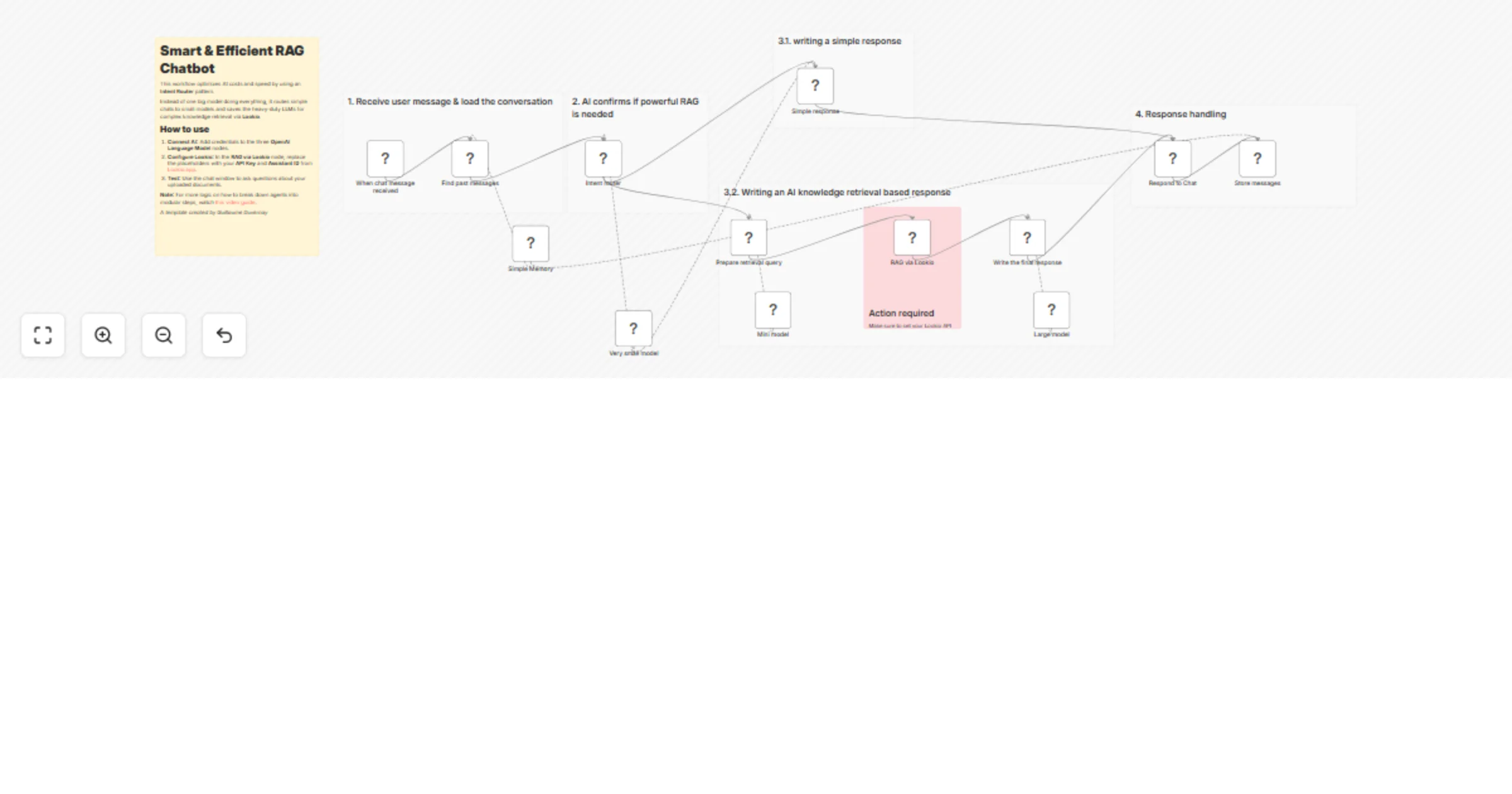
This template provides a high-performance, cost-optimized alternative to standard AI Agents for building RAG (Retrieval-Augmented Generation) chatbots.

Instead of relying on a single expensive model to decide every action, this workflow uses a modular "Routing & Specialized Steps" architecture.

It delivers results up to 50% faster and 3x more cost-efficiently by only involving heavy-duty models when deep internal knowledge is actually required.

By leveraging Lookio as the core RAG platform, you can connect your own documentation (PDFs, Docs, Webpages) to a chat interface without the complexity of managing vector databases or custom chunking strategies manually.

Learn more about breaking down agents for efficiency in this YouTube deep dive.

👥 Who is this for?

  • Customer Support Teams: Build an automated response system that answers queries based on official product guides or internal FAQs.
  • Efficiency-Focused Developers: Scale AI operations without ballooning API costs by offloading simple queries to smaller models.
  • Marketing & Content Teams: Provide instant access to brand guidelines or past content repositories for internal research.

đź’ˇ What problem does this solve?

  • Eliminates Token Waste: Traditional agents send long system prompts to expensive models even for basic greetings like "Hello." This workflow routes those to a "nano" model, saving significant costs.
  • Increases Reliability: By breaking down the "Agent" logic into discrete steps (Categorize -> Query Prep -> Retrieval -> Response), you gain more control over the output guidelines at every stage.
  • Scalable Knowledge Retrieval: Uses Lookio to handle the heavy lifting of RAG, ensuring sourced and factual answers based on your private data rather than general AI training.

⚙️ How it works

  1. Memory & Intent Routing: The workflow fetches past messages and uses a specialized Text Classifier (powered by a small model) to determine if the user is asking a knowledge-based question or just chatting.
  2. Path A (Simple Response): If it's a greeting, a small model handles the reply instantly.
  3. Path B (Knowledge Retrieval): If information is needed, a specialized LLM step crafts a clean search query specifically for Lookio.
  4. RAG Execution: The Lookio API retrieves the exact insights needed from your connected knowledge documents.
  5. Final Generation: A large model synthesizes the specific Lookio results and the conversation history into a final, fact-based response.

What is Lookio, the RAG platform?

Lookio is a business-focused AI platform designed for automated knowledge retrieval.

Unlike casual AI tools, Lookio is "API-first," meaning it’s built specifically to integrate with tools like n8n.

It handles the entire RAG pipeline—from document ingestion to vector storage and logical retrieval—allowing you to focus on building the logic of your automation rather than the infrastructure of your AI.

Lookio offers various query modes (Eco, Flash, Deep) so you can prioritize speed or depth depending on your budget.

🛠️ Setup

  1. Set up Lookio: Create an account at Lookio.app, upload your documents, and create an assistant.
  2. API Key: In the RAG via Lookio node, replace <YOUR-API-KEY> in the header and paste your assistant_id in the body.
  3. AI Credentials: Add your OpenAI (or preferred provider) credentials to the Very small model, Mini model, and Large model nodes.
  4. Activate: Turn the workflow on. You can now chat with your knowledge base via the n8n chat interface.

🚀 Taking it further

  • Add More Branches: Expand the Intent router to include paths for specific actions, like extracting emails for lead generation or checking order statuses via a database lookup.
  • Formatting Tweaks: Adjust the system prompts in the Write the final response node to match your brand's specific tone (e.g., "Explain it like I'm five" or "Legal professional tone").
  • Deployment: Connect this backend to your website or a Slack channel for real-time team usage.

1.2 Logical Blocks

This catalog entry is organized from the workflow JSON. The node-level section below shows the executable blocks available for review before importing the template.

2. Block-by-Block Analysis

Block 1 - When chat message received

Type / Role
@n8n/n8n-nodes-langchain.chatTrigger - chatTrigger
Config choices
Version 1.3

Block 2 - Very small model

Type / Role
@n8n/n8n-nodes-langchain.lmChatOpenAi - lmChatOpenAi
Config choices
Version 1.2

Block 3 - Simple response

Type / Role
@n8n/n8n-nodes-langchain.chainLlm - chainLlm
Config choices
Version 1.7

Block 4 - Prepare retrieval query

Type / Role
@n8n/n8n-nodes-langchain.chainLlm - chainLlm
Config choices
Version 1.7

Block 5 - Write the final response

Type / Role
@n8n/n8n-nodes-langchain.chainLlm - chainLlm
Config choices
Version 1.7

Block 6 - Mini model

Type / Role
@n8n/n8n-nodes-langchain.lmChatOpenAi - lmChatOpenAi
Config choices
Version 1.2

Block 7 - Large model

Type / Role
@n8n/n8n-nodes-langchain.lmChatOpenAi - lmChatOpenAi
Config choices
Version 1.2

Block 8 - RAG via Lookio

Type / Role
n8n-nodes-base.httpRequest - httpRequest
Config choices
Version 4.2

Block 9 - Intent router

Type / Role
@n8n/n8n-nodes-langchain.textClassifier - textClassifier
Config choices
Version 1.1

Block 10 - Respond to Chat

Type / Role
@n8n/n8n-nodes-langchain.chat - chat
Config choices
Version 1

Block 11 - Find past messages

Type / Role
@n8n/n8n-nodes-langchain.memoryManager - memoryManager
Config choices
Version 1.1

Block 12 - Simple Memory

Type / Role
@n8n/n8n-nodes-langchain.memoryBufferWindow - memoryBufferWindow
Config choices
Version 1.3

Block 13 - Store messages

Type / Role
@n8n/n8n-nodes-langchain.memoryManager - memoryManager
Config choices
Version 1.1

Block 14 - Sticky Note1

Type / Role
n8n-nodes-base.stickyNote - stickyNote
Config choices
Version 1

Block 15 - Sticky Note

Type / Role
n8n-nodes-base.stickyNote - stickyNote
Config choices
Version 1

Block 16 - Sticky Note2

Type / Role
n8n-nodes-base.stickyNote - stickyNote
Config choices
Version 1

Block 17 - Sticky Note3

Type / Role
n8n-nodes-base.stickyNote - stickyNote
Config choices
Version 1

Block 18 - Sticky Note4

Type / Role
n8n-nodes-base.stickyNote - stickyNote
Config choices
Version 1

Block 19 - Sticky Note5

Type / Role
n8n-nodes-base.stickyNote - stickyNote
Config choices
Version 1

Block 20 - Sticky Note6

Type / Role
n8n-nodes-base.stickyNote - stickyNote
Config choices
Version 1

3. Summary Table

Workflow Build a cost-efficient Lookio RAG chatbot with GPT-4.1 models for knowledge Q&A
Complexity advanced
Nodes 20
Categories Support Chatbot, AI RAG
Author Guillaume Duvernay
Published 06 Jan 2026

4. Reproducing the Workflow from Scratch

  1. 1. Download the workflow JSON

    Use the JSON export at /data/workflows/12521/12521.json as the source template for this automation.

  2. 2. Import the template into n8n

    Open n8n, import the downloaded JSON, and review each node before activating the workflow.

  3. 3. Configure credentials and variables

    Replace placeholder credentials, API keys, webhook URLs, account IDs, and environment-specific values with your own settings.

  4. 4. Test with sample data

    Run the workflow manually or in a staging workspace, inspect node output, and confirm downstream systems receive the expected data.

  5. 5. Activate and monitor

    Enable the workflow only after testing, then monitor executions, errors, and rate limits during the first production runs.

5. General Notes & Resources

Review imported nodes carefully before activation. This catalog entry is intended to help you inspect the workflow structure, understand required services, and find related templates faster.

Node names, credentials, schedules, webhook paths, and external service limits may need adjustment for your workspace.

Frequently asked questions

What does Build a cost-efficient Lookio RAG chatbot with GPT-4.1 models for knowledge Q&A do?

This template provides a high performance, cost optimized alternative to standard AI Agents for building RAG (Retrieval Augmented Generation) chatbots. Instead of relying on a single expensive mode...

What do I need before importing this workflow?

Review the workflow JSON, configure any required credentials in n8n, and test the automation in a safe workspace before using it in production.

Can I customize this workflow?

Yes. Use the block-by-block analysis and the downloadable JSON to inspect each node, then adjust credentials, prompts, schedules, filters, or destinations for your Support Chatbot, AI RAG use case.