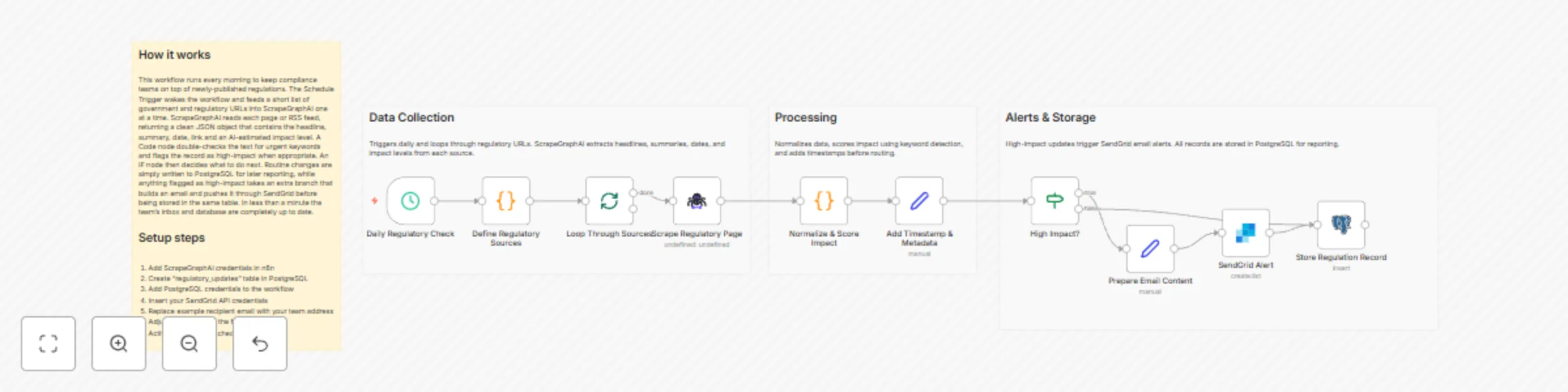
Breaking news aggregator with SendGrid and PostgreSQL

Workflow preview

Workflow preview
100%
Breaking news aggregator with SendGrid and PostgreSQL preview
Open on n8n.io

Important notice

This workflow is provided as-is. Please review and test before using in production.

1. Workflow Overview

Breaking News Aggregator with SendGrid and PostgreSQL ️ COMMUNITY TEMPLATE DISCLAIMER: This is a community contributed template that uses ScrapeGraphAI (a community node). Please ensure you have t...

Best for

  • Market Research automation workflows
  • AI Summarization automation workflows
  • intermediate n8n builders looking for reusable templates

Tools used

n8n-nodes-base.scheduletrigger, n8n-nodes-base.code, n8n-nodes-base.splitinbatches, n8n-nodes-scrapegraphai.scrapegraphai, n8n-nodes-base.set, n8n-nodes-base.if, n8n-nodes-base.sendgrid, n8n-nodes-base.postgres

Source and attribution

This workflow is cataloged by N8N Workflows and links back to its original n8n.io source page by vinci-king-01.

Original n8n.io source

1.1 Workflow description

Title
Breaking news aggregator with SendGrid and PostgreSQL
Workflow name
Breaking news aggregator with SendGrid and PostgreSQL

Breaking News Aggregator with SendGrid and PostgreSQL

⚠️ COMMUNITY TEMPLATE DISCLAIMER: This is a community-contributed template that uses ScrapeGraphAI (a community node). Please ensure you have the ScrapeGraphAI community node installed in your n8n instance before using this template.

This workflow automatically scrapes multiple government and regulatory websites, extracts the latest policy or compliance-related news, stores the data in PostgreSQL, and instantly emails daily summaries to your team through SendGrid. It is ideal for compliance professionals and industry analysts who need near real-time awareness of regulatory changes impacting their sector.

Pre-conditions/Requirements

Prerequisites

  • n8n instance (self-hosted or n8n.cloud)
  • ScrapeGraphAI community node installed
  • Operational SendGrid account
  • PostgreSQL database accessible from n8n
  • Basic knowledge of SQL for table creation

Required Credentials

  • ScrapeGraphAI API Key – Enables web scraping and parsing
  • SendGrid API Key – Sends email notifications
  • PostgreSQL Credentials – Host, port, database, user, and password

Specific Setup Requirements

Resource Requirement Example Value
PostgreSQL Table with columns: id, title, url, source, published_at news_updates
Allowed Hosts Outbound HTTPS access from n8n to target sites & SendGrid endpoint https://*.gov, https://api.sendgrid.com
Keywords List Comma-separated compliance terms to filter results GDPR, AML, cybersecurity

How it works

This workflow automatically scrapes multiple government and regulatory websites, extracts the latest policy or compliance-related news, stores the data in PostgreSQL, and instantly emails daily summaries to your team through SendGrid. It is ideal for compliance professionals and industry analysts who need near real-time awareness of regulatory changes impacting their sector.

Key Steps:

  • Schedule Trigger: Runs once daily (or at any chosen interval).
  • ScrapeGraphAI: Crawls predefined regulatory URLs and returns structured article data.
  • Code (JS): Filters results by keywords and formats them.
  • SplitInBatches: Processes articles in manageable chunks to avoid timeouts.
  • If Node: Checks whether each article already exists in the database.
  • PostgreSQL: Inserts only new articles into the news_updates table.
  • Set Node: Generates an email-friendly HTML summary.
  • SendGrid: Dispatches the compiled summary to compliance stakeholders.

Set up steps

Setup Time: 15-20 minutes

  1. Install ScrapeGraphAI Node:
    • From n8n, go to “Settings → Community Nodes → Install”, search “ScrapeGraphAI”, and install.
  2. Create PostgreSQL Table:
    CREATE TABLE news_updates (
      id SERIAL PRIMARY KEY,
      title TEXT,
      url TEXT UNIQUE,
      source TEXT,
      published_at TIMESTAMP
    );
    
  3. Add Credentials:
    • Navigate to “Credentials”, add ScrapeGraphAI, SendGrid, and PostgreSQL credentials.
  4. Import Workflow:
    • Copy the JSON workflow, paste into “Import from Clipboard”.
  5. Configure Environment Variables (optional):
    • REG_NEWS_KEYWORDS, SEND_TO_EMAILS, DB_TABLE_NAME.
  6. Set Schedule:
    • Open the Schedule Trigger node and define your preferred cron expression.
  7. Activate Workflow:
    • Toggle “Active”, then click “Execute Workflow” once to validate all connections.

Node Descriptions

Core Workflow Nodes:

  • Schedule Trigger – Initiates the workflow at the defined interval.
  • ScrapeGraphAI – Scrapes and parses news listings into JSON.
  • Code – Filters articles by keywords and normalizes timestamps.
  • SplitInBatches – Prevents database overload by batching inserts.
  • If – Determines whether an article is already stored.
  • PostgreSQL – Executes parameterized INSERT statements.
  • Set – Builds the HTML email body.
  • SendGrid – Sends the daily digest email.

Data Flow:

  1. Schedule TriggerScrapeGraphAICodeSplitInBatchesIfPostgreSQLSetSendGrid

Customization Examples

Change Keyword Filtering

// Code Node snippet
const keywords = ['GDPR','AML','SOX']; // Add or remove terms
item.filtered = keywords.some(k => item.title.includes(k));
return item;

Switch to Weekly Digest

{
  "trigger": {
    "cronExpression": "0 9 * * 1" // Every Monday at 09:00
  }
}

Data Output Format

The workflow outputs structured JSON data:

{
  "title": "Data Privacy Act Amendment Passed",
  "url": "https://regulator.gov/news/1234",
  "source": "regulator.gov",
  "published_at": "2024-06-12T14:30:00Z"
}

Troubleshooting

Common Issues

  1. ScrapeGraphAI node not found – Install the community node and restart n8n.
  2. Duplicate key error in PostgreSQL – Ensure the url column is marked UNIQUE to prevent duplicates.
  3. Emails not sending – Verify SendGrid API key and check account’s daily limit.

Performance Tips

  • Limit initial scrape URLs to fewer than 20 to reduce run time.
  • Increase SplitInBatches size only if your database can handle larger inserts.

Pro Tips:

  • Use environment variables to manage sensitive credentials securely.
  • Add an Error Trigger node to catch and log failures for auditing purposes.
  • Combine with Slack or Microsoft Teams nodes to push instant alerts alongside email digests.

1.2 Logical Blocks

This catalog entry is organized from the workflow JSON. The node-level section below shows the executable blocks available for review before importing the template.

2. Block-by-Block Analysis

Block 1 - Daily Regulatory Check

Type / Role
n8n-nodes-base.scheduleTrigger - scheduleTrigger
Config choices
Version 1.1

Block 2 - Define Regulatory Sources

Type / Role
n8n-nodes-base.code - code
Config choices
Version 2

Block 3 - Loop Through Sources

Type / Role
n8n-nodes-base.splitInBatches - splitInBatches
Config choices
Version 3

Block 4 - Scrape Regulatory Page

Type / Role
n8n-nodes-scrapegraphai.scrapegraphAi - scrapegraphAi
Config choices
Version 1

Block 5 - Normalize & Score Impact

Type / Role
n8n-nodes-base.code - code
Config choices
Version 2

Block 6 - Add Timestamp & Metadata

Type / Role
n8n-nodes-base.set - set
Config choices
Version 3.4

Block 7 - High Impact?

Type / Role
n8n-nodes-base.if - if
Config choices
Version 2

Block 8 - Prepare Email Content

Type / Role
n8n-nodes-base.set - set
Config choices
Version 3.4

Block 9 - SendGrid Alert

Type / Role
n8n-nodes-base.sendGrid - sendGrid
Config choices
Version 1

Block 10 - Store Regulation Record

Type / Role
n8n-nodes-base.postgres - postgres
Config choices
Version 2.5

Block 11 - Workflow Overview

Type / Role
n8n-nodes-base.stickyNote - stickyNote
Config choices
Version 1

Block 12 - Section - Data Collection

Type / Role
n8n-nodes-base.stickyNote - stickyNote
Config choices
Version 1

Block 13 - Section - Processing

Type / Role
n8n-nodes-base.stickyNote - stickyNote
Config choices
Version 1

Block 14 - Section - Alerts & Storage

Type / Role
n8n-nodes-base.stickyNote - stickyNote
Config choices
Version 1

3. Summary Table

Workflow Breaking news aggregator with SendGrid and PostgreSQL
Complexity intermediate
Nodes 14
Categories Market Research, AI Summarization
Author vinci-king-01
Published 10 Dec 2025

4. Reproducing the Workflow from Scratch

  1. 1. Download the workflow JSON

    Use the JSON export at /data/workflows/11669/11669.json as the source template for this automation.

  2. 2. Import the template into n8n

    Open n8n, import the downloaded JSON, and review each node before activating the workflow.

  3. 3. Configure credentials and variables

    Replace placeholder credentials, API keys, webhook URLs, account IDs, and environment-specific values with your own settings.

  4. 4. Test with sample data

    Run the workflow manually or in a staging workspace, inspect node output, and confirm downstream systems receive the expected data.

  5. 5. Activate and monitor

    Enable the workflow only after testing, then monitor executions, errors, and rate limits during the first production runs.

5. General Notes & Resources

Review imported nodes carefully before activation. This catalog entry is intended to help you inspect the workflow structure, understand required services, and find related templates faster.

Node names, credentials, schedules, webhook paths, and external service limits may need adjustment for your workspace.

Frequently asked questions

What does Breaking news aggregator with SendGrid and PostgreSQL do?

Breaking News Aggregator with SendGrid and PostgreSQL ️ COMMUNITY TEMPLATE DISCLAIMER: This is a community contributed template that uses ScrapeGraphAI (a community node). Please ensure you have t...

What do I need before importing this workflow?

Review the workflow JSON, configure any required credentials in n8n, and test the automation in a safe workspace before using it in production.

Can I customize this workflow?

Yes. Use the block-by-block analysis and the downloadable JSON to inspect each node, then adjust credentials, prompts, schedules, filters, or destinations for your Market Research, AI Summarization use case.