Block 1 - OpenAI Chat Model3
- Type / Role
- @n8n/n8n-nodes-langchain.lmChatOpenAi - lmChatOpenAi
- Config choices
- Version 1.2


 Early Deal
This workflow is provided as-is. Please review and test before using in production.
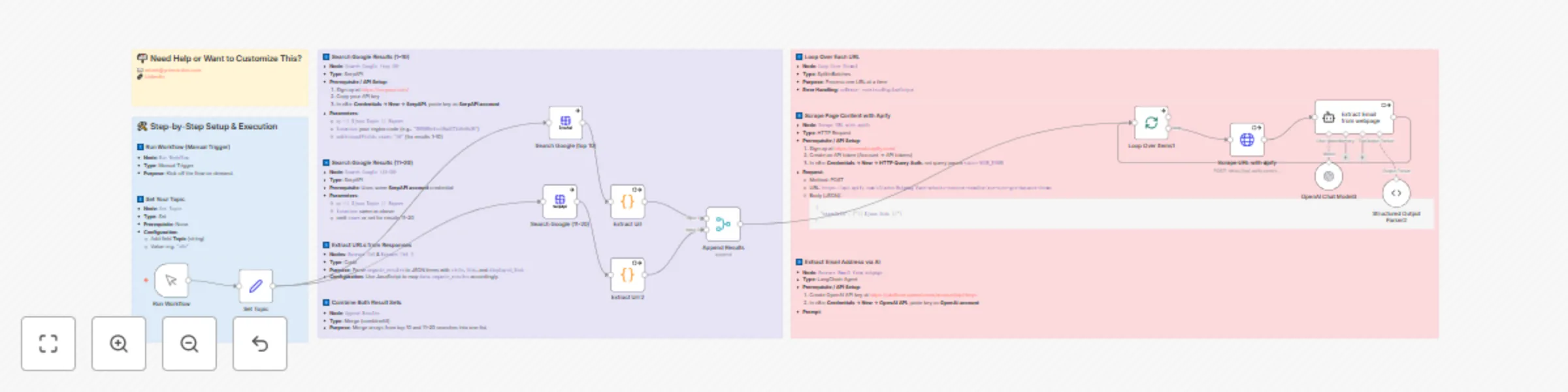
This n8n workflow finds experts on any topic , scrapes their websites, and pulls out contact emails automatically. Core services used: SerpAPI (google search) · Apify (website crawler) · OpenAI (GP...
@n8n/n8n-nodes-langchain.lmchatopenai, @n8n/n8n-nodes-langchain.outputparserstructured, n8n-nodes-base.splitinbatches, n8n-nodes-base.manualtrigger, n8n-nodes-base.stickynote, n8n-nodes-base.set, n8n-nodes-serpapi.serpapi, n8n-nodes-base.code
This workflow is cataloged by N8N Workflows and links back to its original n8n.io source page by Robert Breen.
Original n8n.io sourceThis n8n workflow finds experts on any topic, scrapes their websites, and pulls out contact emails automatically.
Core services used: SerpAPI (google search) · Apify (website crawler) · OpenAI (GPT-4o email extraction).
| Node | Type | Purpose |
|---|---|---|
Run Workflow |
Manual Trigger | Start the workflow on demand while you test. |
| Node | Type | How to configure |
|---|---|---|
Set Topic |
Set | Add a string field Topic – e.g. "n8n". This keyword drives every subsequent step. |
| Node | Type | API Credential |
|---|---|---|
Search Google (top 10) |
SerpAPI | Create SerpAPI credential 1. Sign up → copy API key → n8n → Credentials → New → SerpAPI → paste. 2. Select the credential in this node. |
| Key Params | ||
q |
={{ $json.Topic }} Expert |
|
location |
Region code (ex 585069efee19ad271e9c9b36) |
|
additionalFields.start |
"10" (Google position 1-10) |
| Node | Type | Notes |
|---|---|---|
Search Google (11-20) |
SerpAPI (same credential) | Remove start or set to 20+ to fetch next page. |
| Node | Type | Script Purpose |
|---|---|---|
Extract Url & Extract Url 2 |
Code | Loop data.organic_results → output { title, link, displayed_link } for each result. |
| Node | Type | Details |
|---|---|---|
Append Results |
Merge (combineAll) | Merges arrays from steps 3 & 4 into a single list for processing. |
| Node | Type | Configuration |
|---|---|---|
Loop Over Items1 |
Split In Batches | Default batch = 1 (process one page at a time).onError = continueRegularOutput keeps loop alive on failures. |
| Node | Type | API Credential |
|---|---|---|
Scrape URL with apify |
HTTP Request | Create Apify credential 1. Sign up at https://console.apify.com 2. Account → API tokens → copy. 3. n8n → Credentials → New → HTTP Query Auth → set query param token=YOUR_TOKEN. |
| Request Details | ||
| Method | POST | |
| URL | https://api.apify.com/v2/acts/6sigmag~fast-website-content-crawler/run-sync-get-dataset-items |
|
| JSON Body | json { "startUrls": ["{{ $json.link }}"] } |
| Node | Type | API Credential |
|---|---|---|
Extract Email from webpage |
LangChain Agent | Create OpenAI credential 1. Generate key at https://platform.openai.com/account/api-keys 2. n8n → Credentials → New → OpenAI API → paste key. |
| Prompt (system) | extract the email address from the text. if there is no email address, output null. |
|
| Output Parser | Structured Output Parser2 expects → { "email": "address OR null" } |
{
  "title": "How to Build n8n Workflows",
  "link": "https://example.com",
  "email": "[email protected]"
}
💡 Optional Enhancements Idea How Save Leads Add a Google Sheets or Airtable node after the loop. Validate Emails Chain a ZeroBounce / Hunter.io verification API before saving. Parallel Crawling Increase SplitInBatches size (watch Apify rate limits).
🙋♂️ Need More Help? Robert Breen – Automation Consultant & n8n Expert 📧 [email protected] 🔗 https://www.linkedin.com/in/robert-breen-29429625/ 🌐 https://ynteractive.com
This catalog entry is organized from the workflow JSON. The node-level section below shows the executable blocks available for review before importing the template.
| Workflow | Beginner lead finder using SerpAPI search |
|---|---|
| Complexity | advanced |
| Nodes | 16 |
| Categories | Lead Generation, Multimodal AI |
| Author | Robert Breen |
| Published | 08 Aug 2025 |
Use the JSON export at /data/workflows/7155/7155.json as the source template for this automation.
Open n8n, import the downloaded JSON, and review each node before activating the workflow.
Replace placeholder credentials, API keys, webhook URLs, account IDs, and environment-specific values with your own settings.
Run the workflow manually or in a staging workspace, inspect node output, and confirm downstream systems receive the expected data.
Enable the workflow only after testing, then monitor executions, errors, and rate limits during the first production runs.
Review imported nodes carefully before activation. This catalog entry is intended to help you inspect the workflow structure, understand required services, and find related templates faster.
Node names, credentials, schedules, webhook paths, and external service limits may need adjustment for your workspace.
This n8n workflow finds experts on any topic , scrapes their websites, and pulls out contact emails automatically. Core services used: SerpAPI (google search) · Apify (website crawler) · OpenAI (GP...
Review the workflow JSON, configure any required credentials in n8n, and test the automation in a safe workspace before using it in production.
Yes. Use the block-by-block analysis and the downloadable JSON to inspect each node, then adjust credentials, prompts, schedules, filters, or destinations for your Lead Generation, Multimodal AI use case.