Automatically Classify Zoho Desk Support Tickets using Gemini AI

Workflow preview

Workflow preview
100%
Automatically Classify Zoho Desk Support Tickets using Gemini AI preview
Open on n8n.io

Important notice

This workflow is provided as-is. Please review and test before using in production.

1. Workflow Overview

Automatically Classify Support Tickets in Zoho Desk with AI with Gemini Transform your customer support workflow with intelligent ticket classification. This automation leverages AI to automaticall...

Best for

  • Ticket Management automation workflows
  • AI Summarization automation workflows
  • intermediate n8n builders looking for reusable templates

Tools used

n8n-nodes-base.manualtrigger, @n8n/n8n-nodes-langchain.lmchatopenrouter, n8n-nodes-base.code, n8n-nodes-base.httprequest, @n8n/n8n-nodes-langchain.chainllm, n8n-nodes-base.splitout, n8n-nodes-base.stickynote

Source and attribution

This workflow is cataloged by N8N Workflows and links back to its original n8n.io source page by Julian Kaiser.

Original n8n.io source

1.1 Workflow description

Title
Automatically Classify Zoho Desk Support Tickets using Gemini AI
Workflow name
Automatically Classify Zoho Desk Support Tickets using Gemini AI

Automatically Classify Support Tickets in Zoho Desk with AI with Gemini

Transform your customer support workflow with intelligent ticket classification. This automation leverages AI to automatically categorize incoming support tickets in Zoho Desk, reducing manual work and ensuring faster ticket routing to the right teams.

How It Works

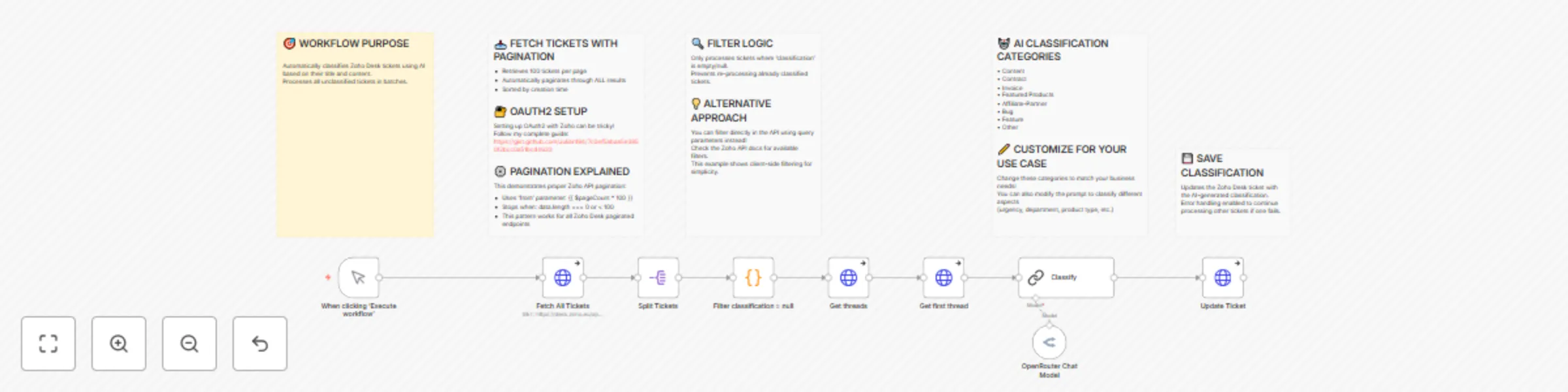
  1. Fetches all tickets from Zoho Desk with pagination support
  2. Filters unclassified tickets (where classification field is null)
  3. Retrieves complete ticket threads for full conversation context
  4. Uses OpenRouter AI (GPT-4, Claude, or other models) to classify tickets into predefined categories
  5. Updates tickets in Zoho Desk with accurate classifications automatically

Use Cases

  • Customer Support Teams: Automatically route tickets to specialized departments (billing, technical, sales)
  • Help Desks: Prioritize urgent issues and categorize feature requests

Prerequisites

  • Active Zoho Desk account with API access
  • OpenRouter API account (supports multiple AI models)
  • Basic understanding of OAuth2 authentication
  • Predefined ticket categories in your Zoho Desk setup

Setup Steps

Time: ~15 minutes

  1. Configure Zoho Desk OAuth2 - Follow our step-by-step GitHub guide for OAuth2 credential setup
  2. Set up OpenRouter API - Create an account and generate API keys at openrouter.ai
  3. Customize classifications - Define your ticket categories (e.g., Technical, Billing, Feature Request, Bug Report)
  4. Adapt the workflow - Modify for any field: status, priority, tags, assignment, or custom fields
  5. Review API documentation - Check Zoho Desk Search API docs for advanced filtering options
  6. Test thoroughly - Run manual triggers before automation

Note: This workflow demonstrates proper Zoho Desk API integration, including OAuth2 authentication and pagination handling—two common integration challenges.

1.2 Logical Blocks

This catalog entry is organized from the workflow JSON. The node-level section below shows the executable blocks available for review before importing the template.

2. Block-by-Block Analysis

Block 1 - When clicking ‘Execute workflow’

Type / Role
n8n-nodes-base.manualTrigger - manualTrigger
Config choices
Version 1

Block 2 - OpenRouter Chat Model

Type / Role
@n8n/n8n-nodes-langchain.lmChatOpenRouter - lmChatOpenRouter
Config choices
Version 1

Block 3 - Filter classification = null

Type / Role
n8n-nodes-base.code - code
Config choices
Version 2

Block 4 - Get threads

Type / Role
n8n-nodes-base.httpRequest - httpRequest
Config choices
Version 4.2

Block 5 - Get first thread

Type / Role
n8n-nodes-base.httpRequest - httpRequest
Config choices
Version 4.2

Block 6 - Classify

Type / Role
@n8n/n8n-nodes-langchain.chainLlm - chainLlm
Config choices
Version 1.7

Block 7 - Update Ticket

Type / Role
n8n-nodes-base.httpRequest - httpRequest
Config choices
Version 4.2

Block 8 - Fetch All Tickets

Type / Role
n8n-nodes-base.httpRequest - httpRequest
Config choices
Version 4.2

Block 9 - Split Tickets

Type / Role
n8n-nodes-base.splitOut - splitOut
Config choices
Version 1

Block 10 - Sticky Note1

Type / Role
n8n-nodes-base.stickyNote - stickyNote
Config choices
Version 1

Block 11 - Sticky Note2

Type / Role
n8n-nodes-base.stickyNote - stickyNote
Config choices
Version 1

Block 12 - Sticky Note3

Type / Role
n8n-nodes-base.stickyNote - stickyNote
Config choices
Version 1

Block 13 - Sticky Note4

Type / Role
n8n-nodes-base.stickyNote - stickyNote
Config choices
Version 1

Block 14 - Sticky Note5

Type / Role
n8n-nodes-base.stickyNote - stickyNote
Config choices
Version 1

3. Summary Table

Workflow Automatically Classify Zoho Desk Support Tickets using Gemini AI
Complexity intermediate
Nodes 14
Categories Ticket Management, AI Summarization
Author Julian Kaiser
Published 06 Oct 2025

4. Reproducing the Workflow from Scratch

  1. 1. Download the workflow JSON

    Use the JSON export at /data/workflows/9307/9307.json as the source template for this automation.

  2. 2. Import the template into n8n

    Open n8n, import the downloaded JSON, and review each node before activating the workflow.

  3. 3. Configure credentials and variables

    Replace placeholder credentials, API keys, webhook URLs, account IDs, and environment-specific values with your own settings.

  4. 4. Test with sample data

    Run the workflow manually or in a staging workspace, inspect node output, and confirm downstream systems receive the expected data.

  5. 5. Activate and monitor

    Enable the workflow only after testing, then monitor executions, errors, and rate limits during the first production runs.

5. General Notes & Resources

Review imported nodes carefully before activation. This catalog entry is intended to help you inspect the workflow structure, understand required services, and find related templates faster.

Node names, credentials, schedules, webhook paths, and external service limits may need adjustment for your workspace.

Frequently asked questions

What does Automatically Classify Zoho Desk Support Tickets using Gemini AI do?

Automatically Classify Support Tickets in Zoho Desk with AI with Gemini Transform your customer support workflow with intelligent ticket classification. This automation leverages AI to automaticall...

What do I need before importing this workflow?

Review the workflow JSON, configure any required credentials in n8n, and test the automation in a safe workspace before using it in production.

Can I customize this workflow?

Yes. Use the block-by-block analysis and the downloadable JSON to inspect each node, then adjust credentials, prompts, schedules, filters, or destinations for your Ticket Management, AI Summarization use case.