Automatic WhatsApp response with Groq LLM and conversation memory

Workflow preview

Workflow preview
100%
Automatic WhatsApp response with Groq LLM and conversation memory preview
Open on n8n.io

Important notice

This workflow is provided as-is. Please review and test before using in production.

1. Workflow Overview

Who is this for? This workflow is intended for individual users or teams who want to automate their small business on WhatsApp practically by automatically replying about your business products or ...

Best for

  • Support Chatbot automation workflows
  • AI Chatbot automation workflows
  • intermediate n8n builders looking for reusable templates

Tools used

@n8n/n8n-nodes-langchain.agent, @n8n/n8n-nodes-langchain.lmchatgroq, @n8n/n8n-nodes-langchain.memorybufferwindow, n8n-nodes-base.stickynote, n8n-nodes-base.whatsapp, n8n-nodes-base.whatsapptrigger, n8n-nodes-base.if

Source and attribution

This workflow is cataloged by N8N Workflows and links back to its original n8n.io source page by Ghufran Ridhawi.

Original n8n.io source

1.1 Workflow description

Title
Automatic WhatsApp response with Groq LLM and conversation memory
Workflow name
Automatic WhatsApp response with Groq LLM and conversation memory

Who is this for?

This workflow is intended for individual users or teams who want to automate their small business on WhatsApp practically by automatically replying about your business products or services using the groq model. Based on small businesses, there is a task to answer many customers or clients on WhatsApp, in reality answering one by one is very time-consuming and tiring, moreover we have to compose sentences first or click on templates and send them. This is also a form of dedication to the community at n8n and n8n company, as well as dedication to small businesses so that reality is no longer tiring and able to answer the problems of existing reality.

How it works?

Easy explanation: 


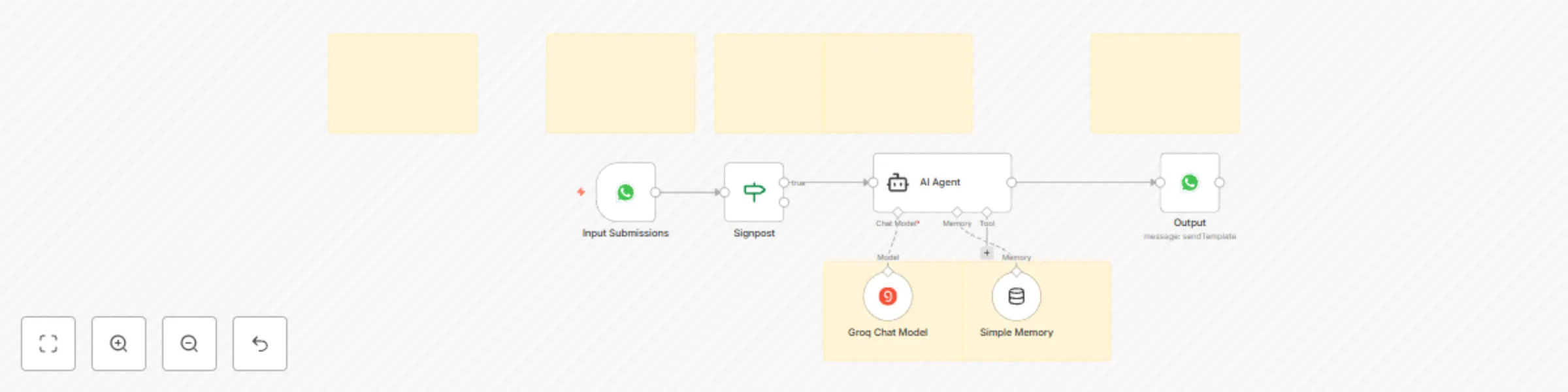
  1. Whatsapp Trigger is used to receive whatsapp messages from other numbers, this is also a place to input data and send it to the next node or to the AI ​​Agent
  2. If node is used to direct the workflow flow under certain conditions. This will be like checking whether a condition is met or not, directing the action to the next node, until it meets the criteria. 


  3. Then it is directed to the AI ​​Agent to be able to use the groq model and storage using simple memory, why? Because it minimizes the costs used later but still works as expected. 


  4. The Groq chat model will think and carry out its tasks and store data in simple memory, and carry out its tasks to answer/send messages to whatsapp customers/clients on the AI ​​Agent node bond. 


  5. And enjoy this workflow working for you.

Set up instructions

Complete what is in the nodes as stated in the notes column.

  1. You need a "Credential Account" On the first node, namely as a WhatsApp trigger, you can register it by following the guide from n8n
  2. You need an AI Agent to carry out the objectives of these tasks. You can change it to define below in “Source for Prompt (User Message)>Fix and “Prompt (User Message)” to text body>Expression.
  3. You need a Groq model to be able to think and carry out tasks, you have to set this up by creating a “Credential Account” and just follow the steps on n8n and select the model.
  4. After that, for practical and simple storage, add memory to the Nodes AI agent, namely “Simple Memory”, select Define below in “Session ID” and in “Key” is used to store incoming chat receipts.
  5. After that, add nodes to produce action output on WhatsApp, namely Message Actions>Send message. After adding this set up nodes according to the existing notes, and I have set it up.
  6. Save and run, test the workflow and activate the workflow. And this Workflow is ready to use.

Requirements


As a reminder:

  1. Must set up in nodes, such as what your business description is, also according to your small business conditional, so that the AI ​​Agent is in accordance with your business knowledge base
  2. Must have (if not, make sure you have registered) on each "Credential Account" by following the guide on how to do it n8n the guidelines are very complete
  3. Do not forget to save, and make sure the workflow is active.

### **How to customize this workflow to your needs
** You can directly set up your business knowledge base on the nodes, so that the accuracy is also high when carrying out tasks and answering them.


1.2 Logical Blocks

This catalog entry is organized from the workflow JSON. The node-level section below shows the executable blocks available for review before importing the template.

2. Block-by-Block Analysis

Block 1 - AI Agent

Type / Role
@n8n/n8n-nodes-langchain.agent - agent
Config choices
Version 1.8

Block 2 - Groq Chat Model

Type / Role
@n8n/n8n-nodes-langchain.lmChatGroq - lmChatGroq
Config choices
Version 1

Block 3 - Simple Memory

Type / Role
@n8n/n8n-nodes-langchain.memoryBufferWindow - memoryBufferWindow
Config choices
Version 1.3

Block 4 - Sticky Note

Type / Role
n8n-nodes-base.stickyNote - stickyNote
Config choices
Version 1

Block 5 - Sticky Note1

Type / Role
n8n-nodes-base.stickyNote - stickyNote
Config choices
Version 1

Block 6 - Sticky Note2

Type / Role
n8n-nodes-base.stickyNote - stickyNote
Config choices
Version 1

Block 7 - Sticky Note3

Type / Role
n8n-nodes-base.stickyNote - stickyNote
Config choices
Version 1

Block 8 - Sticky Note4

Type / Role
n8n-nodes-base.stickyNote - stickyNote
Config choices
Version 1

Block 9 - Sticky Note5

Type / Role
n8n-nodes-base.stickyNote - stickyNote
Config choices
Version 1

Block 10 - Sticky Note6

Type / Role
n8n-nodes-base.stickyNote - stickyNote
Config choices
Version 1

Block 11 - Output

Type / Role
n8n-nodes-base.whatsApp - whatsApp
Config choices
Version 1

Block 12 - Input Submissions

Type / Role
n8n-nodes-base.whatsAppTrigger - whatsAppTrigger
Config choices
Version 1

Block 13 - Signpost

Type / Role
n8n-nodes-base.if - if
Config choices
Version 2.2

3. Summary Table

Workflow Automatic WhatsApp response with Groq LLM and conversation memory
Complexity intermediate
Nodes 13
Categories Support Chatbot, AI Chatbot
Author Ghufran Ridhawi
Published 25 Apr 2025

4. Reproducing the Workflow from Scratch

  1. 1. Download the workflow JSON

    Use the JSON export at /data/workflows/3707/3707.json as the source template for this automation.

  2. 2. Import the template into n8n

    Open n8n, import the downloaded JSON, and review each node before activating the workflow.

  3. 3. Configure credentials and variables

    Replace placeholder credentials, API keys, webhook URLs, account IDs, and environment-specific values with your own settings.

  4. 4. Test with sample data

    Run the workflow manually or in a staging workspace, inspect node output, and confirm downstream systems receive the expected data.

  5. 5. Activate and monitor

    Enable the workflow only after testing, then monitor executions, errors, and rate limits during the first production runs.

5. General Notes & Resources

Review imported nodes carefully before activation. This catalog entry is intended to help you inspect the workflow structure, understand required services, and find related templates faster.

Node names, credentials, schedules, webhook paths, and external service limits may need adjustment for your workspace.

Frequently asked questions

What does Automatic WhatsApp response with Groq LLM and conversation memory do?

Who is this for? This workflow is intended for individual users or teams who want to automate their small business on WhatsApp practically by automatically replying about your business products or ...

What do I need before importing this workflow?

Review the workflow JSON, configure any required credentials in n8n, and test the automation in a safe workspace before using it in production.

Can I customize this workflow?

Yes. Use the block-by-block analysis and the downloadable JSON to inspect each node, then adjust credentials, prompts, schedules, filters, or destinations for your Support Chatbot, AI Chatbot use case.