Automated UPSC current affairs digest from The Hindu to Google Sheets with Gemini AI

Workflow preview

Workflow preview
100%
Automated UPSC current affairs digest from The Hindu to Google Sheets with Gemini AI preview
Open on n8n.io

Important notice

This workflow is provided as-is. Please review and test before using in production.

1. Workflow Overview

This template sets up a scheduled automation that scrapes the latest news from The Hindu website, uses a Google Gemini AI Agent to filter and analyze the content for relevance to the Competitive Ex...

Best for

  • Market Research automation workflows
  • AI RAG automation workflows
  • advanced n8n builders looking for reusable templates

Tools used

n8n-nodes-base.manualtrigger, n8n-nodes-base.httprequest, @n8n/n8n-nodes-langchain.agent, @n8n/n8n-nodes-langchain.lmchatgooglegemini, n8n-nodes-base.html, n8n-nodes-base.googlesheets, n8n-nodes-base.googlesheetstool, n8n-nodes-base.code

Source and attribution

This workflow is cataloged by N8N Workflows and links back to its original n8n.io source page by Pawan.

Original n8n.io source

1.1 Workflow description

Title
Automated UPSC current affairs digest from The Hindu to Google Sheets with Gemini AI
Workflow name
Automated UPSC current affairs digest from The Hindu to Google Sheets with Gemini AI

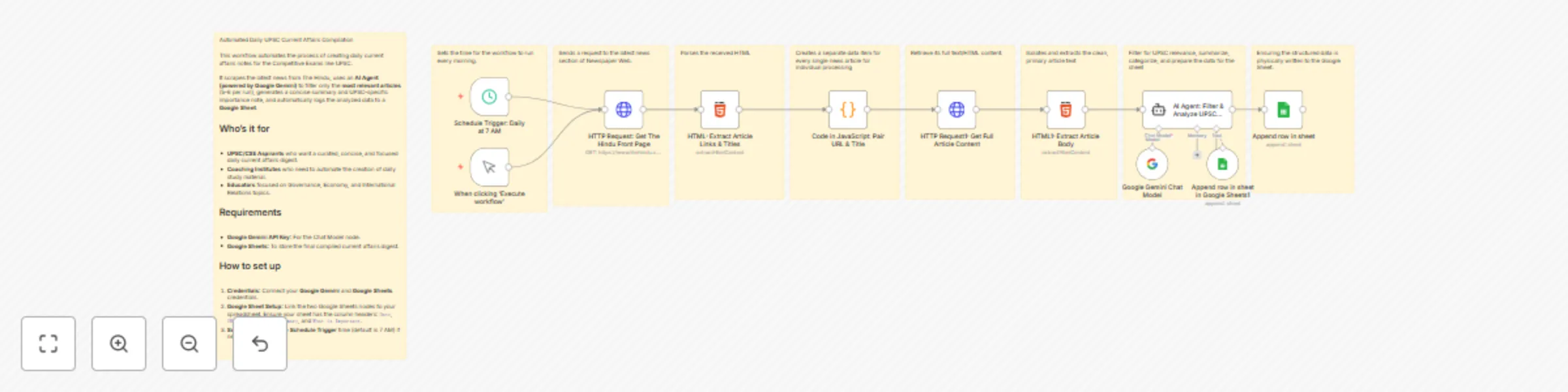
This template sets up a scheduled automation that scrapes the latest news from The Hindu website, uses a Google Gemini AI Agent to filter and analyze the content for relevance to the Competitive Exams like UPSC Civil Services Examination (CSE) syllabus, and compiles a structured daily digest directly into a Google Sheet. It saves hours of manual reading and note-taking by providing concise summaries, subject categorization, and explicit UPSC importance notes.

Who’s it for

This workflow is essential for:

  1. UPSC/CSE Aspirants who require a curated, focused, and systematic daily current affairs digest.
  2. Coaching Institutes aiming to instantly generate structured, high-quality study material for their students.
  3. Educators and Content Creators focused on Governance, Economy, International Relations, and Science & Technology.

How it works / What it does

This workflow runs automatically every morning (scheduled for 7 AM by default) to generate a ready-to-study current affairs document.

  1. Scraping: The Schedule Trigger fires an HTTP Request to fetch the latest news links from The Hindu's front page.
  2. Data Curation: The HTML and Code in JavaScript nodes work together to extract and pair every article URL with its title.
  3. Content Retrieval: For each identified link, a second HTTP Request node fetches the entire article body.
  4. AI Analysis and Filtering: The AI Agent uses a detailed prompt and the Google Gemini Chat Model to perform two critical tasks:
    1. Filter: It filters out all irrelevant articles (e.g., sports results, local crime) to keep only the 5-6 most important UPSC-relevant pieces (Polity, Economy, IR, etc.).
    2. Analyze: For the selected articles, it generates a Brief Summary, identifies the Main Subject, and clearly articulates Why it is Important for the UPSC Exam.
  5. Storage: The AI Agent calls the integrated Google Sheets Tool to automatically append the structured, analyzed data into your designated Google Sheet, creating your daily ready-made notes.

Requirements

To deploy this workflow, you need:

  1. n8n Account: (Cloud or self-hosted).
  2. Google Gemini API Key: For connecting the Google Gemini Chat Model and powering the AI Agent.
  3. Google Sheets Credentials: For reading/writing the final compiled digest.
  4. Target Google Sheet: A spreadsheet with the following columns: Date, URL, Subject, Brief Summary, and What is Important.

How to set up

  • Credentials Setup: Connect your Google Gemini and Google Sheets accounts via the n8n Credentials Manager.
  • Google Sheet Linking: In the Append row in sheet and Append row in sheet in Google Sheets1 nodes, replace the placeholder IDs and GIDs with the actual ID and sheet name of your dedicated UPSC notes spreadsheet.
  • Scheduling: Adjust the time in the Schedule Trigger: Daily at 7 AM node if you want the daily analysis to run at a different hour.
  • AI Customization (Optional): You can refine the System Message in the AI Agent: Filter & Analyze UPSC News node to focus the analysis on specific exam phases (e.g., Prelims only) or adjust the priority of subjects.

1.2 Logical Blocks

This catalog entry is organized from the workflow JSON. The node-level section below shows the executable blocks available for review before importing the template.

2. Block-by-Block Analysis

Block 1 - When clicking ‘Execute workflow’

Type / Role
n8n-nodes-base.manualTrigger - manualTrigger
Config choices
Version 1

Block 2 - HTTP Request: Get The Hindu Front Page

Type / Role
n8n-nodes-base.httpRequest - httpRequest
Config choices
Version 4.2

Block 3 - AI Agent: Filter & Analyze UPSC News

Type / Role
@n8n/n8n-nodes-langchain.agent - agent
Config choices
Version 2.2

Block 4 - Google Gemini Chat Model

Type / Role
@n8n/n8n-nodes-langchain.lmChatGoogleGemini - lmChatGoogleGemini
Config choices
Version 1

Block 5 - HTML: Extract Article Links & Titles

Type / Role
n8n-nodes-base.html - html
Config choices
Version 1.2

Block 6 - HTTP Request1: Get Full Article Content

Type / Role
n8n-nodes-base.httpRequest - httpRequest
Config choices
Version 4.2

Block 7 - HTML1: Extract Article Body

Type / Role
n8n-nodes-base.html - html
Config choices
Version 1.2

Block 8 - Append row in sheet

Type / Role
n8n-nodes-base.googleSheets - googleSheets
Config choices
Version 4.7

Block 9 - Append row in sheet in Google Sheets1

Type / Role
n8n-nodes-base.googleSheetsTool - googleSheetsTool
Config choices
Version 4.7

Block 10 - Code in JavaScript: Pair URL & Title

Type / Role
n8n-nodes-base.code - code
Config choices
Version 2

Block 11 - Schedule Trigger: Daily at 7 AM

Type / Role
n8n-nodes-base.scheduleTrigger - scheduleTrigger
Config choices
Version 1.2

Block 12 - Sticky Note

Type / Role
n8n-nodes-base.stickyNote - stickyNote
Config choices
Version 1

Block 13 - Sticky Note1

Type / Role
n8n-nodes-base.stickyNote - stickyNote
Config choices
Version 1

Block 14 - Sticky Note2

Type / Role
n8n-nodes-base.stickyNote - stickyNote
Config choices
Version 1

Block 15 - Sticky Note3

Type / Role
n8n-nodes-base.stickyNote - stickyNote
Config choices
Version 1

Block 16 - Sticky Note4

Type / Role
n8n-nodes-base.stickyNote - stickyNote
Config choices
Version 1

Block 17 - Sticky Note5

Type / Role
n8n-nodes-base.stickyNote - stickyNote
Config choices
Version 1

Block 18 - Sticky Note6

Type / Role
n8n-nodes-base.stickyNote - stickyNote
Config choices
Version 1

Block 19 - Sticky Note7

Type / Role
n8n-nodes-base.stickyNote - stickyNote
Config choices
Version 1

Block 20 - Sticky Note8

Type / Role
n8n-nodes-base.stickyNote - stickyNote
Config choices
Version 1

3. Summary Table

Workflow Automated UPSC current affairs digest from The Hindu to Google Sheets with Gemini AI
Complexity advanced
Nodes 20
Categories Market Research, AI RAG
Author Pawan
Published 18 Oct 2025

4. Reproducing the Workflow from Scratch

  1. 1. Download the workflow JSON

    Use the JSON export at /data/workflows/9872/9872.json as the source template for this automation.

  2. 2. Import the template into n8n

    Open n8n, import the downloaded JSON, and review each node before activating the workflow.

  3. 3. Configure credentials and variables

    Replace placeholder credentials, API keys, webhook URLs, account IDs, and environment-specific values with your own settings.

  4. 4. Test with sample data

    Run the workflow manually or in a staging workspace, inspect node output, and confirm downstream systems receive the expected data.

  5. 5. Activate and monitor

    Enable the workflow only after testing, then monitor executions, errors, and rate limits during the first production runs.

5. General Notes & Resources

Review imported nodes carefully before activation. This catalog entry is intended to help you inspect the workflow structure, understand required services, and find related templates faster.

Node names, credentials, schedules, webhook paths, and external service limits may need adjustment for your workspace.

Frequently asked questions

What does Automated UPSC current affairs digest from The Hindu to Google Sheets with Gemini AI do?

This template sets up a scheduled automation that scrapes the latest news from The Hindu website, uses a Google Gemini AI Agent to filter and analyze the content for relevance to the Competitive Ex...

What do I need before importing this workflow?

Review the workflow JSON, configure any required credentials in n8n, and test the automation in a safe workspace before using it in production.

Can I customize this workflow?

Yes. Use the block-by-block analysis and the downloadable JSON to inspect each node, then adjust credentials, prompts, schedules, filters, or destinations for your Market Research, AI RAG use case.