Automated tour payment reminders via WhatsApp & email with payment links

Workflow preview

Workflow preview
100%
Automated tour payment reminders via WhatsApp & email with payment links preview
Open on n8n.io

Important notice

This workflow is provided as-is. Please review and test before using in production.

1. Workflow Overview

This workflow automatically notifies travelers about their pending trip payments and provides secure payment links through Email and WhatsApp. It runs twice daily (at 7 AM and 7 PM) to ensure timel...

Best for

  • Lead Nurturing automation workflows
  • advanced n8n builders looking for reusable templates

Tools used

n8n-nodes-base.code, n8n-nodes-base.microsoftexcel, n8n-nodes-base.scheduletrigger, n8n-nodes-base.emailsend, n8n-nodes-base.whatsapp, n8n-nodes-base.stickynote

Source and attribution

This workflow is cataloged by N8N Workflows and links back to its original n8n.io source page by Oneclick AI Squad.

Original n8n.io source

1.1 Workflow description

Title
Automated tour payment reminders via WhatsApp & email with payment links
Workflow name
Automated tour payment reminders via WhatsApp & email with payment links

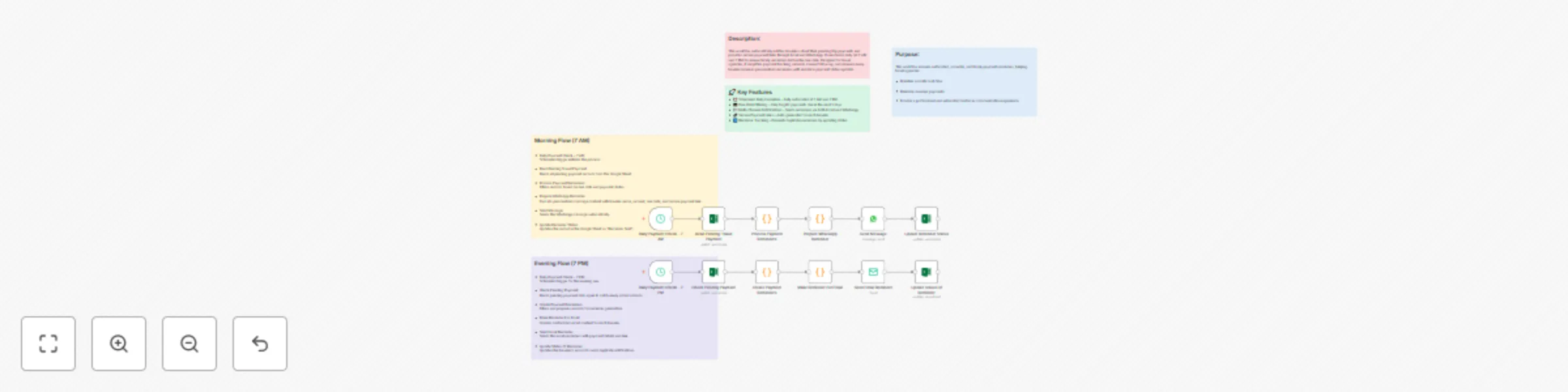
This workflow automatically notifies travelers about their pending trip payments and provides secure payment links through Email and WhatsApp. It runs twice daily (at 7 AM and 7 PM) to ensure timely reminders before the due date. Designed for travel agencies, it simplifies payment tracking, reduces manual follow-up, and ensures every traveler receives personalized reminders with real-time payment status updates.

🔧 Main Components

Daily Payment Check – 7 AM & 7 PM

Scheduled triggers that start the workflow daily at 7 AM and 7 PM.

Read Pending Travel Payment

Fetches traveler payment records from an Excel sheet (using getAll method).

Process Payment Reminders

Filters records to find pending payments due within the next 3 days.

Create Payment Reminders

Generates personalized payment reminders.

Make Reminder For Email

Prepares email-friendly messages with payment links.

Send Email Reminder

Sends the payment reminder email with a secure payment link to the traveler.

Prepare WhatsApp Reminder

Generates WhatsApp-friendly messages with payment and payment details.

Send WhatsApp Message

Sends the message to the traveler’s WhatsApp number using a message API.

Update Status Of Reminder

Updates the Excel file to mark reminders as sent to avoid duplicates.

🧩 Channels Used

📧 Email – with personalized payment link
💬 WhatsApp – formatted reminder message
🔐 Payment Integration
Secure payment links are auto-generated per traveler to enable direct and safe online payments.

✅ Essential Prerequisites

  • Excel sheet with payment records (travel_payment_data.xlsx)
  • SMTP credentials for sending email
  • WhatsApp API or provider integration (like Twilio or Gupshup)
  • Access to a payment gateway or service for link generation
  • File storage access to update reminder status in Excel

📁 Required Excel File Structure (travel_payment_data.xlsx)

Traveler ID Name Email Phone Payment Due Date Amount Reminder Sent
TR001 Arjun Patel [email protected] +919876543210 2025-10-20 ₹3000 No

🧾 Expected Input Format Example

{ "travelerId": "TR001", "name": "Arjun Patel", "email": "[email protected]", "phone": "+919876543210", "dueDate": "2025-10-20", "amount": "₹3000", "reminderSent": "No" }

🚀 Key Features

  • ⏰ Scheduled Daily Execution – Fully automated at 7 AM and 7 PM
  • 🧮 Due-Date Filtering – Only targets payments due in the next 3 days
  • 💬 Multi-Channel Notifications – Sends reminders via both Email and WhatsApp
  • 🔗 Secure Payment Links – Auto-generated for each traveler
  • 🔄 Reminder Tracking – Prevents duplicate reminders by updating status

⚙️ Quick Setup Guide

  • Import Workflow JSON into your n8n instance.
  • Configure schedule in the “Daily Payment Check” node (default: 7 AM & 7 PM).
  • Set Excel file path in the “Read Pending Travel Payment” node.
  • Update your payment processing logic in the “Process Payment Reminders” node.
  • Add email credentials in the “Send Email Reminder” node.
  • Integrate WhatsApp provider API in the “Send WhatsApp Message” node.
  • Define how you generate secure payment links.
  • Test with sample data and activate workflow.

1.2 Logical Blocks

This catalog entry is organized from the workflow JSON. The node-level section below shows the executable blocks available for review before importing the template.

2. Block-by-Block Analysis

Block 1 - Prepare WhatsApp Reminder

Type / Role
n8n-nodes-base.code - code
Config choices
Version 2

Block 2 - Update Reminder Status

Type / Role
n8n-nodes-base.microsoftExcel - microsoftExcel
Config choices
Version 2

Block 3 - Read Pending Travel Payment

Type / Role
n8n-nodes-base.microsoftExcel - microsoftExcel
Config choices
Version 2

Block 4 - Daily Payment Check - 7 AM

Type / Role
n8n-nodes-base.scheduleTrigger - scheduleTrigger
Config choices
Version 1.2

Block 5 - Process Payment Reminders

Type / Role
n8n-nodes-base.code - code
Config choices
Version 2

Block 6 - Send Email Reminder

Type / Role
n8n-nodes-base.emailSend - emailSend
Config choices
Version 2.1

Block 7 - Daily Payment Check - 7 PM

Type / Role
n8n-nodes-base.scheduleTrigger - scheduleTrigger
Config choices
Version 1.2

Block 8 - Check Pending Payment

Type / Role
n8n-nodes-base.microsoftExcel - microsoftExcel
Config choices
Version 2

Block 9 - Create Payment Reminders

Type / Role
n8n-nodes-base.code - code
Config choices
Version 2

Block 10 - Make Reminder For Email

Type / Role
n8n-nodes-base.code - code
Config choices
Version 2

Block 11 - Send Message

Type / Role
n8n-nodes-base.whatsApp - whatsApp
Config choices
Version 1

Block 12 - Update Status Of Reminder

Type / Role
n8n-nodes-base.microsoftExcel - microsoftExcel
Config choices
Version 2

Block 13 - Sticky Note

Type / Role
n8n-nodes-base.stickyNote - stickyNote
Config choices
Version 1

Block 14 - Sticky Note1

Type / Role
n8n-nodes-base.stickyNote - stickyNote
Config choices
Version 1

Block 15 - Sticky Note2

Type / Role
n8n-nodes-base.stickyNote - stickyNote
Config choices
Version 1

Block 16 - Sticky Note3

Type / Role
n8n-nodes-base.stickyNote - stickyNote
Config choices
Version 1

Block 17 - Sticky Note4

Type / Role
n8n-nodes-base.stickyNote - stickyNote
Config choices
Version 1

3. Summary Table

Workflow Automated tour payment reminders via WhatsApp & email with payment links
Complexity advanced
Nodes 17
Categories Lead Nurturing
Author Oneclick AI Squad
Published 17 Oct 2025

4. Reproducing the Workflow from Scratch

  1. 1. Download the workflow JSON

    Use the JSON export at /data/workflows/9844/9844.json as the source template for this automation.

  2. 2. Import the template into n8n

    Open n8n, import the downloaded JSON, and review each node before activating the workflow.

  3. 3. Configure credentials and variables

    Replace placeholder credentials, API keys, webhook URLs, account IDs, and environment-specific values with your own settings.

  4. 4. Test with sample data

    Run the workflow manually or in a staging workspace, inspect node output, and confirm downstream systems receive the expected data.

  5. 5. Activate and monitor

    Enable the workflow only after testing, then monitor executions, errors, and rate limits during the first production runs.

5. General Notes & Resources

Review imported nodes carefully before activation. This catalog entry is intended to help you inspect the workflow structure, understand required services, and find related templates faster.

Node names, credentials, schedules, webhook paths, and external service limits may need adjustment for your workspace.

Frequently asked questions

What does Automated tour payment reminders via WhatsApp & email with payment links do?

This workflow automatically notifies travelers about their pending trip payments and provides secure payment links through Email and WhatsApp. It runs twice daily (at 7 AM and 7 PM) to ensure timel...

What do I need before importing this workflow?

Review the workflow JSON, configure any required credentials in n8n, and test the automation in a safe workspace before using it in production.

Can I customize this workflow?

Yes. Use the block-by-block analysis and the downloadable JSON to inspect each node, then adjust credentials, prompts, schedules, filters, or destinations for your Lead Nurturing use case.