Block 1 - Daily SEO Intelligence Scheduler
- Type / Role
- n8n-nodes-base.scheduleTrigger - scheduleTrigger
- Config choices
- Version 1


 Early Deal
This workflow is provided as-is. Please review and test before using in production.
This workflow contains community nodes that are only compatible with the self hosted version of n8n. Keep your SEO performance on track with this automated SEO Watchlist Monitor! This workflow comb...
n8n-nodes-base.scheduletrigger, n8n-nodes-base.set, n8n-nodes-base.if, @n8n/n8n-nodes-langchain.agent, @n8n/n8n-nodes-langchain.outputparserstructured, n8n-nodes-base.function, @decodo/n8n-nodes-decodo.decodotool, n8n-nodes-base.googlesheets
This workflow is cataloged by N8N Workflows and links back to its original n8n.io source page by Yaron Been.
Original n8n.io sourceThis workflow contains community nodes that are only compatible with the self-hosted version of n8n.
Keep your SEO performance on track with this automated SEO Watchlist Monitor!
This workflow combines AI-powered strategy analysis with real-time search ranking checks to track keyword positions, identify content gaps, and alert you to critical ranking drops. Perfect for marketing teams ensuring search visibility and competitive intelligence across platforms. 🚀🔍
What This Template Does
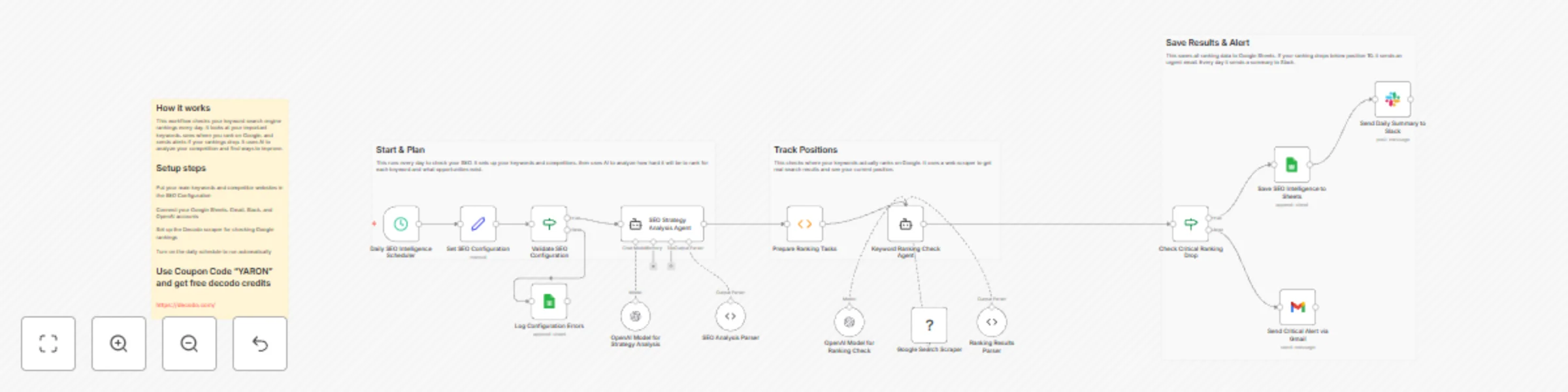
1️⃣ Triggers daily SEO intelligence checks to monitor keyword performance.
2️⃣ Configures target keywords, competitor domains, and geographic focus.
3️⃣ Validates SEO configuration to ensure proper setup.
4️⃣ Uses AI to analyze keyword competitiveness and strategic opportunities.
5️⃣ Checks real-time search rankings using Google Search scraper.
6️⃣ Detects critical ranking drops below position 10.
7️⃣ Saves SEO intelligence to Google Sheets for tracking.
8️⃣ Sends email alerts for urgent ranking issues.
9️⃣ Provides daily Slack summaries of SEO performance.
Key Benefits
✅ Monitors keyword rankings and competitor movements daily
✅ Identifies content gaps and strategic opportunities with AI analysis
✅ Alerts instantly to critical ranking drops for quick action
✅ Centralizes SEO intelligence in Google Sheets for team visibility
✅ Combines AI insights with real-time search data for comprehensive monitoring
Features
Requirements
Target Audience
SEO and digital marketing teams 🎯
Content strategy and growth teams 📈
Competitive intelligence professionals 🔍
Marketing operations teams 🚀
Agency account managers managing multiple clients 💼
Step-by-Step Setup Instructions
1️⃣ Connect OpenAI credentials for AI analysis capabilities
2️⃣ Set up Decodo API credentials for search scraping functionality
3️⃣ Configure Google Sheets with required headers (Keyword, Rank, description, etc.)
4️⃣ Add Gmail and Slack credentials for alerting and notifications
5️⃣ Set your target keywords, competitors, and geographic focus in the configuration node
6️⃣ Configure the cron schedule (hourly) for daily monitoring frequency
7️⃣ Run once manually to verify all integrations and data flow
8️⃣ Activate for ongoing SEO performance tracking and alerting ✅
Pro Tip: Use coupon code "YARON" to get 23K requests for testing (in Decodo)
This catalog entry is organized from the workflow JSON. The node-level section below shows the executable blocks available for review before importing the template.
| Workflow | Automated SEO ranking monitor with AI, Decodo scraper & multi-channel alerts |
|---|---|
| Complexity | advanced |
| Nodes | 20 |
| Categories | Market Research, AI Summarization |
| Author | Yaron Been |
| Published | 01 Nov 2025 |
Use the JSON export at /data/workflows/10412/10412.json as the source template for this automation.
Open n8n, import the downloaded JSON, and review each node before activating the workflow.
Replace placeholder credentials, API keys, webhook URLs, account IDs, and environment-specific values with your own settings.
Run the workflow manually or in a staging workspace, inspect node output, and confirm downstream systems receive the expected data.
Enable the workflow only after testing, then monitor executions, errors, and rate limits during the first production runs.
Review imported nodes carefully before activation. This catalog entry is intended to help you inspect the workflow structure, understand required services, and find related templates faster.
Node names, credentials, schedules, webhook paths, and external service limits may need adjustment for your workspace.
This workflow contains community nodes that are only compatible with the self hosted version of n8n. Keep your SEO performance on track with this automated SEO Watchlist Monitor! This workflow comb...
Review the workflow JSON, configure any required credentials in n8n, and test the automation in a safe workspace before using it in production.
Yes. Use the block-by-block analysis and the downloadable JSON to inspect each node, then adjust credentials, prompts, schedules, filters, or destinations for your Market Research, AI Summarization use case.