Block 1 - Schedule Trigger
- Type / Role
- n8n-nodes-base.scheduleTrigger - scheduleTrigger
- Config choices
- Version 1.2


 Early Deal
This workflow is provided as-is. Please review and test before using in production.
Auto Routing Nicereply Feedback to Microsoft Teams by Team and Sentiment Automatically collect client feedback from Nicereply, analyze sentiment, and send it to the right Microsoft Teams channels —...
n8n-nodes-base.scheduletrigger, n8n-nodes-base.filter, n8n-nodes-base.microsoftteams, n8n-nodes-base.splitout, n8n-nodes-base.httprequest, n8n-nodes-base.set, n8n-nodes-base.stickynote, n8n-nodes-base.if
This workflow is cataloged by N8N Workflows and links back to its original n8n.io source page by Easy8.ai.
Original n8n.io sourceAutomatically collect client feedback from Nicereply, analyze sentiment, and send it to the right Microsoft Teams channels — smartly split by team, tone, and comment presence.
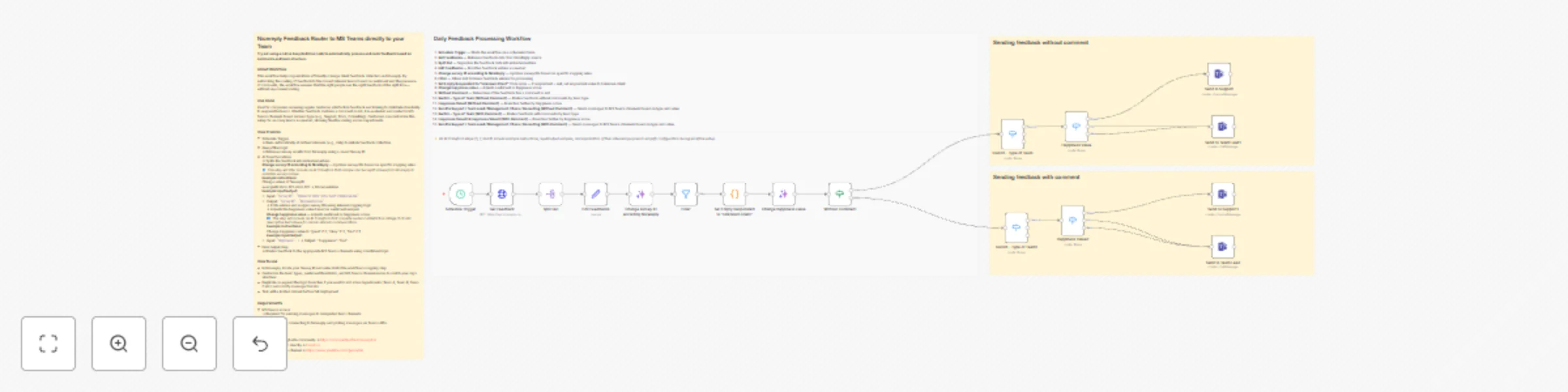
This workflow pulls customer satisfaction feedback from Nicereply, filters out irrelevant or test entries, and evaluates each item based on the team it belongs to and the sentiment of the response (Great, OK, Bad). It automatically routes the feedback to Microsoft Teams — either as a summary in a channel or a direct message — depending on the team's role and whether a comment is included.
Perfect for support, delivery, consulting, and documentation teams that want to stay in the loop with customer sentiment. It ensures that positive feedback reaches the teams who earned it, and that negative feedback is escalated quickly to leads or management.
Schedule Trigger
Starts the workflow on a set schedule (e.g., daily at 7:00 AM)
Get Feedback
Pulls customer feedback from Nicereply using survey ID
Split Out
Processes each feedback entry separately
Edit Feedbacks
Renames or adjusts fields for easier filtering and readability
Change Survey ID
Maps internal survey identifiers for accurate team routing
(Survey ID can be found in Nicereply: Settings > Surveys > [Survey] > ID)
Filter
Excludes old responses
Code Node
Tag unknown clients
Change Happiness Value
Converts score into “Great”, “OK”, or “Bad” for routing logic
Without Comment
Checks if feedback includes a text comment or not
Send Feedback Without Comment
Routes simple feedback (no comment) to MS Teams based on team + score
Send Feedback With Comment
Routes full feedback with comment to MS Teams for closer review
Each team receives only what’s most relevant:
These rules can be freely customized. For example, you may want Support to receive all responses, or Management only when multiple Bad entries are received. The structure is modular and easily adjustable.
Import the workflow
Load the .json file into your Easy Redmine automation workspace
Set up connections
Change Happiness Value) This catalog entry is organized from the workflow JSON. The node-level section below shows the executable blocks available for review before importing the template.
| Workflow | Automated Nicereply feedback routing to MS Teams by team and sentiment |
|---|---|
| Complexity | advanced |
| Nodes | 21 |
| Categories | Ticket Management, AI Summarization |
| Author | Easy8.ai |
| Published | 24 Oct 2025 |
Use the JSON export at /data/workflows/10113/10113.json as the source template for this automation.
Open n8n, import the downloaded JSON, and review each node before activating the workflow.
Replace placeholder credentials, API keys, webhook URLs, account IDs, and environment-specific values with your own settings.
Run the workflow manually or in a staging workspace, inspect node output, and confirm downstream systems receive the expected data.
Enable the workflow only after testing, then monitor executions, errors, and rate limits during the first production runs.
Review imported nodes carefully before activation. This catalog entry is intended to help you inspect the workflow structure, understand required services, and find related templates faster.
Node names, credentials, schedules, webhook paths, and external service limits may need adjustment for your workspace.
Auto Routing Nicereply Feedback to Microsoft Teams by Team and Sentiment Automatically collect client feedback from Nicereply, analyze sentiment, and send it to the right Microsoft Teams channels —...
Review the workflow JSON, configure any required credentials in n8n, and test the automation in a safe workspace before using it in production.
Yes. Use the block-by-block analysis and the downloadable JSON to inspect each node, then adjust credentials, prompts, schedules, filters, or destinations for your Ticket Management, AI Summarization use case.