Automated NASA patent lead generation & scoring with OpenAI, Google, and Notion

Workflow preview

Workflow preview
100%
Automated NASA patent lead generation & scoring with OpenAI, Google, and Notion preview
Open on n8n.io

Important notice

This workflow is provided as-is. Please review and test before using in production.

1. Workflow Overview

Who is this for This workflow is designed for Innovation Managers , Tech Transfer Offices , and Business Development Representatives looking to find commercial partners for new technologies. What i...

Best for

  • Lead Generation automation workflows
  • AI Summarization automation workflows
  • intermediate n8n builders looking for reusable templates

Tools used

n8n-nodes-base.manualtrigger, n8n-nodes-base.set, n8n-nodes-base.httprequest, n8n-nodes-base.splitinbatches, @apify/n8n-nodes-preview-apify.apify, n8n-nodes-base.code, @n8n/n8n-nodes-langchain.openai, n8n-nodes-base.if

Source and attribution

This workflow is cataloged by N8N Workflows and links back to its original n8n.io source page by Takumi Oku.

Original n8n.io source

1.1 Workflow description

Title
Automated NASA patent lead generation & scoring with OpenAI, Google, and Notion
Workflow name
Automated NASA patent lead generation & scoring with OpenAI, Google, and Notion

Who is this for

This workflow is designed for Innovation Managers, Tech Transfer Offices, and Business Development Representatives looking to find commercial partners for new technologies.

What it does

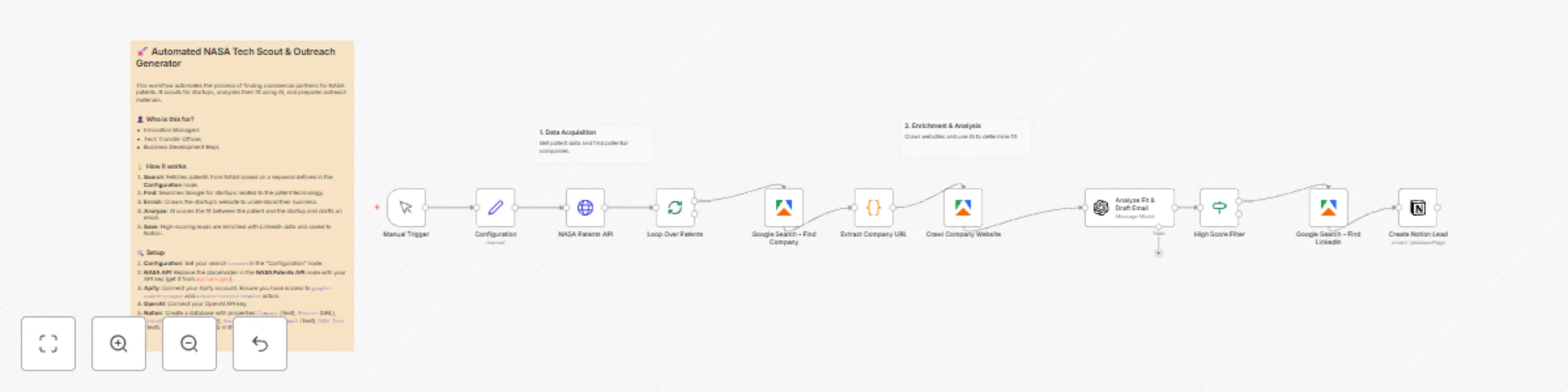
This template automates the process of scouting startups that might be a good fit for NASA patents.

  1. Search: It fetches patents from the NASA Tech Transfer API based on a keyword you define.
  2. Find: It searches Google to identify startups operating in related fields.
  3. Enrich: It crawls the identified startup's website to extract context about their business.
  4. Analyze: Using OpenAI, it scores the "fit" between the patent and the startup and drafts a personalized outreach email.
  5. Save: High-scoring leads are enriched with LinkedIn company pages and saved directly to a Notion database.

How to set up

  1. Configuration: In the Configuration node, set the keyword variable to the technology topic you want to search for (e.g., "robotics").
  2. NASA API: Get a free API key from api.nasa.gov and enter it in the NASA Patents API node parameters.
  3. Apify: Connect your Apify account credential. You will need credits to run the google-search-scraper and website-content-crawler actors.
  4. OpenAI: Connect your OpenAI credential.
  5. Notion: Create a database with the following properties and connect it in the Create Notion Lead node:
    • Company (Text)
    • Website (URL)
    • LinkedIn (URL)
    • Email (Email)
    • Score (Number)
    • Draft Email (Text)
    • NASA Tech (Text)

Requirements

  • NASA API Key: Free to obtain.
  • Apify Account: Requires google-search-scraper and website-content-crawler actors.
  • OpenAI API Key: For analysis and text generation.
  • Notion Account: To store the leads.

1.2 Logical Blocks

This catalog entry is organized from the workflow JSON. The node-level section below shows the executable blocks available for review before importing the template.

2. Block-by-Block Analysis

Block 1 - Manual Trigger

Type / Role
n8n-nodes-base.manualTrigger - manualTrigger
Config choices
Version 1

Block 2 - Configuration

Type / Role
n8n-nodes-base.set - set
Config choices
Version 3.4

Block 3 - NASA Patents API

Type / Role
n8n-nodes-base.httpRequest - httpRequest
Config choices
Version 4.3

Block 4 - Loop Over Patents

Type / Role
n8n-nodes-base.splitInBatches - splitInBatches
Config choices
Version 3

Block 5 - Google Search - Find Company

Type / Role
@apify/n8n-nodes-preview-apify.apify - apify
Config choices
Version 1

Block 6 - Extract Company URL

Type / Role
n8n-nodes-base.code - code
Config choices
Version 2

Block 7 - Crawl Company Website

Type / Role
@apify/n8n-nodes-preview-apify.apify - apify
Config choices
Version 1

Block 8 - Analyze Fit & Draft Email

Type / Role
@n8n/n8n-nodes-langchain.openAi - openAi
Config choices
Version 2

Block 9 - High Score Filter

Type / Role
n8n-nodes-base.if - if
Config choices
Version 2.2

Block 10 - Google Search - Find LinkedIn

Type / Role
@apify/n8n-nodes-preview-apify.apify - apify
Config choices
Version 1

Block 11 - Create Notion Lead

Type / Role
n8n-nodes-base.notion - notion
Config choices
Version 2.2

Block 12 - Template Description

Type / Role
n8n-nodes-base.stickyNote - stickyNote
Config choices
Version 1

Block 13 - Step 1

Type / Role
n8n-nodes-base.stickyNote - stickyNote
Config choices
Version 1

Block 14 - Step 2

Type / Role
n8n-nodes-base.stickyNote - stickyNote
Config choices
Version 1

3. Summary Table

Workflow Automated NASA patent lead generation & scoring with OpenAI, Google, and Notion
Complexity intermediate
Nodes 14
Categories Lead Generation, AI Summarization
Author Takumi Oku
Published 27 Nov 2025

4. Reproducing the Workflow from Scratch

  1. 1. Download the workflow JSON

    Use the JSON export at /data/workflows/11309/11309.json as the source template for this automation.

  2. 2. Import the template into n8n

    Open n8n, import the downloaded JSON, and review each node before activating the workflow.

  3. 3. Configure credentials and variables

    Replace placeholder credentials, API keys, webhook URLs, account IDs, and environment-specific values with your own settings.

  4. 4. Test with sample data

    Run the workflow manually or in a staging workspace, inspect node output, and confirm downstream systems receive the expected data.

  5. 5. Activate and monitor

    Enable the workflow only after testing, then monitor executions, errors, and rate limits during the first production runs.

5. General Notes & Resources

Review imported nodes carefully before activation. This catalog entry is intended to help you inspect the workflow structure, understand required services, and find related templates faster.

Node names, credentials, schedules, webhook paths, and external service limits may need adjustment for your workspace.

Frequently asked questions

What does Automated NASA patent lead generation & scoring with OpenAI, Google, and Notion do?

Who is this for This workflow is designed for Innovation Managers , Tech Transfer Offices , and Business Development Representatives looking to find commercial partners for new technologies. What i...

What do I need before importing this workflow?

Review the workflow JSON, configure any required credentials in n8n, and test the automation in a safe workspace before using it in production.

Can I customize this workflow?

Yes. Use the block-by-block analysis and the downloadable JSON to inspect each node, then adjust credentials, prompts, schedules, filters, or destinations for your Lead Generation, AI Summarization use case.