Automated LinkedIn profile summaries with GPT-4o and Google Sheets

Workflow preview

Workflow preview
100%
Automated LinkedIn profile summaries with GPT-4o and Google Sheets preview
Open on n8n.io

Important notice

This workflow is provided as-is. Please review and test before using in production.

1. Workflow Overview

Quickly transform any LinkedIn profile URL into a concise, AI‑generated professional summary — perfect for recruiters, sales teams, and hiring managers who need instant insights into prospects or c...

Best for

  • Lead Generation automation workflows
  • AI Summarization automation workflows
  • intermediate n8n builders looking for reusable templates

Tools used

@n8n/n8n-nodes-langchain.lmchatopenai, n8n-nodes-base.stickynote, n8n-nodes-base.splitout, n8n-nodes-base.code, @n8n/n8n-nodes-langchain.chainsummarization, n8n-nodes-base.googlesheetstrigger, n8n-nodes-base.httprequest, n8n-nodes-base.googlesheets

Source and attribution

This workflow is cataloged by N8N Workflows and links back to its original n8n.io source page by Hostinger.

Original n8n.io source

1.1 Workflow description

Title
Automated LinkedIn profile summaries with GPT-4o and Google Sheets
Workflow name
Automated LinkedIn profile summaries with GPT-4o and Google Sheets

Quickly transform any LinkedIn profile URL into a concise, AI‑generated professional summary — perfect for recruiters, sales teams, and hiring managers who need instant insights into prospects or candidates without manual research.

How it works

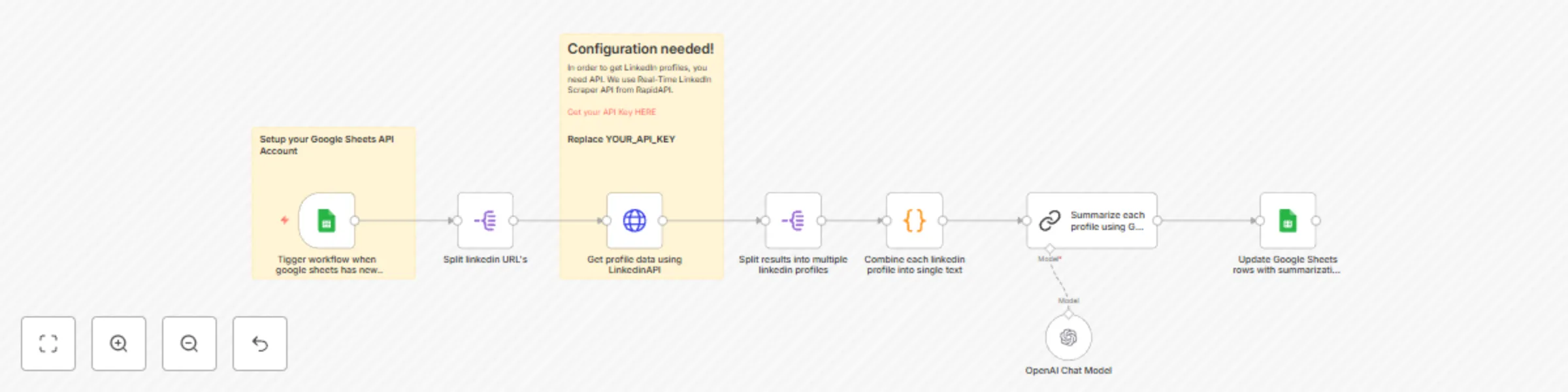
  • The workflow polls a Google Sheet for new or updated rows containing LinkedIn profile URLs.
  • For each URL, the Real‑Time LinkedIn Scraper API (via RapidAPI) pulls experience and education sections.
  • Extracted profile data is sent to OpenAI’s GPT model, which generates a clean, structured summary highlighting key strengths, career trajectory, and differentiators.
  • The generated summary is written back into a new column in the same row of your Google Sheet for easy review and sharing.

Set up steps

  • Connect your Google account and select the spreadsheet + worksheet containing your list of LinkedIn URLs.
  • Sign up for the Real‑Time LinkedIn Scraper API on RapidAPI, copy your API key, and add it to the workflow’s HTTP Request node.
  • Insert your OpenAI API key credentials.
  • Ensure your Google Sheet has one column for “linkedin_url” and create two empty columns named “full_name” and "summary" (or customize them based on your needs).
  • Run a single row through the workflow to verify scraping accuracy and summary formatting, then turn on the workflow for continuous automation.

With this template, eliminate hours of manual profile review — instantly gain actionable insights and focus on what really matters: building relationships and closing deals.

1.2 Logical Blocks

This catalog entry is organized from the workflow JSON. The node-level section below shows the executable blocks available for review before importing the template.

2. Block-by-Block Analysis

Block 1 - OpenAI Chat Model

Type / Role
@n8n/n8n-nodes-langchain.lmChatOpenAi - lmChatOpenAi
Config choices
Version 1.2

Block 2 - Sticky Note

Type / Role
n8n-nodes-base.stickyNote - stickyNote
Config choices
Version 1

Block 3 - Sticky Note1

Type / Role
n8n-nodes-base.stickyNote - stickyNote
Config choices
Version 1

Block 4 - Split linkedin URL's

Type / Role
n8n-nodes-base.splitOut - splitOut
Config choices
Version 1

Block 5 - Combine each linkedin profile into single text

Type / Role
n8n-nodes-base.code - code
Config choices
Version 2

Block 6 - Summarize each profile using GPT model

Type / Role
@n8n/n8n-nodes-langchain.chainSummarization - chainSummarization
Config choices
Version 2

Block 7 - Tigger workflow when google sheets has new row added

Type / Role
n8n-nodes-base.googleSheetsTrigger - googleSheetsTrigger
Config choices
Version 1

Block 8 - Get profile data using LinkedinAPI

Type / Role
n8n-nodes-base.httpRequest - httpRequest
Config choices
Version 4.2

Block 9 - Split results into multiple linkedin profiles

Type / Role
n8n-nodes-base.splitOut - splitOut
Config choices
Version 1

Block 10 - Update Google Sheets rows with summarization for each profile

Type / Role
n8n-nodes-base.googleSheets - googleSheets
Config choices
Version 4.5

3. Summary Table

Workflow Automated LinkedIn profile summaries with GPT-4o and Google Sheets
Complexity intermediate
Nodes 10
Categories Lead Generation, AI Summarization
Author Hostinger
Published 20 Mar 2025

4. Reproducing the Workflow from Scratch

  1. 1. Download the workflow JSON

    Use the JSON export at /data/workflows/3249/3249.json as the source template for this automation.

  2. 2. Import the template into n8n

    Open n8n, import the downloaded JSON, and review each node before activating the workflow.

  3. 3. Configure credentials and variables

    Replace placeholder credentials, API keys, webhook URLs, account IDs, and environment-specific values with your own settings.

  4. 4. Test with sample data

    Run the workflow manually or in a staging workspace, inspect node output, and confirm downstream systems receive the expected data.

  5. 5. Activate and monitor

    Enable the workflow only after testing, then monitor executions, errors, and rate limits during the first production runs.

5. General Notes & Resources

Review imported nodes carefully before activation. This catalog entry is intended to help you inspect the workflow structure, understand required services, and find related templates faster.

Node names, credentials, schedules, webhook paths, and external service limits may need adjustment for your workspace.

Frequently asked questions

What does Automated LinkedIn profile summaries with GPT-4o and Google Sheets do?

Quickly transform any LinkedIn profile URL into a concise, AI‑generated professional summary — perfect for recruiters, sales teams, and hiring managers who need instant insights into prospects or c...

What do I need before importing this workflow?

Review the workflow JSON, configure any required credentials in n8n, and test the automation in a safe workspace before using it in production.

Can I customize this workflow?

Yes. Use the block-by-block analysis and the downloadable JSON to inspect each node, then adjust credentials, prompts, schedules, filters, or destinations for your Lead Generation, AI Summarization use case.