Automated lead generation from digital footprints with Decodo & Airtable

Workflow preview

Workflow preview
100%
Automated lead generation from digital footprints with Decodo & Airtable preview
Open on n8n.io

Important notice

This workflow is provided as-is. Please review and test before using in production.

1. Workflow Overview

Stop manually searching Google for sales leads. Start listening to the internet. This advanced workflow automatically identifies, qualifies, and enriches high value leads by searching for their dig...

Best for

  • Lead Generation automation workflows
  • advanced n8n builders looking for reusable templates

Tools used

@decodo/n8n-nodes-decodo.decodo, n8n-nodes-base.if, n8n-nodes-base.airtable, n8n-nodes-base.splitinbatches, n8n-nodes-base.code, n8n-nodes-base.manualtrigger, n8n-nodes-base.set, n8n-nodes-base.stickynote

Source and attribution

This workflow is cataloged by N8N Workflows and links back to its original n8n.io source page by Atta.

Original n8n.io source

1.1 Workflow description

Title
Automated lead generation from digital footprints with Decodo & Airtable
Workflow name
Automated lead generation from digital footprints with Decodo & Airtable

Stop manually searching Google for sales leads. Start listening to the internet.

This advanced workflow automatically identifies, qualifies, and enriches high-value leads by searching for their digital footprints (i.e., specific technology use or public directories). It uses a robust Find/Create/Conditional Update database pattern to prevent duplicates and ensure you only spend credits on enriching incomplete records.

The workflow provides a fully persistent lead record, updating the same Airtable row as new data is found across multiple search steps.

✨ Key Features

  • Persistent Data Integrity: Uses a dedicated Loop Over Items structure to run the Find/Create/Update logic sequentially for every lead, guaranteeing no data is lost or duplicated.
  • Conditional Enrichment: A smart gate checks the Airtable record: if the high-value email field is empty, the workflow proceeds to the expensive scraping steps. If it is already complete, it skips the scrape.
  • Targeted Scraping: Executes precise Google Dorks (via Decodo) to find initial leads and then targets the specific Contact Us page for deep email extraction.
  • Database-as-a-State-Machine: Airtable acts as the single source of truth, logging the initial lead status and updating the same row across several enrichment phases.
  • Final Output: Delivers the fully enriched lead data (Domain, Primary Email, Contact Page URL) to a final notification channel.

⚙️ How it Works (The Find/Create/Update Loop)

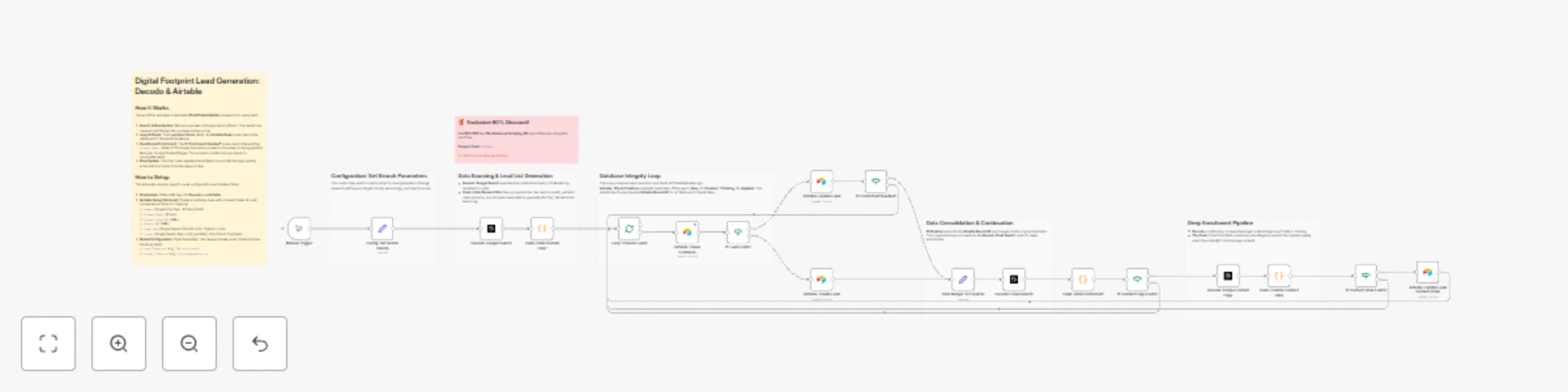
  1. Search & Filter: The workflow is manually triggered and uses the Config variables to execute a wide-scope Google Search via Decodo. The results are filtered into a clean array of unique domains.
  2. Loop & Check: The Loop Over Items node starts. Inside, the Airtable Read node checks the database for the current lead's domain.
  3. Create/Update:
    • If the lead is NEW, the workflow creates a record (Airtable: Create Lead).
    • If the lead EXISTS, the record is updated (Airtable: Update Lead).
  4. Data Merger: The Data Merger: ID Finalizer node consolidates the workflow, ensuring the unique Airtable Record ID is passed to the next step, regardless of whether the lead was created or updated.
  5. Conditional Enrichment: The If: Enrichment Needed? node checks the existing Primary Email status. If it's empty, the item proceeds to the deep scraping pipeline (Decodo: Email SearchDecodo: Scrape Contact Page).
  6. Final Update: The final node updates the Airtable record with the high-quality email address found from the deep scrape.

📥 Decodo Node Installation

The Decodo node is used three times in this workflow for precision scraping and searching.

  1. Find the Node: Click the + button in your n8n canvas.
  2. Search: Search for the Decodo node and select it.
  3. Credentials: When configuring the first Decodo node, use your API key (obtained with the 80% discount coupon).

🎁 Exclusive Deal for n8n Users

To run this workflow, you require a robust scraping provider. We have secured a massive discount for Decodo users:


🛠️ Setup Instructions

This template requires specific node configuration and Airtable fields.

  1. Credentials: Obtain API keys for Decodo (using the coupon above) and Airtable.
  2. Airtable Setup (Schema): Create an Airtable base with a 'Leads' table. It must include these fields for mapping:
    • Domain (Single Line Text - Primary Field)
    • Primary Email (Email)
    • Contact Page URL (URL)
    • Source URL (URL)
    • Lead Type (Single Select: Paid Ad Lead, Organic Lead)
    • Status (Single Select: New Lead, Updated, Enrichment Complete)
  3. Global Configuration: Open the Config: Set Search Params node. Customize the following fields:
    • tech_footprint: e.g., "We use Klaviyo"
    • target_industry: e.g., site:promarketer.ca

➕ How to Adapt the Template

  • Change Database: Replace the Airtable nodes with Postgres, Notion, or Google Sheets for logging, adapting the field mappings.
  • Final Notification: Add a Slack or Gmail node to alert the sales team immediately upon successful enrichment.
  • Multi-Step Enrichment: Integrate a service like Hunter.io or Clearbit to find key employee names and titles before the final database update.
  • Adjust Scoring: Add an If Node after the deep scrape to set a Lead Score based on whether a direct email (sales@) was found versus a general contact page link.
  • Add AI Lead Scoring: Integrate a Gemini or OpenAI node after the deep scraping step to assign an "AI Score" (1-100) based on lead quality (e.g., domain authority, quality of the extracted email), before the final update.

1.2 Logical Blocks

This catalog entry is organized from the workflow JSON. The node-level section below shows the executable blocks available for review before importing the template.

2. Block-by-Block Analysis

Block 1 - Decodo: Google Search

Type / Role
@decodo/n8n-nodes-decodo.decodo - decodo
Config choices
Version 1

Block 2 - Decodo: Scrape Contact Page

Type / Role
@decodo/n8n-nodes-decodo.decodo - decodo
Config choices
Version 1

Block 3 - If: Lead Exists?

Type / Role
n8n-nodes-base.if - if
Config choices
Version 2.2

Block 4 - Airtable: Create Lead

Type / Role
n8n-nodes-base.airtable - airtable
Config choices
Version 2.1

Block 5 - Airtable: Update Lead

Type / Role
n8n-nodes-base.airtable - airtable
Config choices
Version 2.1

Block 6 - Loop: Process Leads

Type / Role
n8n-nodes-base.splitInBatches - splitInBatches
Config choices
Version 3

Block 7 - Decodo: Email Search

Type / Role
@decodo/n8n-nodes-decodo.decodo - decodo
Config choices
Version 1

Block 8 - Code: Initial Enrichment

Type / Role
n8n-nodes-base.code - code
Config choices
Version 2

Block 9 - If: Enrichment Needed?

Type / Role
n8n-nodes-base.if - if
Config choices
Version 2.2

Block 10 - If: Contact Page Exists?

Type / Role
n8n-nodes-base.if - if
Config choices
Version 2.2

Block 11 - If: Contact Email Exists?

Type / Role
n8n-nodes-base.if - if
Config choices
Version 2.2

Block 12 - Airtable: Update Lead Contact Email

Type / Role
n8n-nodes-base.airtable - airtable
Config choices
Version 2.1

Block 13 - Manual Trigger

Type / Role
n8n-nodes-base.manualTrigger - manualTrigger
Config choices
Version 1

Block 14 - Config: Set Search Params

Type / Role
n8n-nodes-base.set - set
Config choices
Version 3.4

Block 15 - Code: Initial Domain Filter

Type / Role
n8n-nodes-base.code - code
Config choices
Version 2

Block 16 - Airtable: Check Existence

Type / Role
n8n-nodes-base.airtable - airtable
Config choices
Version 2.1

Block 17 - Code: Finalize Contact Data

Type / Role
n8n-nodes-base.code - code
Config choices
Version 2

Block 18 - Data Merger: ID Finalizer

Type / Role
n8n-nodes-base.set - set
Config choices
Version 3.4

Block 19 - Sticky Note

Type / Role
n8n-nodes-base.stickyNote - stickyNote
Config choices
Version 1

Block 20 - Sticky Note1

Type / Role
n8n-nodes-base.stickyNote - stickyNote
Config choices
Version 1

Block 21 - Sticky Note2

Type / Role
n8n-nodes-base.stickyNote - stickyNote
Config choices
Version 1

Block 22 - Sticky Note3

Type / Role
n8n-nodes-base.stickyNote - stickyNote
Config choices
Version 1

Block 23 - Sticky Note4

Type / Role
n8n-nodes-base.stickyNote - stickyNote
Config choices
Version 1

Block 24 - Sticky Note5

Type / Role
n8n-nodes-base.stickyNote - stickyNote
Config choices
Version 1

Showing the first 24 of 25 workflow blocks. Download the JSON for the full node graph.

3. Summary Table

Workflow Automated lead generation from digital footprints with Decodo & Airtable
Complexity advanced
Nodes 25
Categories Lead Generation
Author Atta
Published 19 Nov 2025

4. Reproducing the Workflow from Scratch

  1. 1. Download the workflow JSON

    Use the JSON export at /data/workflows/11023/11023.json as the source template for this automation.

  2. 2. Import the template into n8n

    Open n8n, import the downloaded JSON, and review each node before activating the workflow.

  3. 3. Configure credentials and variables

    Replace placeholder credentials, API keys, webhook URLs, account IDs, and environment-specific values with your own settings.

  4. 4. Test with sample data

    Run the workflow manually or in a staging workspace, inspect node output, and confirm downstream systems receive the expected data.

  5. 5. Activate and monitor

    Enable the workflow only after testing, then monitor executions, errors, and rate limits during the first production runs.

5. General Notes & Resources

Review imported nodes carefully before activation. This catalog entry is intended to help you inspect the workflow structure, understand required services, and find related templates faster.

Node names, credentials, schedules, webhook paths, and external service limits may need adjustment for your workspace.

Frequently asked questions

What does Automated lead generation from digital footprints with Decodo & Airtable do?

Stop manually searching Google for sales leads. Start listening to the internet. This advanced workflow automatically identifies, qualifies, and enriches high value leads by searching for their dig...

What do I need before importing this workflow?

Review the workflow JSON, configure any required credentials in n8n, and test the automation in a safe workspace before using it in production.

Can I customize this workflow?

Yes. Use the block-by-block analysis and the downloadable JSON to inspect each node, then adjust credentials, prompts, schedules, filters, or destinations for your Lead Generation use case.