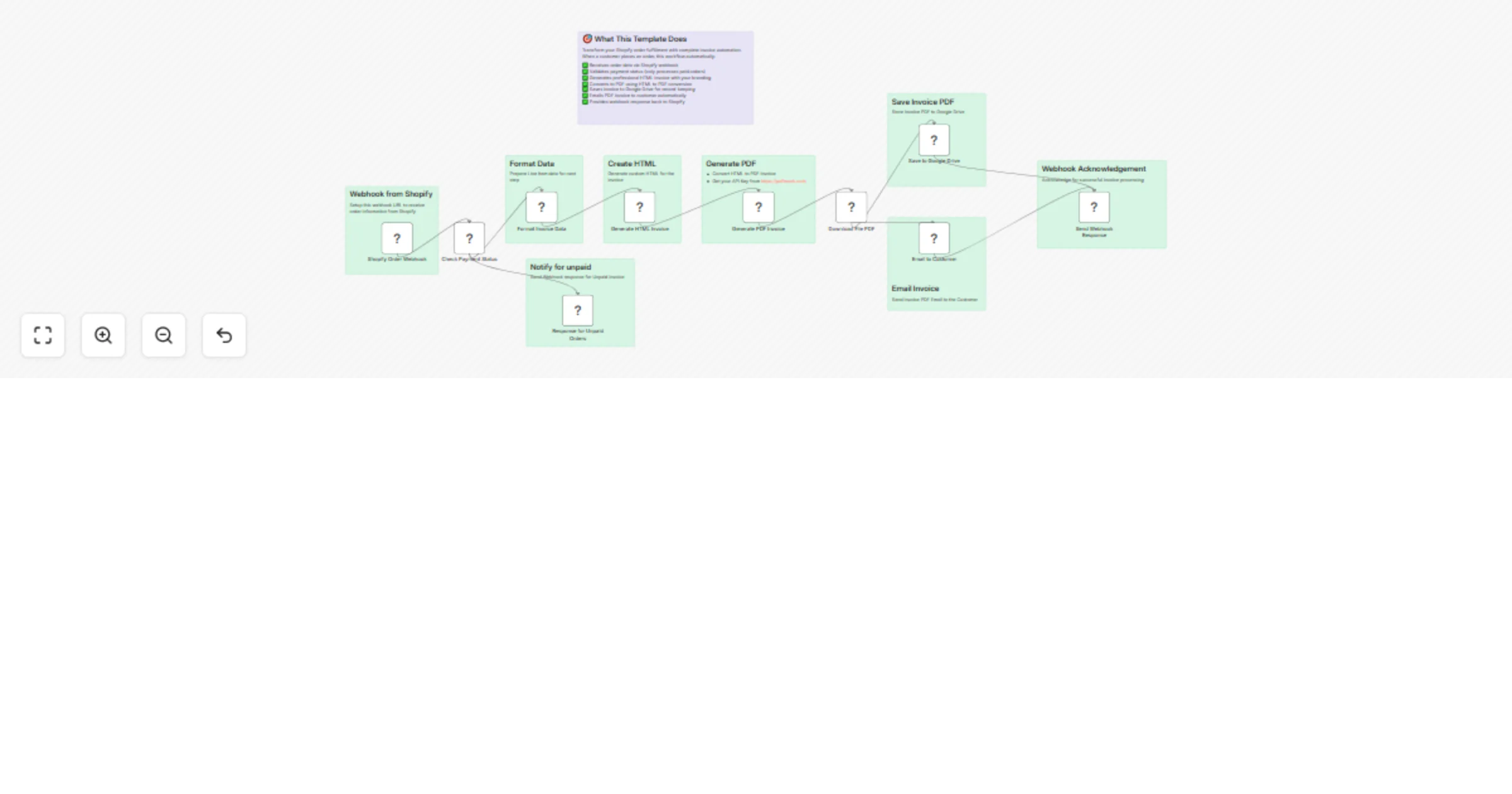
Automated invoice generator - Shopify to PDF with Google Drive storage and email

Workflow preview

Workflow preview
100%
Automated invoice generator - Shopify to PDF with Google Drive storage and email preview
Open on n8n.io

Important notice

This workflow is provided as-is. Please review and test before using in production.

1. Workflow Overview

Automatically generate professional PDF invoices when new orders are placed in Shopify. This template creates beautifully formatted invoices from order data, converts them to PDF, saves to Google D...

Best for

  • Content Creation automation workflows
  • Invoice Processing automation workflows
  • advanced n8n builders looking for reusable templates

Tools used

n8n-nodes-base.webhook, n8n-nodes-base.if, n8n-nodes-base.code, n8n-nodes-base.googledrive, n8n-nodes-base.respondtowebhook, n8n-nodes-base.gmail, n8n-nodes-htmlcsstopdf.htmlcsstopdf, n8n-nodes-base.httprequest

Source and attribution

This workflow is cataloged by N8N Workflows and links back to its original n8n.io source page by Jitesh Dugar.

Original n8n.io source

1.1 Workflow description

Title
Automated invoice generator - Shopify to PDF with Google Drive storage and email
Workflow name
Automated invoice generator - Shopify to PDF with Google Drive storage and email

Overview

Automatically generate professional PDF invoices when new orders are placed in Shopify. This template creates beautifully formatted invoices from order data, converts them to PDF, saves to Google Drive, and emails customers - all in one seamless workflow.

🎯 What This Template Does

Transform your Shopify order fulfillment with complete invoice automation. When a customer places an order, this workflow automatically:

  • βœ… Receives order data via Shopify webhook
  • βœ… Validates payment status (only processes paid orders)
  • βœ… Generates professional HTML invoice with your branding
  • βœ… Converts to PDF using HTML to PDF conversion
  • βœ… Saves invoice to Google Drive for record-keeping
  • βœ… Emails PDF invoice to customer automatically
  • βœ… Provides webhook response back to Shopify

πŸš€ Key Benefits

Save Hours of Manual Work

  • Eliminate manual invoice creation and sending
  • Process unlimited orders 24/7 without intervention
  • Professional invoices enhance your brand image

Complete Automation

  • No missed invoices - every paid order gets processed
  • Automatic file organization in Google Drive
  • Immediate customer notification improves satisfaction

Professional Results

  • Clean, branded invoice design that looks enterprise-ready
  • Proper calculations for taxes, shipping, and totals
  • PDF format suitable for accounting and customer records

πŸ›  What You'll Need

Required Integrations:

  • Shopify Store - For order webhooks
  • HTML to PDF Service - For invoice conversion (API key required)
  • Google Drive - For invoice storage
  • Email Provider - For sending invoices to customers

Technical Requirements:

  • n8n instance (cloud or self-hosted)
  • Basic webhook configuration in Shopify
  • 10 minutes for initial setup

πŸ“‹ Features Included

Smart Order Processing

  • Payment validation (only processes paid orders)
  • Complete order data extraction (customer, items, addresses)
  • Tax and shipping calculations
  • Multi-currency support

Professional Invoice Design

  • Modern, clean layout with company branding
  • Detailed line items with SKUs and quantities
  • Proper totals breakdown (subtotal, tax, shipping)
  • Customer billing and shipping addresses

Automated Distribution

  • PDF saved with descriptive filename (invoice-ORDER_NUMBER.pdf)
  • Organized storage in Google Drive "Invoices" folder
  • Professional email template with attachment
  • Proper webhook responses for Shopify integration

Error Handling

  • Skips unpaid orders with proper notification
  • Comprehensive data validation
  • Detailed execution logs for troubleshooting

🎨 Customization Options

Easy Branding

  • Update company name, address, and contact details
  • Modify color scheme and styling
  • Add your logo and brand elements

Invoice Layout

  • Customize invoice template in HTML/CSS
  • Add or remove fields as needed
  • Modify PDF formatting options

Email Templates

  • Personalize customer email messages
  • Add tracking links or additional information
  • Customize sender details

πŸ’Ό Perfect For

  • E-commerce Stores - Shopify merchants of any size
  • Service Businesses - Professional service invoicing
  • Digital Products - Immediate invoice delivery
  • B2B Companies - Automated business invoicing
  • Accounting Teams - Streamlined record-keeping

πŸ”§ Setup Instructions

  1. Import Template - Add to your n8n instance
  2. Configure Webhook - Set up Shopify order webhook
  3. Add Credentials - Connect Google Drive and email accounts
  4. Update API Endpoint - Add your HTML to PDF service URL
  5. Customize Branding - Update company information in HTML template
  6. Test & Deploy - Run test orders to verify functionality

πŸ“Š Expected Results

Time Savings: Save 15-30 minutes per order on manual invoice processing Accuracy: Eliminate human errors in invoice calculations Customer Experience: Immediate invoice delivery improves satisfaction Organization: All invoices automatically organized and stored Scalability: Handle thousands of orders without additional effort

πŸ”— Works With

  • Shopify (primary trigger)
  • WooCommerce (with minor modifications)
  • Any HTML to PDF API (Puppeteer, wkhtmltopdf, etc.)
  • Google Drive (file storage)
  • Gmail/SMTP (email delivery)

πŸ“ˆ Use Cases

Retail Stores

  • Automatic invoice generation for online orders
  • Professional receipts for customer records
  • Seamless integration with existing Shopify workflow

Service Businesses

  • Automated billing for completed services
  • Professional invoice presentation
  • Immediate delivery to clients

Digital Products

  • Instant invoice delivery upon purchase
  • Automated VAT/tax handling for different regions
  • Professional documentation for digital goods

🎯 ROI Calculator

If you process 100 orders per month:

  • Manual time: 100 orders Γ— 20 minutes = 33+ hours
  • Cost savings: 33 hours Γ— $25/hour = $825/month
  • Annual savings: $9,900+ in labor costs alone

Plus benefits of improved customer satisfaction, reduced errors, and better organization.

πŸš€ Get Started

Ready to automate your invoice workflow? This template provides everything you need for professional, automated invoice generation that scales with your business.

Installation Time: 10 minutes
Skill Level: Beginner to Intermediate
Maintenance: Zero - runs automatically once configured

Transform your order fulfillment process today with this complete invoice automation solution!

1.2 Logical Blocks

This catalog entry is organized from the workflow JSON. The node-level section below shows the executable blocks available for review before importing the template.

2. Block-by-Block Analysis

Block 1 - Shopify Order Webhook

Type / Role
n8n-nodes-base.webhook - webhook
Config choices
Version 1

Block 2 - Check Payment Status

Type / Role
n8n-nodes-base.if - if
Config choices
Version 2

Block 3 - Format Invoice Data

Type / Role
n8n-nodes-base.code - code
Config choices
Version 2

Block 4 - Generate HTML Invoice

Type / Role
n8n-nodes-base.code - code
Config choices
Version 2

Block 5 - Save to Google Drive

Type / Role
n8n-nodes-base.googleDrive - googleDrive
Config choices
Version 3

Block 6 - Send Webhook Response

Type / Role
n8n-nodes-base.respondToWebhook - respondToWebhook
Config choices
Version 1

Block 7 - Response for Unpaid Orders

Type / Role
n8n-nodes-base.respondToWebhook - respondToWebhook
Config choices
Version 1

Block 8 - Email to Customer

Type / Role
n8n-nodes-base.gmail - gmail
Config choices
Version 2.1

Block 9 - Generate PDF Invoice

Type / Role
n8n-nodes-htmlcsstopdf.htmlcsstopdf - htmlcsstopdf
Config choices
Version 1

Block 10 - Download File PDF

Type / Role
n8n-nodes-base.httpRequest - httpRequest
Config choices
Version 4.2

Block 11 - Sticky Note

Type / Role
n8n-nodes-base.stickyNote - stickyNote
Config choices
Version 1

Block 12 - Sticky Note1

Type / Role
n8n-nodes-base.stickyNote - stickyNote
Config choices
Version 1

Block 13 - Sticky Note2

Type / Role
n8n-nodes-base.stickyNote - stickyNote
Config choices
Version 1

Block 14 - Sticky Note3

Type / Role
n8n-nodes-base.stickyNote - stickyNote
Config choices
Version 1

Block 15 - Sticky Note4

Type / Role
n8n-nodes-base.stickyNote - stickyNote
Config choices
Version 1

Block 16 - Sticky Note5

Type / Role
n8n-nodes-base.stickyNote - stickyNote
Config choices
Version 1

Block 17 - Sticky Note6

Type / Role
n8n-nodes-base.stickyNote - stickyNote
Config choices
Version 1

Block 18 - Sticky Note7

Type / Role
n8n-nodes-base.stickyNote - stickyNote
Config choices
Version 1

Block 19 - Sticky Note8

Type / Role
n8n-nodes-base.stickyNote - stickyNote
Config choices
Version 1

3. Summary Table

Workflow Automated invoice generator - Shopify to PDF with Google Drive storage and email
Complexity advanced
Nodes 19
Categories Content Creation, Invoice Processing
Author Jitesh Dugar
Published 18 Sept 2025

4. Reproducing the Workflow from Scratch

  1. 1. Download the workflow JSON

    Use the JSON export at /data/workflows/8696/8696.json as the source template for this automation.

  2. 2. Import the template into n8n

    Open n8n, import the downloaded JSON, and review each node before activating the workflow.

  3. 3. Configure credentials and variables

    Replace placeholder credentials, API keys, webhook URLs, account IDs, and environment-specific values with your own settings.

  4. 4. Test with sample data

    Run the workflow manually or in a staging workspace, inspect node output, and confirm downstream systems receive the expected data.

  5. 5. Activate and monitor

    Enable the workflow only after testing, then monitor executions, errors, and rate limits during the first production runs.

5. General Notes & Resources

Review imported nodes carefully before activation. This catalog entry is intended to help you inspect the workflow structure, understand required services, and find related templates faster.

Node names, credentials, schedules, webhook paths, and external service limits may need adjustment for your workspace.

Frequently asked questions

What does Automated invoice generator - Shopify to PDF with Google Drive storage and email do?

Automatically generate professional PDF invoices when new orders are placed in Shopify. This template creates beautifully formatted invoices from order data, converts them to PDF, saves to Google D...

What do I need before importing this workflow?

Review the workflow JSON, configure any required credentials in n8n, and test the automation in a safe workspace before using it in production.

Can I customize this workflow?

Yes. Use the block-by-block analysis and the downloadable JSON to inspect each node, then adjust credentials, prompts, schedules, filters, or destinations for your Content Creation, Invoice Processing use case.