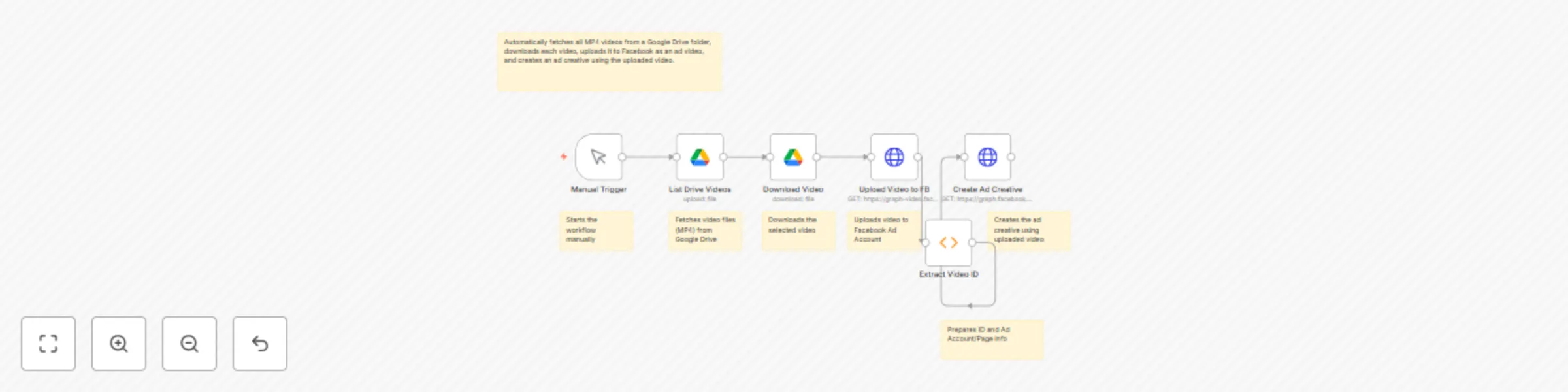
Automated Google Drive to Facebook Ads: one-click video marketing workflow

Workflow preview

Workflow preview
100%
Automated Google Drive to Facebook Ads: one-click video marketing workflow preview
Open on n8n.io

Important notice

This workflow is provided as-is. Please review and test before using in production.

1. Workflow Overview

This cutting edge n8n automation is a powerful digital marketing tool designed to streamline the process of transforming Google Drive videos into Facebook advertising assets. By intelligently conne...

Best for

  • Social Media automation workflows
  • intermediate n8n builders looking for reusable templates

Tools used

n8n-nodes-base.manualtrigger, n8n-nodes-base.googledrive, n8n-nodes-base.httprequest, n8n-nodes-base.function, n8n-nodes-base.stickynote

Source and attribution

This workflow is cataloged by N8N Workflows and links back to its original n8n.io source page by Yaron Been.

Original n8n.io source

1.1 Workflow description

Title
Automated Google Drive to Facebook Ads: one-click video marketing workflow
Workflow name
Automated Google Drive to Facebook Ads: one-click video marketing workflow

This cutting-edge n8n automation is a powerful digital marketing tool designed to streamline the process of transforming Google Drive videos into Facebook advertising assets. By intelligently connecting cloud storage, video upload, and ad creation platforms, this workflow:

  1. Discovers Marketing Content:

    • Automatically scans Google Drive
    • Identifies video marketing materials
    • Eliminates manual content searching
  2. Seamless Video Distribution:

    • Downloads selected video files
    • Uploads directly to Facebook
    • Prepares videos for advertising
  3. Instant Ad Creative Generation:

    • Creates Facebook ad creatives
    • Leverages uploaded video content
    • Accelerates marketing campaign setup
  4. Automated Platform Integration:

    • Connects Google Drive and Facebook
    • Reduces manual intervention
    • Speeds up content deployment

Key Benefits

  • ๐Ÿค– Full Automation: Zero-touch video marketing
  • ๐Ÿ’ก Smart Content Management: Effortless video distribution
  • ๐Ÿ“Š Rapid Campaign Setup: Quick ad creative generation
  • ๐ŸŒ Multi-Platform Synchronization: Seamless content flow

Workflow Architecture

๐Ÿ”น Stage 1: Content Discovery

  • Manual Trigger: Workflow initiation
  • Google Drive Integration: Video file scanning
  • Intelligent File Selection:
    • Identifies MP4 video files
    • Prepares for marketing use

๐Ÿ”น Stage 2: Video Preparation

  • Automatic Download
  • File Validation
  • Marketing-Ready Formatting

๐Ÿ”น Stage 3: Facebook Upload

  • Direct Video Upload
  • Ad Account Integration
  • Seamless Platform Transfer

๐Ÿ”น Stage 4: Ad Creative Generation

  • Automated Creative Setup
  • Video-Based Ad Creation
  • Instant Marketing Asset Preparation

Potential Use Cases

  • Digital Marketing Teams: Rapid content deployment
  • Social Media Managers: Streamlined ad creation
  • Content Creators: Efficient video marketing
  • Small Business Owners: Simplified advertising workflow
  • Marketing Agencies: Scalable content distribution

Setup Requirements

  1. Google Drive

    • Connected Google account
    • Configured video folder
    • Appropriate sharing settings
  2. Facebook Ads

    • Ad account credentials
    • Page ID configuration
    • API access token
  3. n8n Installation

    • Cloud or self-hosted instance
    • Workflow configuration
    • API credential management

Future Enhancement Suggestions

  • ๐Ÿค– AI-powered video selection
  • ๐Ÿ“Š Performance tracking integration
  • ๐Ÿ”” Campaign launch notifications
  • ๐ŸŒ Multi-platform ad deployment
  • ๐Ÿง  Intelligent content routing

Technical Considerations

  • Implement robust error handling
  • Use secure API authentication
  • Maintain flexible file processing
  • Ensure compliance with platform guidelines

Ethical Guidelines

  • Respect copyright and usage rights
  • Maintain transparent marketing practices
  • Ensure appropriate content selection
  • Provide clear advertising disclosures

Hashtag Performance Boost ๐Ÿš€

#MarketingAutomation #VideoAdvertising #FacebookAds #DigitalMarketing #ContentMarketing #AIMarketing #WorkflowAutomation #SocialMediaStrategy #AdTech #MarketingInnovation

Workflow Visualization

[Manual Trigger]
    โฌ‡๏ธ
[List Drive Videos]
    โฌ‡๏ธ
[Download Video]
    โฌ‡๏ธ
[Upload to Facebook]
    โฌ‡๏ธ
[Create Ad Creative]

Connect With Me

Ready to revolutionize your digital marketing?

๐Ÿ“ง Email: [email protected]

๐ŸŽฅ YouTube: @YaronBeen

๐Ÿ’ผ LinkedIn: Yaron Been

Transform your marketing workflow with intelligent, automated solutions!

1.2 Logical Blocks

This catalog entry is organized from the workflow JSON. The node-level section below shows the executable blocks available for review before importing the template.

2. Block-by-Block Analysis

Block 1 - Manual Trigger

Type / Role
n8n-nodes-base.manualTrigger - manualTrigger
Config choices
Version 1

Block 2 - List Drive Videos

Type / Role
n8n-nodes-base.googleDrive - googleDrive
Config choices
Version 2

Block 3 - Download Video

Type / Role
n8n-nodes-base.googleDrive - googleDrive
Config choices
Version 2

Block 4 - Upload Video to FB

Type / Role
n8n-nodes-base.httpRequest - httpRequest
Config choices
Version 3

Block 5 - Create Ad Creative

Type / Role
n8n-nodes-base.httpRequest - httpRequest
Config choices
Version 3

Block 6 - Extract Video ID

Type / Role
n8n-nodes-base.function - function
Config choices
Version 1

Block 7 - Sticky Note

Type / Role
n8n-nodes-base.stickyNote - stickyNote
Config choices
Version 1

Block 8 - Sticky Note1

Type / Role
n8n-nodes-base.stickyNote - stickyNote
Config choices
Version 1

Block 9 - Sticky Note2

Type / Role
n8n-nodes-base.stickyNote - stickyNote
Config choices
Version 1

Block 10 - Sticky Note3

Type / Role
n8n-nodes-base.stickyNote - stickyNote
Config choices
Version 1

Block 11 - Sticky Note4

Type / Role
n8n-nodes-base.stickyNote - stickyNote
Config choices
Version 1

Block 12 - Sticky Note5

Type / Role
n8n-nodes-base.stickyNote - stickyNote
Config choices
Version 1

Block 13 - Sticky Note6

Type / Role
n8n-nodes-base.stickyNote - stickyNote
Config choices
Version 1

3. Summary Table

Workflow Automated Google Drive to Facebook Ads: one-click video marketing workflow
Complexity intermediate
Nodes 13
Categories Social Media
Author Yaron Been
Published 03 Jun 2025

4. Reproducing the Workflow from Scratch

  1. 1. Download the workflow JSON

    Use the JSON export at /data/workflows/4620/4620.json as the source template for this automation.

  2. 2. Import the template into n8n

    Open n8n, import the downloaded JSON, and review each node before activating the workflow.

  3. 3. Configure credentials and variables

    Replace placeholder credentials, API keys, webhook URLs, account IDs, and environment-specific values with your own settings.

  4. 4. Test with sample data

    Run the workflow manually or in a staging workspace, inspect node output, and confirm downstream systems receive the expected data.

  5. 5. Activate and monitor

    Enable the workflow only after testing, then monitor executions, errors, and rate limits during the first production runs.

5. General Notes & Resources

Review imported nodes carefully before activation. This catalog entry is intended to help you inspect the workflow structure, understand required services, and find related templates faster.

Node names, credentials, schedules, webhook paths, and external service limits may need adjustment for your workspace.

Frequently asked questions

What does Automated Google Drive to Facebook Ads: one-click video marketing workflow do?

This cutting edge n8n automation is a powerful digital marketing tool designed to streamline the process of transforming Google Drive videos into Facebook advertising assets. By intelligently conne...

What do I need before importing this workflow?

Review the workflow JSON, configure any required credentials in n8n, and test the automation in a safe workspace before using it in production.

Can I customize this workflow?

Yes. Use the block-by-block analysis and the downloadable JSON to inspect each node, then adjust credentials, prompts, schedules, filters, or destinations for your Social Media use case.