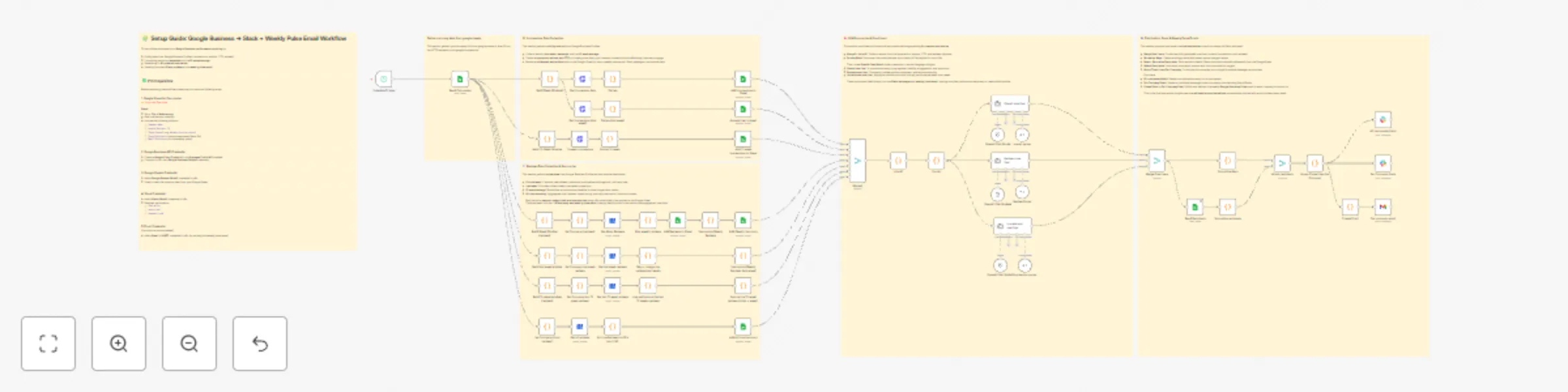
Automated Google Business reports with GPT insights to Slack & email

Workflow preview

Workflow preview
100%
Automated Google Business reports with GPT insights to Slack & email preview
Open on n8n.io

Important notice

This workflow is provided as-is. Please review and test before using in production.

1. Workflow Overview

Created by: Peyton Leveillee Last updated: October 2025 TL;DR Marketing companies charge hundreds or even thousands per month for automated “Google Business Pulse” reports that show visibility, ...

Best for

  • Market Research automation workflows
  • AI Summarization automation workflows
  • advanced n8n builders looking for reusable templates

Tools used

@n8n/n8n-nodes-langchain.lmchatopenai, n8n-nodes-base.googlesheets, n8n-nodes-base.code, n8n-nodes-base.httprequest, n8n-nodes-base.googlebusinessprofile, n8n-nodes-base.merge, @n8n/n8n-nodes-langchain.outputparserstructured, n8n-nodes-base.scheduletrigger

Source and attribution

This workflow is cataloged by N8N Workflows and links back to its original n8n.io source page by Peyton Leveillee.

Original n8n.io source

1.1 Workflow description

Title
Automated Google Business reports with GPT insights to Slack & email
Workflow name
Automated Google Business reports with GPT insights to Slack & email

Created by: Peyton Leveillee
Last updated: October 2025


🧠 TL;DR

Marketing companies charge hundreds or even thousands per month for automated “Google Business Pulse” reports that show visibility, reviews, and engagement trends.
Now you can do it for free — right inside n8n.
This workflow pulls Google Business data, compares weekly and 12-week trends, runs it through an LLM for insight summaries, and sends out Slack updates and weekly email reports — automatically.


🔥 Name: Google Pulse Pro

Your AI marketing analyst that runs 24/7 — no subscription, no fluff.


🧩 Categories

  • Business Intelligence
  • Marketing Automation
  • AI Summarization
  • Multichannel Reporting

💬 Overview

Google Pulse Pro automates weekly Google Business reporting for multiple companies or locations.
It combines data collection, trend analysis, and AI commentary into a fully automated system — delivering updates through Slack and email.
Perfect for agencies or businesses that want client-ready, insight-driven updates without paying for SaaS dashboards.


⚙️ Good to Know

  • Uses OpenAI Chat Models for summarization and insights
  • Integrates Google Business API, Google Sheets, Slack, and Email (Gmail or SMTP)
  • Compares this week vs last week and 12-week averages
  • Outputs LLM-generated summaries formatted for Slack Blocks and email templates
  • 100% no-code friendly — ready to deploy instantly

🧠 How It Works

  1. Read Companies (Google Sheets)
    Loads company info, Google Business IDs, Slack channels, and recipient emails.

  2. Pull Google Business Data
    Queries the Google Business API for impressions, actions, CTR, and reviews across:

    • This week
    • Last week
    • 12-week average
  3. Summarize & Compare
    Code nodes calculate trends and append results back to Google Sheets.

  4. AI Summaries (OpenAI)
    Three separate LLMs generate insight lines:

    • Impressions one-liner → Visibility & engagement shifts
    • Reviews one-liner → Sentiment & reputation trends
    • Overall one-liner → Combined marketing summary
  5. Format & Distribute
    All one-liners merge per company. Recipients are attached, and messages are formatted for output.

  6. Send Reports

    • Slack: Beautifully formatted updates via Slack Blocks
    • Email: Branded Weekly Google Business Pulse summaries

📈 Example Output

Slack Message:

Weekly Google Reviews & Impressions Number 1 Auto Repair Sept 22–28, 2025

• Impressions down 41% vs last week • CTR 3pp lower than 12-week avg • 2 new reviews, 100% positive sentiment

Email Pulse:


🧾 Requirements

  • Google Business API credential (OAuth2)
  • Google Sheets credential (OAuth2)
  • Slack credential (OAuth2) — chat:write, users:read, channels:read
  • Gmail or SMTP credential (for email pulse delivery)
  • OpenAI credential (for summaries)

✏️ Customizing

  • Add other KPIs (Google Ads, GA4, POS data)
  • Adjust scheduling cadence (daily, bi-weekly, monthly)
  • Send reports to Notion, Airtable, or HubSpot
  • Update Slack + email branding for your agency

💡 Use Cases

  • Agencies automating client reporting
  • Multi-location businesses monitoring reputation
  • Service centers tracking performance trends
  • Anyone tired of paying for “Google Business Pulse” dashboards

🎯 Why It Matters

Most marketing firms hide behind “AI dashboards” to sell visibility reports.
Google Pulse Pro gives you that same power — automated, AI-enhanced, and free.

Unchain your reporting. Impress clients.
And keep your marketing dollars where they belong — in your business.

1.2 Logical Blocks

This catalog entry is organized from the workflow JSON. The node-level section below shows the executable blocks available for review before importing the template.

2. Block-by-Block Analysis

Block 1 - OpenAI Chat Model4

Type / Role
@n8n/n8n-nodes-langchain.lmChatOpenAi - lmChatOpenAi
Config choices
Version 1.2

Block 2 - Read Companies

Type / Role
n8n-nodes-base.googleSheets - googleSheets
Config choices
Version 4

Block 3 - Build Week Window2

Type / Role
n8n-nodes-base.code - code
Config choices
Version 2

Block 4 - Get Impression data

Type / Role
n8n-nodes-base.httpRequest - httpRequest
Config choices
Version 4

Block 5 - Flatten

Type / Role
n8n-nodes-base.code - code
Config choices
Version 2

Block 6 - Add Impressions to Sheet

Type / Role
n8n-nodes-base.googleSheets - googleSheets
Config choices
Version 4

Block 7 - Set Company (reviews)

Type / Role
n8n-nodes-base.code - code
Config choices
Version 2

Block 8 - Get Many Reviews

Type / Role
n8n-nodes-base.googleBusinessProfile - googleBusinessProfile
Config choices
Version 1

Block 9 - Build Week Window (reviews)

Type / Role
n8n-nodes-base.code - code
Config choices
Version 2

Block 10 - Add Reviews to Sheet

Type / Role
n8n-nodes-base.googleSheets - googleSheets
Config choices
Version 4.7

Block 11 - Summarize Weekly Reviews

Type / Role
n8n-nodes-base.code - code
Config choices
Version 2

Block 12 - Add Weekly Summary

Type / Role
n8n-nodes-base.googleSheets - googleSheets
Config choices
Version 4.7

Block 13 - Set Company (total reviews)

Type / Role
n8n-nodes-base.code - code
Config choices
Version 2

Block 14 - Build 12-Week Window

Type / Role
n8n-nodes-base.code - code
Config choices
Version 2

Block 15 - 12 week impressions

Type / Role
n8n-nodes-base.httpRequest - httpRequest
Config choices
Version 4

Block 16 - Flatten 12-week

Type / Role
n8n-nodes-base.code - code
Config choices
Version 2

Block 17 - Add 12 week Impressions to Sheet

Type / Role
n8n-nodes-base.googleSheets - googleSheets
Config choices
Version 4

Block 18 - Add all time Summary

Type / Role
n8n-nodes-base.googleSheets - googleSheets
Config choices
Version 4.7

Block 19 - Get all reviews

Type / Role
n8n-nodes-base.googleBusinessProfile - googleBusinessProfile
Config choices
Version 1

Block 20 - Merge2

Type / Role
n8n-nodes-base.merge - merge
Config choices
Version 3.2

Block 21 - Get Impressions (last week)

Type / Role
n8n-nodes-base.httpRequest - httpRequest
Config choices
Version 4

Block 22 - Flatten (last week)

Type / Role
n8n-nodes-base.code - code
Config choices
Version 2

Block 23 - Join All

Type / Role
n8n-nodes-base.code - code
Config choices
Version 2

Block 24 - OpenAI Chat Model2

Type / Role
@n8n/n8n-nodes-langchain.lmChatOpenAi - lmChatOpenAi
Config choices
Version 1.2

Showing the first 24 of 62 workflow blocks. Download the JSON for the full node graph.

3. Summary Table

Workflow Automated Google Business reports with GPT insights to Slack & email
Complexity advanced
Nodes 62
Categories Market Research, AI Summarization
Author Peyton Leveillee
Published 06 Oct 2025

4. Reproducing the Workflow from Scratch

  1. 1. Download the workflow JSON

    Use the JSON export at /data/workflows/9290/9290.json as the source template for this automation.

  2. 2. Import the template into n8n

    Open n8n, import the downloaded JSON, and review each node before activating the workflow.

  3. 3. Configure credentials and variables

    Replace placeholder credentials, API keys, webhook URLs, account IDs, and environment-specific values with your own settings.

  4. 4. Test with sample data

    Run the workflow manually or in a staging workspace, inspect node output, and confirm downstream systems receive the expected data.

  5. 5. Activate and monitor

    Enable the workflow only after testing, then monitor executions, errors, and rate limits during the first production runs.

5. General Notes & Resources

Review imported nodes carefully before activation. This catalog entry is intended to help you inspect the workflow structure, understand required services, and find related templates faster.

Node names, credentials, schedules, webhook paths, and external service limits may need adjustment for your workspace.

Frequently asked questions

What does Automated Google Business reports with GPT insights to Slack & email do?

Created by: Peyton Leveillee Last updated: October 2025 TL;DR Marketing companies charge hundreds or even thousands per month for automated “Google Business Pulse” reports that show visibility, ...

What do I need before importing this workflow?

Review the workflow JSON, configure any required credentials in n8n, and test the automation in a safe workspace before using it in production.

Can I customize this workflow?

Yes. Use the block-by-block analysis and the downloadable JSON to inspect each node, then adjust credentials, prompts, schedules, filters, or destinations for your Market Research, AI Summarization use case.