Block 1 - Faield Login Trigger
- Type / Role
- n8n-nodes-base.webhook - webhook
- Config choices
- Version 1


 Early Deal
This workflow is provided as-is. Please review and test before using in production.
Automated Failed Login Detection with Jira Security Tasks, Slack Notifications Webhook: Failed Login Attempts → Jira Security Case → Slack Warnings This n8n workflow monitors failed login attempts ...
n8n-nodes-base.webhook, n8n-nodes-base.function, n8n-nodes-base.if, n8n-nodes-base.jira, n8n-nodes-base.slack, n8n-nodes-base.stickynote, n8n-nodes-base.code, n8n-nodes-base.notion
This workflow is cataloged by N8N Workflows and links back to its original n8n.io source page by WeblineIndia.
Original n8n.io sourceWebhook: Failed Login Attempts → Jira Security Case → Slack Warnings
This n8n workflow monitors failed login attempts from any application, normalizes incoming data, detects repeated attempts within a configurable time window and automatically:
It ensures fast, structured and automated responses to potential account compromise or brute-force attempts while maintaining persistent records.
This workflow is ideal for:
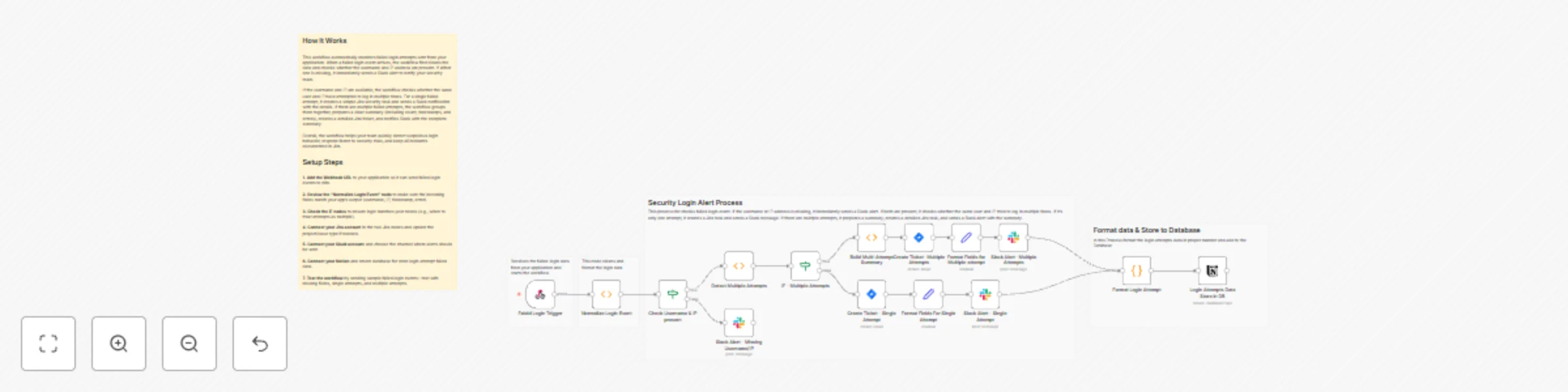
| Step Node | Description |
|---|---|
| Normalize input | Normalize Login Event — Ensures each event has required fields and prepares a logMessage. |
| Validate fields | Check Username & IP present — IF node → alerts Slack if data is incomplete. |
| Detect repeats | Detect Multiple Attempts — Finds multiple attempts within a 5-minute window; sets multiple flag. |
| Multiple attempts | IF - Multiple Attempts + Build Multi-Attempt Summary — Prepares grouped summary for Slack & Jira. |
| Single attempt | Create Ticket - Single Attempt — Creates Jira task & Slack alert for one-off events. |
| Multiple attempt ticket | Create Ticket - Multiple Attempts — Creates detailed Jira task. |
| Slack alert formatting | Format Fields For Single/Multiple Attempt — Prepares structured message for Slack. |
| Slack alert delivery | Slack Alert - Single/Multiple Attempts — Posts alert in selected Slack channel. |
| Notion logging | Login Attempts Data Store in DB — Stores structured attempt data in Notion database. |
Optional Enhancements:
| Issue | Possible Cause | Solution |
|---|---|---|
| Workflow not receiving data | Webhook misconfigured | Verify webhook URL & POST payload format |
| Jira ticket creation fails | Invalid credentials or insufficient permissions | Update Jira API token and project access |
| Slack alert not sent | Incorrect channel ID or missing bot scopes | Fix Slack credentials and permissions |
| Multiple attempts not detected | Sliding window logic misaligned | Adjust Detect Multiple Attempts node code |
| Notion logging fails | Incorrect database ID or missing credentials | Update Notion node credentials and database configuration |
| Errors in normalization | Payload format mismatch | Update Normalize Login Event function code |
If you need help setting up, customizing or extending this workflow, WeblineIndia can assist with full n8n development, workflow automation, security event processing and custom integrations.
This catalog entry is organized from the workflow JSON. The node-level section below shows the executable blocks available for review before importing the template.
| Workflow | Automated failed login detection with Jira tasks, Slack alerts & Notion logging |
|---|---|
| Complexity | advanced |
| Nodes | 20 |
| Categories | SecOps |
| Author | WeblineIndia |
| Published | 25 Nov 2025 |
Use the JSON export at /data/workflows/11220/11220.json as the source template for this automation.
Open n8n, import the downloaded JSON, and review each node before activating the workflow.
Replace placeholder credentials, API keys, webhook URLs, account IDs, and environment-specific values with your own settings.
Run the workflow manually or in a staging workspace, inspect node output, and confirm downstream systems receive the expected data.
Enable the workflow only after testing, then monitor executions, errors, and rate limits during the first production runs.
Review imported nodes carefully before activation. This catalog entry is intended to help you inspect the workflow structure, understand required services, and find related templates faster.
Node names, credentials, schedules, webhook paths, and external service limits may need adjustment for your workspace.
Automated Failed Login Detection with Jira Security Tasks, Slack Notifications Webhook: Failed Login Attempts → Jira Security Case → Slack Warnings This n8n workflow monitors failed login attempts ...
Review the workflow JSON, configure any required credentials in n8n, and test the automation in a safe workspace before using it in production.
Yes. Use the block-by-block analysis and the downloadable JSON to inspect each node, then adjust credentials, prompts, schedules, filters, or destinations for your SecOps use case.