Block 1 - Trigger – Fetch New Facebook Messages (Every Hour)
- Type / Role
- n8n-nodes-base.scheduleTrigger - scheduleTrigger
- Config choices
- Version 1.2


 Early Deal
This workflow is provided as-is. Please review and test before using in production.
Description This workflow automates AI driven Facebook Messenger product inquiry handling, connecting Facebook DMs with Airtable inventory and returning instant automated replies based on produc...
n8n-nodes-base.scheduletrigger, n8n-nodes-base.airtable, n8n-nodes-base.facebookgraphapi, @n8n/n8n-nodes-langchain.agent, n8n-nodes-base.code, @n8n/n8n-nodes-langchain.lmchatazureopenai, n8n-nodes-base.merge, n8n-nodes-base.if
This workflow is cataloged by N8N Workflows and links back to its original n8n.io source page by Rahul Joshi.
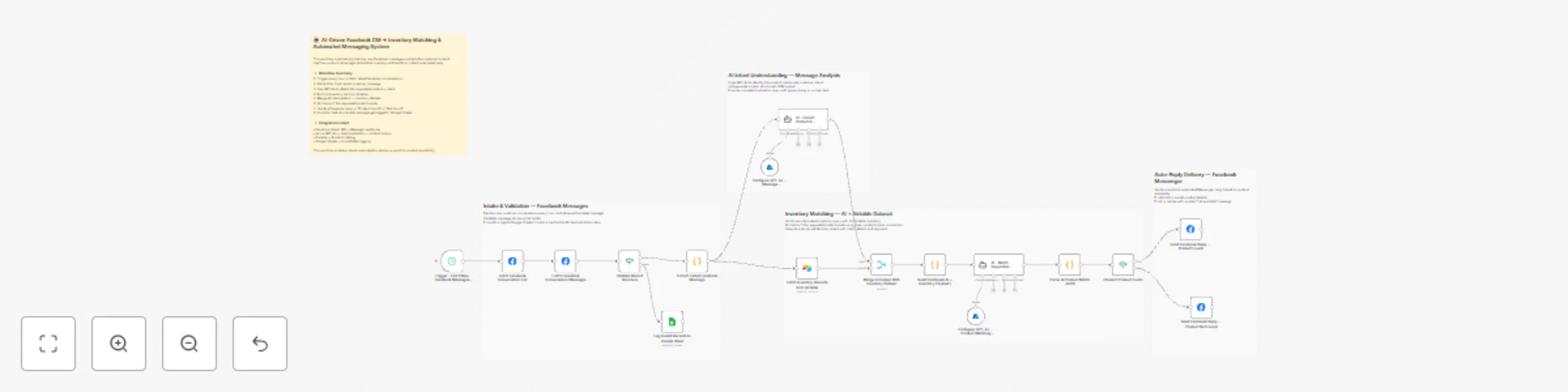
Original n8n.io sourceThis workflow automates AI-driven Facebook Messenger product inquiry handling, connecting Facebook DMs with Airtable inventory and returning instant automated replies based on product availability. It runs hourly, fetches new messages, extracts the latest customer query, uses GPT-4o to identify the product and intent, merges this with the Airtable inventory dataset, performs an AI-assisted product match, and replies automatically inside the same Facebook conversation. Invalid or malformed messages are logged to Google Sheets for review.
▶️ Trigger – Fetch New Facebook Messages (Every Hour) Schedules hourly polling of new conversations from Facebook Messenger.
🟦 Fetch Facebook Conversation List (Graph API) Retrieves conversation threads from the connected Facebook Page.
💬 Fetch Facebook Conversation Messages (Graph API) Loads message details (content, sender, timestamp) for the selected conversation.
📩 Extract Latest Facebook Message (Code) Sorts all messages and picks the latest one → this is the message analyzed by AI.
🔍 Validate Record Structure (IF) Ensures the incoming message has required fields. Valid → AI analysis Invalid → logged to Google Sheets.
📄 Log Invalid Records to Google Sheet Stores malformed or unprocessable messages for audit and correction.
🧠 Configure GPT-4o — Message Classification Model Defines AI model used to extract product details and intent from the customer’s message.
🤖 AI – Extract Product & Customer Intent AI identifies: product name (standardized) customer intent (availability, pricing, inquiry) cleaned query always returns structured JSON No inventory lookup happens here.
📦 Fetch Inventory Records from Airtable Pulls complete product inventory list to cross-match with customer request.
🔁 Merge AI Output With Inventory Dataset Combines: AI-interpreted message data Airtable inventory records This prepares a unified object for product lookup.
📝 Build Combined AI + Inventory Payload (Code) Constructs { ai: {...}, inventory: [...] } for the product-matching AI agent.
🧠 Configure GPT-4o — Product Matching Model Sets strict rules for identifying whether the requested product exists in inventory.
🤖 AI – Match Requested Product in Inventory AI checks: exact / close match to product name whether item exists generates structured JSON reply text + confidence score.
🧹 Parse AI Product Match JSON (Code) Ensures the AI output is valid JSON before making decisions.
🔍 Check If Product Exists (IF) If found → sends “product available” reply If not → sends “product not found” reply.
📨 Send Facebook Reply — Product Found (Graph API) Sends a personalized Messenger reply including matched product details.
📨 Send Facebook Reply — Product Not Found (Graph API) Replies politely informing customer that the product is not available.
✔ Fully automated Facebook DM handling ✔ AI-powered product identification even with typos or unclear wording ✔ Real-time product availability responses ✔ Unified Airtable-driven catalog lookup ✔ Automatic fallback for invalid messages ✔ Zero manual intervention for customer support
This catalog entry is organized from the workflow JSON. The node-level section below shows the executable blocks available for review before importing the template.
| Workflow | Automated Facebook message response with GPT-4o and Airtable inventory matching |
|---|---|
| Complexity | advanced |
| Nodes | 22 |
| Categories | Support Chatbot, AI Chatbot |
| Author | Rahul Joshi |
| Published | 28 Nov 2025 |
Use the JSON export at /data/workflows/11321/11321.json as the source template for this automation.
Open n8n, import the downloaded JSON, and review each node before activating the workflow.
Replace placeholder credentials, API keys, webhook URLs, account IDs, and environment-specific values with your own settings.
Run the workflow manually or in a staging workspace, inspect node output, and confirm downstream systems receive the expected data.
Enable the workflow only after testing, then monitor executions, errors, and rate limits during the first production runs.
Review imported nodes carefully before activation. This catalog entry is intended to help you inspect the workflow structure, understand required services, and find related templates faster.
Node names, credentials, schedules, webhook paths, and external service limits may need adjustment for your workspace.
Description This workflow automates AI driven Facebook Messenger product inquiry handling, connecting Facebook DMs with Airtable inventory and returning instant automated replies based on produc...
Review the workflow JSON, configure any required credentials in n8n, and test the automation in a safe workspace before using it in production.
Yes. Use the block-by-block analysis and the downloadable JSON to inspect each node, then adjust credentials, prompts, schedules, filters, or destinations for your Support Chatbot, AI Chatbot use case.