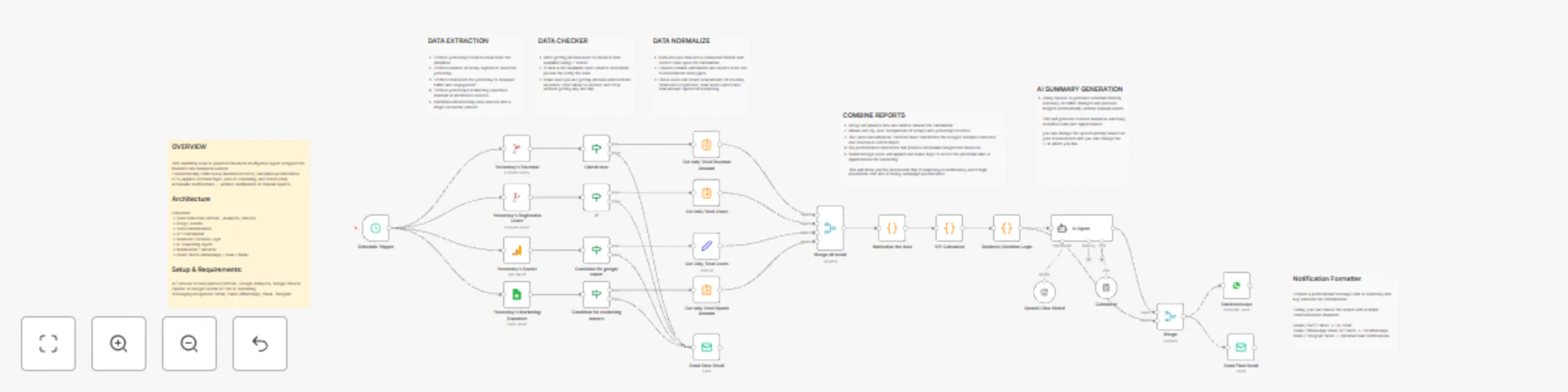
Automated business KPI insights with GPT-4, MSSQL, analytics & multi-channel alerts

Workflow preview

Workflow preview
100%
Automated business KPI insights with GPT-4, MSSQL, analytics & multi-channel alerts preview
Open on n8n.io

Important notice

This workflow is provided as-is. Please review and test before using in production.

1. Workflow Overview

This workflow is an AI powered business intelligence agent designed for founders and business owners. It automatically collects key business metrics, calculates performance KPIs, applies decision l...

Best for

  • Market Research automation workflows
  • AI Chatbot automation workflows
  • advanced n8n builders looking for reusable templates

Tools used

n8n-nodes-base.scheduletrigger, n8n-nodes-base.microsoftsql, n8n-nodes-base.googleanalytics, n8n-nodes-base.if, n8n-nodes-base.googlesheets, n8n-nodes-base.summarize, n8n-nodes-base.set, n8n-nodes-base.emailsend

Source and attribution

This workflow is cataloged by N8N Workflows and links back to its original n8n.io source page by Mohamed Abubakkar.

Original n8n.io source

1.1 Workflow description

Title
Automated business KPI insights with GPT-4, MSSQL, analytics & multi-channel alerts
Workflow name
Automated business KPI insights with GPT-4, MSSQL, analytics & multi-channel alerts

WORKFLOW OVERVIEW

This workflow is an AI-powered business intelligence agent designed for founders and business owners. It automatically collects key business metrics, calculates performance KPIs, applies decision logic, uses AI reasoning, and sends clear, actionable notifications — without dashboards or manual reports.

Key Features:

✅ Aggregates multiple data sources (MSSQL, Google Analytics, Google Sheets) ✅ Calculates critical KPIs: ROAS, CAC, Revenue & User Growth ✅ Applies rule-based decision logic for business risk and opportunity detection ✅ AI-powered reasoning: summarizes insights and recommends actions ✅ Multi-channel notifications: Email, WhatsApp, Slack, Telegram ✅ Fully automated daily execution via Cron trigger ✅ Enterprise-ready: error handling, structured data, KPI validation

Setup & Requirements:

  • API access to data sources (MSSQL, Google Analytics, Google Sheets)
  • OpenAI or Google Gemini API for AI reasoning
  • Messaging integration: Gmail, Twilio (WhatsApp), Slack, Telegram

Workflow Flow:

  • Cron Trigger – runs daily at a chosen time
  • Data Collection – revenue, users, marketing spend, website analytics
  • Merge Node – combines all data sources
  • Function Node – consolidates into a single JSON object
  • KPI Calculation – calculates ROAS, CAC, growth rates
  • Business Logic Engine – identifies risks and opportunities
  • AI Reasoning Agent – summarizes insights, suggests actions
  • Notification Formatter – builds founder-friendly message
  • Notification Delivery – sends via WhatsApp, Email, Slack, or Telegram

Example Data Formation

These data below Getting from all different channels.

{ "revenue": 4290, "registeredUsers": 20, "totalUsers": 3, "adSpend": 800 }

Applies rule-based logic to detect potential risks or opportunities

{ "ROAS": 5.36, "CAC": 40, "agentStatus": "normal", "agentPriority": "low", "insights": ["Marketing campaigns are performing very well"] }

Workflow Highlights

Fully automated, runs daily without human intervention Integrates multiple business data sources Converts raw data into KPIs for actionable insight Applies both rule-based logic and AI reasoning Generates concise, human-friendly notifications Sending notification to different channels.

1.2 Logical Blocks

This catalog entry is organized from the workflow JSON. The node-level section below shows the executable blocks available for review before importing the template.

2. Block-by-Block Analysis

Block 1 - Schedule Trigger

Type / Role
n8n-nodes-base.scheduleTrigger - scheduleTrigger
Config choices
Version 1.2

Block 2 - Yesterday's Revenue

Type / Role
n8n-nodes-base.microsoftSql - microsoftSql
Config choices
Version 1.1

Block 3 - Yesterday's Registered Users

Type / Role
n8n-nodes-base.microsoftSql - microsoftSql
Config choices
Version 1.1

Block 4 - Yesterday's Report

Type / Role
n8n-nodes-base.googleAnalytics - googleAnalytics
Config choices
Version 2

Block 5 - Check data

Type / Role
n8n-nodes-base.if - if
Config choices
Version 2.2

Block 6 - If

Type / Role
n8n-nodes-base.if - if
Config choices
Version 2.2

Block 7 - Yesterday's Marketing Expenses

Type / Role
n8n-nodes-base.googleSheets - googleSheets
Config choices
Version 4.7

Block 8 - Condition for google report

Type / Role
n8n-nodes-base.if - if
Config choices
Version 2.2

Block 9 - Condition for marketing reports

Type / Role
n8n-nodes-base.if - if
Config choices
Version 2.2

Block 10 - Get only Total Revenue Amount

Type / Role
n8n-nodes-base.summarize - summarize
Config choices
Version 1.1

Block 11 - Get only Total Users

Type / Role
n8n-nodes-base.summarize - summarize
Config choices
Version 1.1

Block 12 - Get Only Total Users

Type / Role
n8n-nodes-base.set - set
Config choices
Version 3.4

Block 13 - Get only Total Spend Amount

Type / Role
n8n-nodes-base.summarize - summarize
Config choices
Version 1.1

Block 14 - Send Error Email

Type / Role
n8n-nodes-base.emailSend - emailSend
Config choices
Version 2.1

Block 15 - Merge all result

Type / Role
n8n-nodes-base.merge - merge
Config choices
Version 3.2

Block 16 - Normalize the data

Type / Role
n8n-nodes-base.code - code
Config choices
Version 2

Block 17 - KPI Calculator

Type / Role
n8n-nodes-base.code - code
Config choices
Version 2

Block 18 - Business Decision Logic

Type / Role
n8n-nodes-base.code - code
Config choices
Version 2

Block 19 - AI Agent

Type / Role
@n8n/n8n-nodes-langchain.agent - agent
Config choices
Version 3

Block 20 - OpenAI Chat Model

Type / Role
@n8n/n8n-nodes-langchain.lmChatOpenAi - lmChatOpenAi
Config choices
Version 1.2

Block 21 - Calculator

Type / Role
@n8n/n8n-nodes-langchain.toolCalculator - toolCalculator
Config choices
Version 1

Block 22 - Merge

Type / Role
n8n-nodes-base.merge - merge
Config choices
Version 3.2

Block 23 - Send message

Type / Role
n8n-nodes-base.whatsApp - whatsApp
Config choices
Version 1.1

Block 24 - Send Final Email

Type / Role
n8n-nodes-base.emailSend - emailSend
Config choices
Version 2.1

Showing the first 24 of 31 workflow blocks. Download the JSON for the full node graph.

3. Summary Table

Workflow Automated business KPI insights with GPT-4, MSSQL, analytics & multi-channel alerts
Complexity advanced
Nodes 31
Categories Market Research, AI Chatbot
Author Mohamed Abubakkar
Published 22 Dec 2025

4. Reproducing the Workflow from Scratch

  1. 1. Download the workflow JSON

    Use the JSON export at /data/workflows/12008/12008.json as the source template for this automation.

  2. 2. Import the template into n8n

    Open n8n, import the downloaded JSON, and review each node before activating the workflow.

  3. 3. Configure credentials and variables

    Replace placeholder credentials, API keys, webhook URLs, account IDs, and environment-specific values with your own settings.

  4. 4. Test with sample data

    Run the workflow manually or in a staging workspace, inspect node output, and confirm downstream systems receive the expected data.

  5. 5. Activate and monitor

    Enable the workflow only after testing, then monitor executions, errors, and rate limits during the first production runs.

5. General Notes & Resources

Review imported nodes carefully before activation. This catalog entry is intended to help you inspect the workflow structure, understand required services, and find related templates faster.

Node names, credentials, schedules, webhook paths, and external service limits may need adjustment for your workspace.

Frequently asked questions

What does Automated business KPI insights with GPT-4, MSSQL, analytics & multi-channel alerts do?

This workflow is an AI powered business intelligence agent designed for founders and business owners. It automatically collects key business metrics, calculates performance KPIs, applies decision l...

What do I need before importing this workflow?

Review the workflow JSON, configure any required credentials in n8n, and test the automation in a safe workspace before using it in production.

Can I customize this workflow?

Yes. Use the block-by-block analysis and the downloadable JSON to inspect each node, then adjust credentials, prompts, schedules, filters, or destinations for your Market Research, AI Chatbot use case.