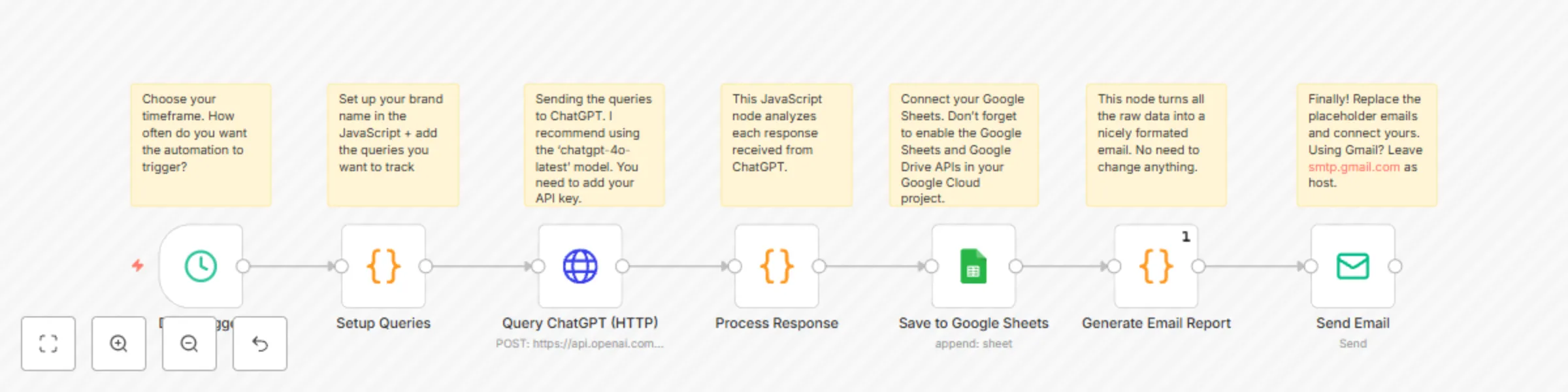
Automated brand mentions tracker with GPT-4o, Google Sheets, and email

Workflow preview

Workflow preview
100%
Automated brand mentions tracker with GPT-4o, Google Sheets, and email preview
Open on n8n.io

Important notice

This workflow is provided as-is. Please review and test before using in production.

1. Workflow Overview

This workflow enables you to automate the daily monitoring of how an AI model (like ChatGPT) responds to specific queries relevant to your market. It identif...

Best for

  • Market Research automation workflows
  • AI Summarization automation workflows
  • intermediate n8n builders looking for reusable templates

Tools used

n8n-nodes-base.scheduletrigger, n8n-nodes-base.code, n8n-nodes-base.httprequest, n8n-nodes-base.googlesheets, n8n-nodes-base.emailsend, n8n-nodes-base.stickynote

Source and attribution

This workflow is cataloged by N8N Workflows and links back to its original n8n.io source page by Daniel Shashko.

Original n8n.io source

1.1 Workflow description

Title
Automated brand mentions tracker with GPT-4o, Google Sheets, and email
Workflow name
Automated brand mentions tracker with GPT-4o, Google Sheets, and email

This workflow enables you to automate the daily monitoring of how an AI model (like ChatGPT) responds to specific queries relevant to your market. It identifies mentions of your brand and predefined competitors, logs detailed interactions in Google Sheets, and delivers a comprehensive email report.

Main Use Cases

  • Monitor how your brand is mentioned by AI in response to relevant user queries.
  • Track mentions of key competitors to understand AI's comparative positioning.
  • Gain insights into AI's current knowledge and portrayal of your brand and market landscape.
  • Automate daily intelligence gathering on AI-driven brand perception.

How it works

The workflow operates as a scheduled process, organized into these stages:

  1. Configuration & Scheduling
    • Triggers daily (or can be run manually).
    • Key variables are defined within the workflow: your brand name (e.g., "YourBrandName"), a list of queries to ask the AI, and a list of competitor names to track in responses.
  2. AI Querying
    • For each predefined query, the workflow sends a request to the OpenAI ChatGPT API (via an HTTP Request node).
  3. Response Analysis
    • Each AI response is processed by a Code node to:
      • Check if your brand name is mentioned (case-insensitive).
      • Identify if any of the listed competitors are mentioned (case-insensitive).
      • Extract the core AI response content (limited to 500 characters for brevity in logs/reports).
  4. Data Logging to Google Sheets
    • Detailed results for each query—including timestamp, date, the query itself, query index, your brand name, the AI's response, whether your brand was mentioned, and any errors—are appended to a specified Google Sheet.
  5. Email Report Generation
    • A comprehensive HTML email report is compiled. This report summarizes:
      • Total queries processed, number of times your brand was mentioned, total competitor mentions, and any errors encountered.
      • A summary of competitor mentions, listing each competitor and how many times they were mentioned.
      • A detailed table listing each query, whether your brand was mentioned, and which competitors (if any) were mentioned in the AI's response.
  6. Automated Reporting
    • The generated HTML email report is sent to specified recipients, providing a daily snapshot of AI interactions.

Summary Flow:

Schedule/Workflow Trigger → Initialize Brand, Queries, Competitors (in Code node) → For each Query: Query ChatGPT API → Process AI Response (Check for Brand & Competitor Mentions) → Log Results to Google Sheets → Generate Consolidated HTML Email Report → Send Email Notification

Benefits:

  • Fully automated daily monitoring of AI responses concerning your brand and competitors.
  • Provides objective insights into how AI models are representing your brand in user interactions.
  • Delivers actionable competitive intelligence by tracking competitor mentions.
  • Centralized logging in Google Sheets for historical analysis and trend spotting.
  • Easily customizable with your specific brand, queries, competitor list, and reporting recipients.

1.2 Logical Blocks

This catalog entry is organized from the workflow JSON. The node-level section below shows the executable blocks available for review before importing the template.

2. Block-by-Block Analysis

Block 1 - Daily Trigger

Type / Role
n8n-nodes-base.scheduleTrigger - scheduleTrigger
Config choices
Version 1.1

Block 2 - Setup Queries

Type / Role
n8n-nodes-base.code - code
Config choices
Version 2

Block 3 - Query ChatGPT (HTTP)

Type / Role
n8n-nodes-base.httpRequest - httpRequest
Config choices
Version 4.2

Block 4 - Process Response

Type / Role
n8n-nodes-base.code - code
Config choices
Version 2

Block 5 - Save to Google Sheets

Type / Role
n8n-nodes-base.googleSheets - googleSheets
Config choices
Version 4.4

Block 6 - Generate Email Report

Type / Role
n8n-nodes-base.code - code
Config choices
Version 2

Block 7 - Send Email

Type / Role
n8n-nodes-base.emailSend - emailSend
Config choices
Version 2.1

Block 8 - Sticky Note

Type / Role
n8n-nodes-base.stickyNote - stickyNote
Config choices
Version 1

Block 9 - Sticky Note1

Type / Role
n8n-nodes-base.stickyNote - stickyNote
Config choices
Version 1

Block 10 - Sticky Note2

Type / Role
n8n-nodes-base.stickyNote - stickyNote
Config choices
Version 1

Block 11 - Sticky Note3

Type / Role
n8n-nodes-base.stickyNote - stickyNote
Config choices
Version 1

Block 12 - Sticky Note4

Type / Role
n8n-nodes-base.stickyNote - stickyNote
Config choices
Version 1

Block 13 - Sticky Note5

Type / Role
n8n-nodes-base.stickyNote - stickyNote
Config choices
Version 1

Block 14 - Sticky Note6

Type / Role
n8n-nodes-base.stickyNote - stickyNote
Config choices
Version 1

3. Summary Table

Workflow Automated brand mentions tracker with GPT-4o, Google Sheets, and email
Complexity intermediate
Nodes 14
Categories Market Research, AI Summarization
Author Daniel Shashko
Published 27 May 2025

4. Reproducing the Workflow from Scratch

  1. 1. Download the workflow JSON

    Use the JSON export at /data/workflows/4443/4443.json as the source template for this automation.

  2. 2. Import the template into n8n

    Open n8n, import the downloaded JSON, and review each node before activating the workflow.

  3. 3. Configure credentials and variables

    Replace placeholder credentials, API keys, webhook URLs, account IDs, and environment-specific values with your own settings.

  4. 4. Test with sample data

    Run the workflow manually or in a staging workspace, inspect node output, and confirm downstream systems receive the expected data.

  5. 5. Activate and monitor

    Enable the workflow only after testing, then monitor executions, errors, and rate limits during the first production runs.

5. General Notes & Resources

Review imported nodes carefully before activation. This catalog entry is intended to help you inspect the workflow structure, understand required services, and find related templates faster.

Node names, credentials, schedules, webhook paths, and external service limits may need adjustment for your workspace.

Frequently asked questions

What does Automated brand mentions tracker with GPT-4o, Google Sheets, and email do?

This workflow enables you to automate the daily monitoring of how an AI model (like ChatGPT) responds to specific queries relevant to your market. It identif...

What do I need before importing this workflow?

Review the workflow JSON, configure any required credentials in n8n, and test the automation in a safe workspace before using it in production.

Can I customize this workflow?

Yes. Use the block-by-block analysis and the downloadable JSON to inspect each node, then adjust credentials, prompts, schedules, filters, or destinations for your Market Research, AI Summarization use case.