Block 1 - Split RSS Feeds
- Type / Role
- n8n-nodes-base.splitInBatches - splitInBatches
- Config choices
- Version 3


 Early Deal
This workflow is provided as-is. Please review and test before using in production.
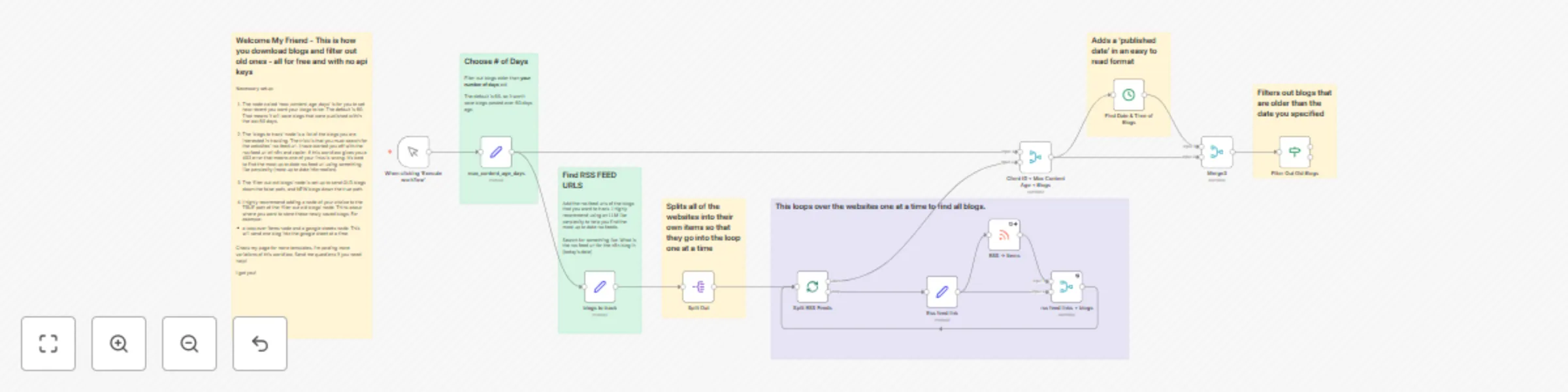
Automated Blog Monitoring System with RSS Feeds and Time Based Filtering Overview This workflow provides a powerful yet simple foundation for monitoring blogs using RSS feeds . It automatically fet...
n8n-nodes-base.splitinbatches, n8n-nodes-base.rssfeedread, n8n-nodes-base.manualtrigger, n8n-nodes-base.merge, n8n-nodes-base.datetime, n8n-nodes-base.if, n8n-nodes-base.set, n8n-nodes-base.splitout
This workflow is cataloged by N8N Workflows and links back to its original n8n.io source page by automedia.
Original n8n.io sourceThis workflow provides a powerful yet simple foundation for monitoring blogs using RSS feeds. It automatically fetches articles from a list of your favorite blogs and filters them based on their publication date, separating new content from old. It is the perfect starting point for anyone looking to build a custom content aggregation or notification system without needing any API keys.
This template is designed for developers, hobbyists, and marketers who want a reliable way to track new blog posts and then decide what to do with them. Instead of including a specific final step, this workflow intentionally ends with a filter, giving you complete freedom to add your own integrations.
Why would you need to monitor and filter blog posts?
true path of the "Filter Out Old Blogs" node.false path.true path empty so you can add your desired next steps.This workflow requires minimal setup and is designed for easy customization.
Add Your Blog Feeds:
source_identifier field, replace the example URLs with the RSS feeds you want to monitor.// Add your target RSS feed URLs in this array
['https://blog.n8n.io/rss', 'https://zapier.com/blog/feeds/latest/']
Set the Time Filter:
60 to your desired number of days. For example, use 7 to only get articles published in the last week.Customize Your Output (Required Next Step):
true output of the "Filter Out Old Blogs" node.This catalog entry is organized from the workflow JSON. The node-level section below shows the executable blocks available for review before importing the template.
| Workflow | Automated blog content tracking with RSS feeds and time-based filtering |
|---|---|
| Complexity | advanced |
| Nodes | 19 |
| Categories | Market Research |
| Author | automedia |
| Published | 14 Oct 2025 |
Use the JSON export at /data/workflows/9596/9596.json as the source template for this automation.
Open n8n, import the downloaded JSON, and review each node before activating the workflow.
Replace placeholder credentials, API keys, webhook URLs, account IDs, and environment-specific values with your own settings.
Run the workflow manually or in a staging workspace, inspect node output, and confirm downstream systems receive the expected data.
Enable the workflow only after testing, then monitor executions, errors, and rate limits during the first production runs.
Review imported nodes carefully before activation. This catalog entry is intended to help you inspect the workflow structure, understand required services, and find related templates faster.
Node names, credentials, schedules, webhook paths, and external service limits may need adjustment for your workspace.
Automated Blog Monitoring System with RSS Feeds and Time Based Filtering Overview This workflow provides a powerful yet simple foundation for monitoring blogs using RSS feeds . It automatically fet...
Review the workflow JSON, configure any required credentials in n8n, and test the automation in a safe workspace before using it in production.
Yes. Use the block-by-block analysis and the downloadable JSON to inspect each node, then adjust credentials, prompts, schedules, filters, or destinations for your Market Research use case.