Automated birthday emails with Google Sheets, OpenRouter GPT-4o & Gmail
Workflow preview


 Early Deal
DISCOUNT 20%

Important notice
This workflow is provided as-is. Please review and test before using in production.
Overview
This workflow contains community nodes that are only compatible with the self-hosted version of n8n.
Send Automated Personalized Birthday Emails Using Google Sheets, OpenRouter AI, and Gmail
🧠 What This Workflow Does
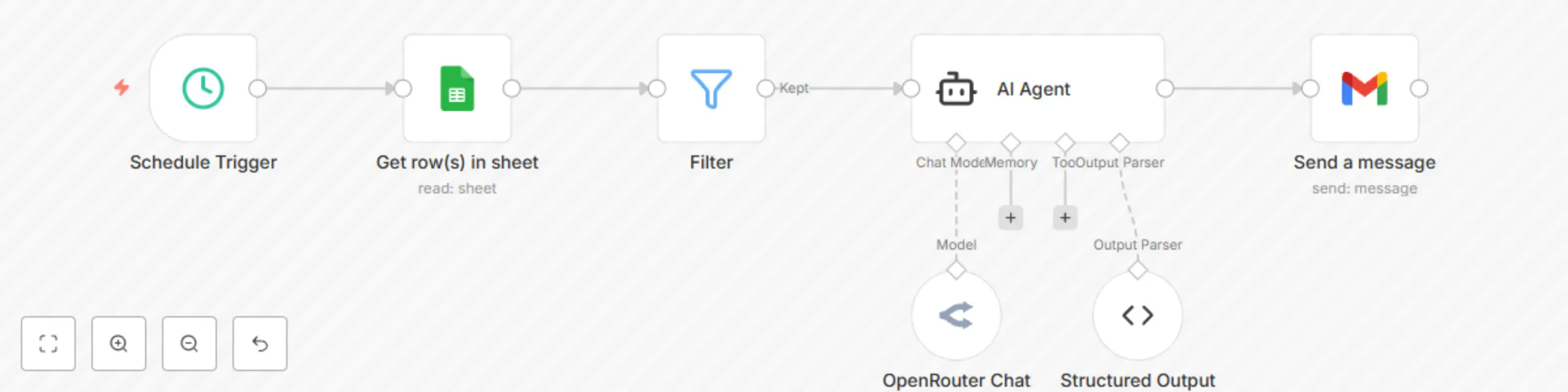
This workflow sends personalized birthday greetings via email every morning using data from Google Sheets and messages generated with AI. It’s great for communities, schools, small businesses, or anyone who wants to automate meaningful connections.
⚙️ Features
🗓 Daily Birthday Check — Runs every day at 9 AM 📋 Google Sheets Integration — Reads user data: Name, Email, DOB 🔍 Smart Date Matching — Extracts day & month from DOB to match today’s date 🤖 OpenRouter AI Integration — Generates a custom subject + email message 🛠 Function Node Cleanup — Separates AI response into subject & body 📬 Gmail Node — Sends personalized birthday wishes instantly
🔧 Tech Stack
- Google Sheets
- OpenRouter (or OpenAI-compatible model)
- Gmail
💡 Use Cases
- Educators sending birthday emails to students
- Team leads acknowledging team members’ birthdays
- Freelancers staying in touch with clients
- 1Coaches or mentors maintaining personal rapport
📝 Requirements
- Google Sheet with columns: Name, DOB (DD/MM/YYYY), and Email
- Gmail account with OAuth2 connected
- OpenRouter (or OpenAI) API key
- Basic understanding of n8n nodes