Automated asteroid alerts with NASA API, Slack & Google Calendar

Workflow preview

Workflow preview
100%
Automated asteroid alerts with NASA API, Slack & Google Calendar preview
Open on n8n.io

Important notice

This workflow is provided as-is. Please review and test before using in production.

1. Workflow Overview

This n8n template creates an automated alert system that checks NASA's data for near Earth asteroids twice a day. When it finds asteroids meeting specific criteria, it sends a summary alert to Slac...

Best for

  • Social Media automation workflows
  • advanced n8n builders looking for reusable templates

Tools used

n8n-nodes-base.scheduletrigger, n8n-nodes-base.stickynote, n8n-nodes-base.code, n8n-nodes-base.if, n8n-nodes-base.slack, n8n-nodes-base.splitout, n8n-nodes-base.nasa, n8n-nodes-base.googlecalendar

Source and attribution

This workflow is cataloged by N8N Workflows and links back to its original n8n.io source page by Yusuke Yamamoto.

Original n8n.io source

1.1 Workflow description

Title
Automated asteroid alerts with NASA API, Slack & Google Calendar
Workflow name
Automated asteroid alerts with NASA API, Slack & Google Calendar

This n8n template creates an automated alert system that checks NASA's data for near-Earth asteroids twice a day. When it finds asteroids meeting specific criteria, it sends a summary alert to Slack and creates individual events in Google Calendar for each object.

Use cases

  • Automated Monitoring: Keep track of potentially hazardous asteroids without manually checking websites.
  • Team or Community Alerts: Automatically inform a team, a group of friends, or a community about significant celestial events via Slack.
  • Personalized Space Calendar: Populate your Google Calendar with upcoming asteroid close approaches, creating a personal "what's up in space" agenda.
  • Educational Tool: Use this as a foundation to learn about API data fetching, data processing, and multi-channel notifications in n8n.

Good to know

  • This workflow runs on a schedule (every 12 hours by default) and does not require a manual trigger.
  • NASA API Key is highly recommended. The default DEMO_KEY has strict rate limits. Get a free key from api.nasa.gov.
  • The filtering logic for what constitutes an "alert-worthy" asteroid (distance and size) is fully customizable within the "Filter and Process Asteroids" Code node.

How it works

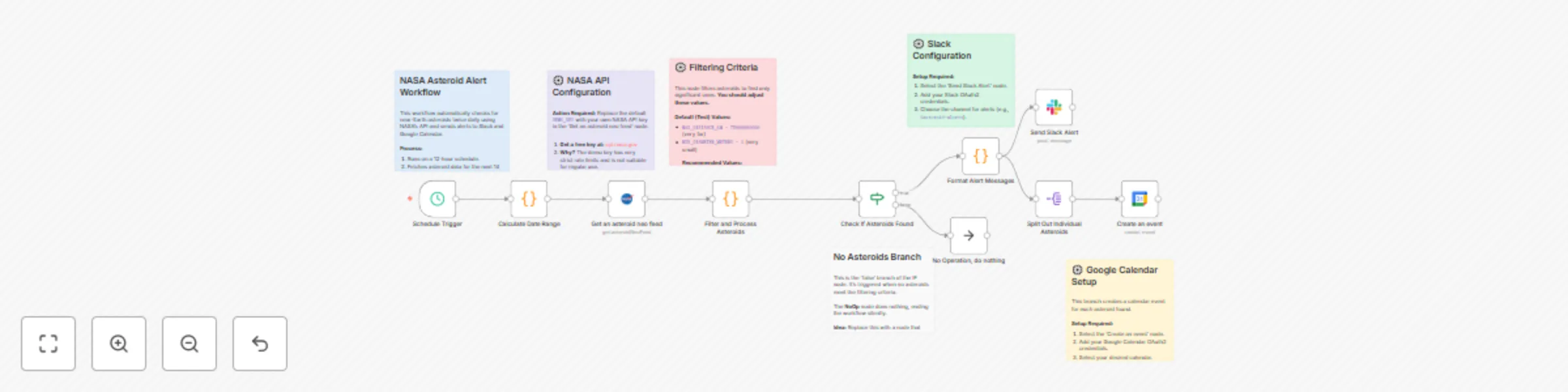
  1. A Schedule Trigger starts the workflow every 12 hours.
  2. The "Calculate Date Range" Code node generates the start and end dates for the API query (today to 14 days from now).
  3. The NASA node uses these dates to query the Near Earth Object Web Service (NeoWs) API, retrieving a list of all asteroids that will pass by Earth in that period.
  4. The "Filter and Process Asteroids" Code node iterates through the list. It filters out objects that are too small or too far away, based on thresholds defined in the code. It then formats and sorts the remaining "interesting" asteroids by their closest approach distance.
  5. An If node checks if any asteroids were found after filtering.
    • If true (asteroids were found), the flow continues to the alert steps.
    • If false, the workflow ends quietly via a NoOp node.
  6. The "Format Alert Messages" Code node compiles a single, well-formatted summary message for Slack and prepares the data for other notifications.
  7. The workflow then splits into two parallel branches:
    • Slack Alert: The Slack node sends the summary message to a specified channel.
    • Calendar Events: The Split Out node separates the data so that each asteroid is processed individually. For each asteroid, the Google Calendar node creates an all-day event on its close-approach date.

How to use

  1. Configure the NASA Node:

    • Open the "Get an asteroid neo feed" (NASA) node.
    • Create new credentials and replace the default DEMO_KEY with your own NASA API key.
  2. Customize Filtering (Optional):

    • Open the "Filter and Process Asteroids" Code node.
    • Adjust the MAX_DISTANCE_KM and MIN_DIAMETER_METERS variables to make the alerts more or less sensitive.
      // Example: For closer, larger objects
      const MAX_DISTANCE_KM = 7500000; // 7.5 million km (approx. 19.5 lunar distances)
      const MIN_DIAMETER_METERS = 100;   // 100 meters
      
  3. Configure Slack Alerts:

    • Open the "Send Slack Alert" node.
    • Add your Slack OAuth2 credentials.
    • Select the channel where you want to receive alerts (e.g., #asteroid-watch).
  4. Configure Google Calendar Events:

    • Open the "Create an event" (Google Calendar) node.
    • Add your Google Calendar OAuth2 credentials.
    • Select the calendar where events should be created.
  5. Activate the workflow.

Requirements

  • A free NASA API Key.
  • Slack credentials (OAuth2) and a workspace to post alerts.
  • Google Calendar credentials (OAuth2) to create events.

Customising this workflow

  • Add More Notification Channels: Add nodes for Discord, Telegram, or email to send alerts to other platforms.
  • Create a Dashboard: Instead of just sending alerts, use the processed data to populate a database (like Baserow or Postgres) to power a simple dashboard.
  • Different Data Source: Modify the HTTP Request node to pull data from other space-related APIs, like a feed of upcoming rocket launches.

1.2 Logical Blocks

This catalog entry is organized from the workflow JSON. The node-level section below shows the executable blocks available for review before importing the template.

2. Block-by-Block Analysis

Block 1 - Schedule Trigger

Type / Role
n8n-nodes-base.scheduleTrigger - scheduleTrigger
Config choices
Version 1.2

Block 2 - Workflow Overview

Type / Role
n8n-nodes-base.stickyNote - stickyNote
Config choices
Version 1

Block 3 - Calculate Date Range

Type / Role
n8n-nodes-base.code - code
Config choices
Version 2

Block 4 - API Key Note

Type / Role
n8n-nodes-base.stickyNote - stickyNote
Config choices
Version 1

Block 5 - Filter and Process Asteroids

Type / Role
n8n-nodes-base.code - code
Config choices
Version 2

Block 6 - Filter Settings

Type / Role
n8n-nodes-base.stickyNote - stickyNote
Config choices
Version 1

Block 7 - Check If Asteroids Found

Type / Role
n8n-nodes-base.if - if
Config choices
Version 2

Block 8 - Format Alert Messages

Type / Role
n8n-nodes-base.code - code
Config choices
Version 2

Block 9 - Send Slack Alert

Type / Role
n8n-nodes-base.slack - slack
Config choices
Version 2.2

Block 10 - Slack Setup

Type / Role
n8n-nodes-base.stickyNote - stickyNote
Config choices
Version 1

Block 11 - Split Out Individual Asteroids

Type / Role
n8n-nodes-base.splitOut - splitOut
Config choices
Version 1

Block 12 - Calendar Setup

Type / Role
n8n-nodes-base.stickyNote - stickyNote
Config choices
Version 1

Block 13 - No Results Note

Type / Role
n8n-nodes-base.stickyNote - stickyNote
Config choices
Version 1

Block 14 - Get an asteroid neo feed

Type / Role
n8n-nodes-base.nasa - nasa
Config choices
Version 1

Block 15 - Create an event

Type / Role
n8n-nodes-base.googleCalendar - googleCalendar
Config choices
Version 1.3

Block 16 - No Operation, do nothing

Type / Role
n8n-nodes-base.noOp - noOp
Config choices
Version 1

3. Summary Table

Workflow Automated asteroid alerts with NASA API, Slack & Google Calendar
Complexity advanced
Nodes 16
Categories Social Media
Author Yusuke Yamamoto
Published 19 Oct 2025

4. Reproducing the Workflow from Scratch

  1. 1. Download the workflow JSON

    Use the JSON export at /data/workflows/9877/9877.json as the source template for this automation.

  2. 2. Import the template into n8n

    Open n8n, import the downloaded JSON, and review each node before activating the workflow.

  3. 3. Configure credentials and variables

    Replace placeholder credentials, API keys, webhook URLs, account IDs, and environment-specific values with your own settings.

  4. 4. Test with sample data

    Run the workflow manually or in a staging workspace, inspect node output, and confirm downstream systems receive the expected data.

  5. 5. Activate and monitor

    Enable the workflow only after testing, then monitor executions, errors, and rate limits during the first production runs.

5. General Notes & Resources

Review imported nodes carefully before activation. This catalog entry is intended to help you inspect the workflow structure, understand required services, and find related templates faster.

Node names, credentials, schedules, webhook paths, and external service limits may need adjustment for your workspace.

Frequently asked questions

What does Automated asteroid alerts with NASA API, Slack & Google Calendar do?

This n8n template creates an automated alert system that checks NASA's data for near Earth asteroids twice a day. When it finds asteroids meeting specific criteria, it sends a summary alert to Slac...

What do I need before importing this workflow?

Review the workflow JSON, configure any required credentials in n8n, and test the automation in a safe workspace before using it in production.

Can I customize this workflow?

Yes. Use the block-by-block analysis and the downloadable JSON to inspect each node, then adjust credentials, prompts, schedules, filters, or destinations for your Social Media use case.