Block 1 - Convert to File
- Type / Role
- n8n-nodes-base.convertToFile - convertToFile
- Config choices
- Version 1.1


 Early Deal
This workflow is provided as-is. Please review and test before using in production.
Title: ️ Deep Dive: Automating Weekly US Trademark Reports with n8n, RapidAPI & Google Drive (No Code Workflow) Full Breakdown Post: In this in depth walkthrough, we're exploring a powerful no cod...
n8n-nodes-base.converttofile, n8n-nodes-base.scheduletrigger, n8n-nodes-base.httprequest, n8n-nodes-base.datetime, n8n-nodes-base.code, n8n-nodes-base.set, n8n-nodes-base.googledrive
This workflow is cataloged by N8N Workflows and links back to its original n8n.io source page by iamvaar.
Original n8n.io sourceTitle: ⚙️ Deep Dive: Automating Weekly US Trademark Reports with n8n, RapidAPI & Google Drive (No-Code Workflow)
Full Breakdown Post:
In this in-depth walkthrough, we're exploring a powerful no-code automation built entirely using n8n, that automatically fetches the latest US trademark registrations every 7 days, saves them to a CSV, and uploads that file to your Google Drive — no manual effort required.
Whether you're a startup founder, legal tech builder, or data analyst, this type of automation can save you hours every week and give you a real-time pulse on newly registered trademarks in the US.
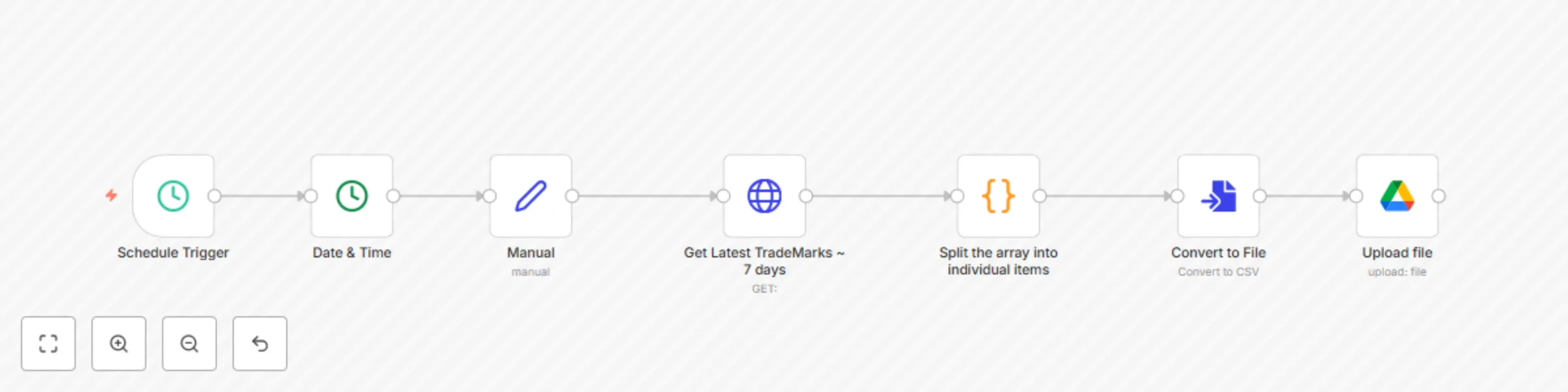
Every week, the workflow automatically:
Triggers on a schedule
Calculates the date range (today and 7 days prior)
Fetches trademark data from the USPTO via a RapidAPI endpoint
Splits the API response into individual rows
Converts it into a CSV file
Uploads the file to Google Drive with a dynamic name like:
Active TM (2025-07-29 - 2025-08-05).csv
Schedule TriggerDate & TimeNode: Set
Purpose: Assigns two dynamic values:
Start_Date: Current date minus 7 daysEnd_Date: Current date (today)HTTP RequestThis returns an array of trademark records from USPTO's database that were registered in the past week.
CodeThis takes the results array from the HTTP response and flattens it so that each trademark record becomes its own item in n8n's context.
Convert to Filetest.csv (you can change this dynamically if needed)This node takes all the individual trademark JSON objects and generates a CSV file out of them.
Node: Google Drive
Folder ID: Your target folder’s ID
Dynamic Name:
=Active TM ({{ $('Manual').item.json.Start_Date }} - {{ $('Manual').item.json.End_Date }})
This uploads the generated CSV file directly into your specified Google Drive folder with the correct name and date range.
> DISCLAIMER: THIS IS FOR EDUCATIONAL PURPOSES ONLY. THE CREATOR IS NOT LIABLE FOR ANY LOSSES OR DAMAGES CAUSED BY MISUSE OF THIS WORKFLOW.
With this one workflow, you're building a production-grade automation pipeline that would otherwise take a full dev sprint to manually script and deploy.
Use it, extend it, and plug it into other workflows like:
n8n is your playground — this is just the beginning.
This catalog entry is organized from the workflow JSON. The node-level section below shows the executable blocks available for review before importing the template.
| Workflow | Automate weekly US trademark reports with USPTO API and Google Drive CSV export |
|---|---|
| Complexity | intermediate |
| Nodes | 7 |
| Categories | Market Research |
| Author | iamvaar |
| Published | 05 Aug 2025 |
Use the JSON export at /data/workflows/7024/7024.json as the source template for this automation.
Open n8n, import the downloaded JSON, and review each node before activating the workflow.
Replace placeholder credentials, API keys, webhook URLs, account IDs, and environment-specific values with your own settings.
Run the workflow manually or in a staging workspace, inspect node output, and confirm downstream systems receive the expected data.
Enable the workflow only after testing, then monitor executions, errors, and rate limits during the first production runs.
Review imported nodes carefully before activation. This catalog entry is intended to help you inspect the workflow structure, understand required services, and find related templates faster.
Node names, credentials, schedules, webhook paths, and external service limits may need adjustment for your workspace.
Title: ️ Deep Dive: Automating Weekly US Trademark Reports with n8n, RapidAPI & Google Drive (No Code Workflow) Full Breakdown Post: In this in depth walkthrough, we're exploring a powerful no cod...
Review the workflow JSON, configure any required credentials in n8n, and test the automation in a safe workspace before using it in production.
Yes. Use the block-by-block analysis and the downloadable JSON to inspect each node, then adjust credentials, prompts, schedules, filters, or destinations for your Market Research use case.