Block 1 - Schedule Trigger
- Type / Role
- n8n-nodes-base.scheduleTrigger - scheduleTrigger
- Config choices
- Version 1.2


 Early Deal
This workflow is provided as-is. Please review and test before using in production.
Automated Facebook Page Story Video Publisher (Google Drive → Facebook → Google Sheet) Recommended: Self hosted via tino.vn/vps n8n?affid=388 — use code VP...
n8n-nodes-base.scheduletrigger, n8n-nodes-base.googledrive, n8n-nodes-base.set, n8n-nodes-base.googlesheets, n8n-nodes-base.if, n8n-nodes-base.httprequest, n8n-nodes-base.code, n8n-nodes-base.stickynote
This workflow is cataloged by N8N Workflows and links back to its original n8n.io source page by Đỗ Thành Nguyên.
Original n8n.io source> Recommended: Self-hosted via tino.vn/vps-n8n?affid=388 — use code VPSN8N for up to 39% off.
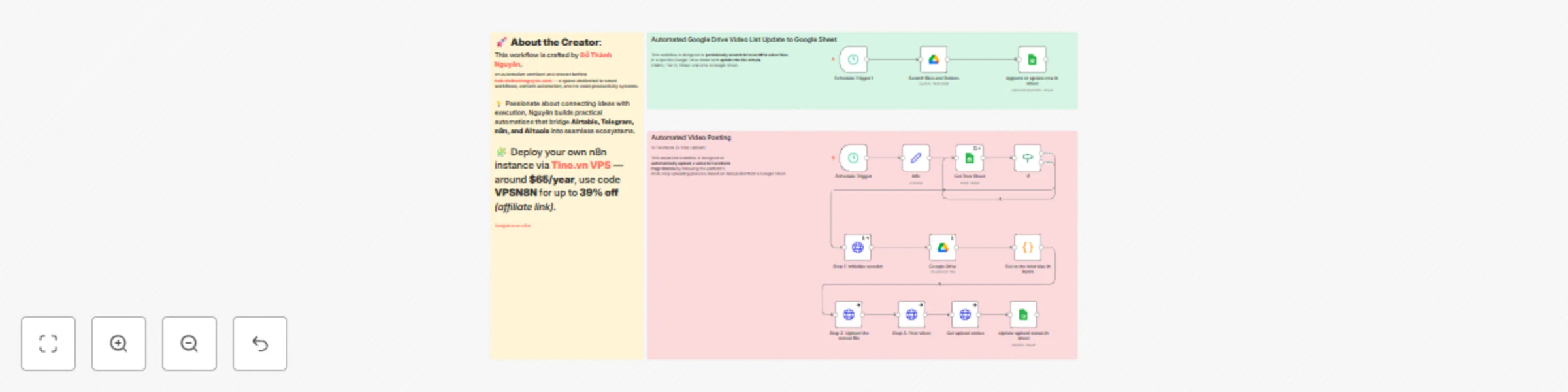
This workflow is an automated solution for publishing video content from Google Drive to your Facebook Page Stories, while using Google Sheets as a posting queue manager.
This automation orchestrates a complete multi-step process for uploading and publishing videos to Facebook Stories:
Queue Management: Every 2 hours and 30 minutes, the workflow checks a Google Sheet (Get Row Sheet node) to find the first video whose Stories column is empty — meaning it hasn’t been posted yet.
Conditional Execution: An If node confirms that the video’s File ID exists before proceeding.
Video Retrieval: Using the File ID, the workflow downloads the video from Google Drive (Google Drive node) and calculates its binary size (Set to the total size in bytes node).
Facebook 3-Step Upload: It performs the Facebook Graph API’s three-step upload process through HTTP Request nodes:
upload_url and video_id.upload_url.Status Update: Once completed, the workflow updates the same row in Google Sheets (Update upload status in sheet node) using the row_number to mark the video as processed.
> Recommended: Self-hosted via tino.vn/vps-n8n?affid=388 — use code VPSN8N for up to 39% off.
Google Drive Credentials: OAuth2 credentials for Google Drive to let n8n download video files.
Google Sheets Credentials: OAuth2 credentials for Google Sheets to read the posting queue and update statuses.
Google Sheet: A spreadsheet (ID: 1RnE5O06l7W6TLCLKkwEH5Oyl-EZ3OE-Uc3OWFbDohYI) containing:
File ID — the video’s unique ID in Google Drive.Stories — posting status column (leave empty for pending videos).row_number — used for updating the correct row after posting.115432036514099 in the info node).pages_manage_posts and pages_read_engagement.
This token is hardcoded in the info node and again in Step 3. Post video.Schedule Trigger will automatically handle new uploads every 2 hours and 30 minutes.⚠️ Token Security: Hardcoding your Access Token inside the info node is not recommended. Tokens expire and expose your Page to risk if leaked.
👉 Action: Replace the static token with a secure Credential setup that supports token rotation.
Loop Efficiency: The “false” output of the If node currently loops back to the Get Row Sheet node. This creates unnecessary cycles if no videos are found.
👉 Action: Disconnect that branch so the workflow stops gracefully when no unposted videos remain.
Status Updates: To prevent re-posting the same video, the final Update upload status in sheet node must update the Stories column (e.g., write "POSTED").
👉 Action: Add this mapping explicitly to your Google Sheets node.
Automated File ID Sync: This workflow assumes that the Google Sheet already contains valid File IDs.
👉 You can build a secondary workflow (using Schedule Trigger1 → Search files and folders → Append or update row in sheet) to automatically populate new video File IDs from your Google Drive.
Once active, this workflow automatically:
This catalog entry is organized from the workflow JSON. The node-level section below shows the executable blocks available for review before importing the template.
| Workflow | Automate video story publishing to Facebook Page using Google Drive and Sheets |
|---|---|
| Complexity | advanced |
| Nodes | 17 |
| Categories | Social Media |
| Author | Đỗ Thành Nguyên |
| Published | 23 Oct 2025 |
Use the JSON export at /data/workflows/10067/10067.json as the source template for this automation.
Open n8n, import the downloaded JSON, and review each node before activating the workflow.
Replace placeholder credentials, API keys, webhook URLs, account IDs, and environment-specific values with your own settings.
Run the workflow manually or in a staging workspace, inspect node output, and confirm downstream systems receive the expected data.
Enable the workflow only after testing, then monitor executions, errors, and rate limits during the first production runs.
Review imported nodes carefully before activation. This catalog entry is intended to help you inspect the workflow structure, understand required services, and find related templates faster.
Node names, credentials, schedules, webhook paths, and external service limits may need adjustment for your workspace.
Automated Facebook Page Story Video Publisher (Google Drive → Facebook → Google Sheet) Recommended: Self hosted via tino.vn/vps n8n?affid=388 — use code VP...
Review the workflow JSON, configure any required credentials in n8n, and test the automation in a safe workspace before using it in production.
Yes. Use the block-by-block analysis and the downloadable JSON to inspect each node, then adjust credentials, prompts, schedules, filters, or destinations for your Social Media use case.