Đ

Đỗ Thành Nguyên

3
Workflows

Workflows by Đỗ Thành Nguyên
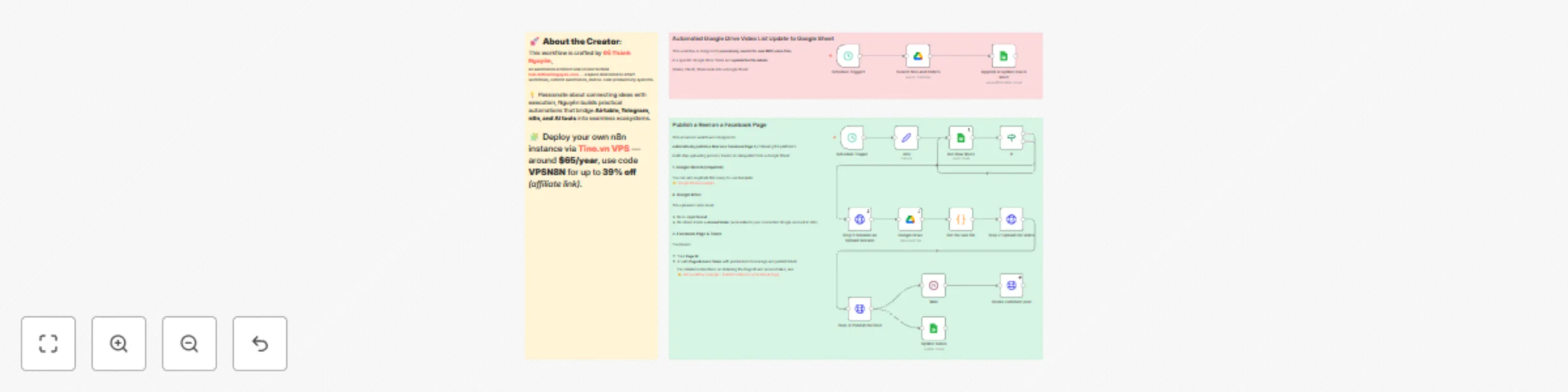
Workflow preview: Automate Facebook reels publishing with Google Sheets and Drive
Free advanced

Automate Facebook reels publishing with Google Sheets and Drive

## Publish a Reel on a Facebook Page ### 🧠 Good to Know > Set up n8n self-hosted instance using **[https://tino.vn/vps-n8n?affid=388](https://tino.vn/vps-n8n?affid=388)** > Use the code ==**VPSN8N**== for up to 39% off. This workflow automatically **uploads and publishes Facebook Reels** using data from Google Sheets and video files stored in Google Drive. It runs on a schedule (every 30 minutes by default) and can be fully customized for your posting routine. --- ### ⚙️ How It Works 1. **Google Sheets** provides the content data — video file ID, caption, and optional links. 2. **Google Drive** hosts the actual video file (.mp4 format). 3. The workflow initializes an **upload session** with the Facebook Graph API, uploads the video, and publishes it as a Reel on your Page. 4. Finally, it updates your Google Sheet and adds a comment under the published Reel with your affiliate or product link. --- ### How to Use 1. **Open the template Google Sheet** or make a copy: 👉 [Template Sheet](https://docs.google.com/spreadsheets/d/1JMT2BpWxfcG-d_XEWRppdSr_ZkG0XvtiaGaB8Lzdl78/edit?usp=sharing) 2. Fill out each row with: * **File ID** → the ID of your video file from Google Drive * **File name** → optional * **Caption** → your post caption * **Link Share** → optional * **Link post** → leave empty (it will be filled after posting) 3. Ensure your video file: * **.mp4 format** * **shared folder** on Google Drive that’s accessible to your connected account 4. Add your **Facebook Page ID** and **Page Access Token** to the “info” node. (Learn how to get these here: [Facebook Reels Workflow Guide](https://n8n.io/workflows/10038)) ![image.png](fileId:3103) --- ### 📋 Requirements * **n8n instance (Self-hosted recommended):** * Set up a self-hosted instance using **[https://tino.vn/vps-n8n?affid=388](https://tino.vn/vps-n8n?affid=388)** * Use the code **VPSN8N** for up to 39% off. * **Facebook Page** with publishing permissions * **[Page Access Token](https://n8n.io/workflows/10038)** (with `pages_manage_posts`, `pages_read_engagement`) * **Google Drive** and **Google Sheets** account connected to n8n * Video files in **.mp4** format, under the 1GB upload limit --- ### 🎨 Customizing This Workflow * **Change schedule:** Adjust the **Schedule Trigger** node (e.g., every 2 hours or only during business hours). * **Track post links:** Add a node to fetch the `permalink_url` from the Graph API and update it in your sheet. * **Auto-comment control:** Modify or remove the “Create comment post” node to suit your campaign style. * **Improve security:** Replace hardcoded tokens with **n8n credentials**, **secrets**, or a **Data Table** lookup. This structure keeps your automation scalable, secure, and easy to adapt for multi-page or multi-brand use.

Đ
Đỗ Thành Nguyên
Social Media
24 Oct 2025
746
0
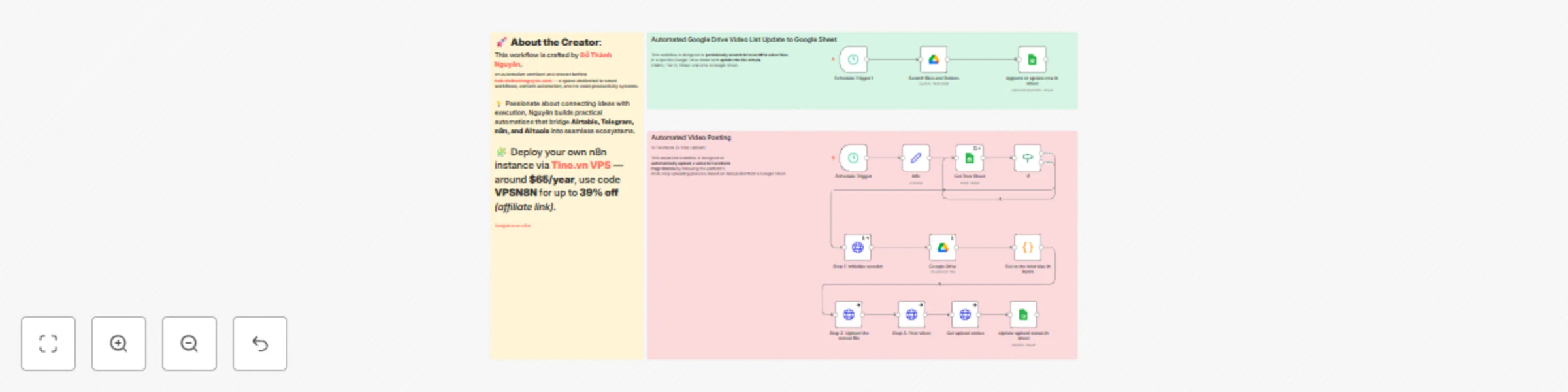
Workflow preview: Automate video story publishing to Facebook Page using Google Drive and Sheets
Free advanced

Automate video story publishing to Facebook Page using Google Drive and Sheets

## **Automated Facebook Page Story Video Publisher (Google Drive → Facebook → Google Sheet)** > **Recommended:** Self-hosted via [tino.vn/vps-n8n?affid=388](https://tino.vn/vps-n8n?affid=388) — use code **VPSN8N** for up to **39% off**. This workflow is an **automated solution for publishing video content from Google Drive to your Facebook Page Stories**, while using Google Sheets as a posting queue manager. --- ## **What This Workflow Does (Workflow Function)** This automation orchestrates a complete multi-step process for uploading and publishing videos to Facebook Stories: 1. **Queue Management:** Every 2 hours and 30 minutes, the workflow checks a Google Sheet (`Get Row Sheet` node) to find the **first video** whose `Stories` column is empty — meaning it hasn’t been posted yet. 2. **Conditional Execution:** An **If** node confirms that the video’s `File ID` exists before proceeding. 3. **Video Retrieval:** Using the `File ID`, the workflow downloads the video from Google Drive (`Google Drive` node) and calculates its binary size (`Set to the total size in bytes` node). 4. **Facebook 3-Step Upload:** It performs the Facebook Graph API’s three-step upload process through HTTP Request nodes: * **Step 1 – Initialize Session:** Starts an upload session and retrieves the `upload_url` and `video_id`. * **Step 2 – Upload File:** Uploads the binary video data to the provided `upload_url`. * **Step 3 – Publish Video:** Finalizes and publishes the uploaded video as a Facebook Story. 5. **Status Update:** Once completed, the workflow updates the same row in Google Sheets (`Update upload status in sheet` node) using the `row_number` to mark the video as processed. --- ## **Prerequisites (What You Need Before Running)** ### 1. n8n Instance > **Recommended:** Self-hosted via [tino.vn/vps-n8n?affid=388](https://tino.vn/vps-n8n?affid=388) — use code **VPSN8N** for up to **39% off**. ### 2. Google Services * **Google Drive Credentials:** OAuth2 credentials for Google Drive to let n8n download video files. * **Google Sheets Credentials:** OAuth2 credentials for Google Sheets to read the posting queue and update statuses. * **Google Sheet:** A spreadsheet (ID: `1RnE5O06l7W6TLCLKkwEH5Oyl-EZ3OE-Uc3OWFbDohYI`) containing: * `File ID` — the video’s unique ID in Google Drive. * `Stories` — posting status column (leave empty for pending videos). * `row_number` — used for updating the correct row after posting. ### 3. Facebook Setup * **Page ID:** Your Facebook Page ID (currently hardcoded as `115432036514099` in the `info` node). * **Access Token:** A **Page Access Token** with permissions such as `pages_manage_posts` and `pages_read_engagement`. This token is hardcoded in the `info` node and again in `Step 3. Post video`. --- ## **Usage Guide and Implementation Notes** ### **How to Use** 1. **Queue Videos:** Add video entries to your Google Sheet. Each entry must include a valid Google Drive **File ID**. Leave the **Stories** column empty for videos that haven’t been posted. 2. **Activate:** Save and **activate** the workflow. The `Schedule Trigger` will automatically handle new uploads every 2 hours and 30 minutes. --- ### **Implementation Notes** * **⚠️ Token Security:** Hardcoding your **Access Token** inside the `info` node is **not recommended**. Tokens expire and expose your Page to risk if leaked. 👉 **Action:** Replace the static token with a secure **Credential** setup that supports token rotation. * **Loop Efficiency:** The **“false”** output of the `If` node currently loops back to the `Get Row Sheet` node. This creates unnecessary cycles if no videos are found. 👉 **Action:** Disconnect that branch so the workflow stops gracefully when no unposted videos remain. * **Status Updates:** To prevent re-posting the same video, the final `Update upload status in sheet` node must update the **Stories** column (e.g., write `"POSTED"`). 👉 **Action:** Add this mapping explicitly to your Google Sheets node. * **Automated File ID Sync:** This workflow assumes that the Google Sheet already contains valid File IDs. 👉 You can build a **secondary workflow** (using `Schedule Trigger1 → Search files and folders → Append or update row in sheet`) to automatically populate new video File IDs from your Google Drive. --- ## ✅ **Result** Once active, this workflow automatically: * pulls pending videos from your Google Sheet, * uploads them to Facebook Stories, * and marks them as posted — all without manual intervention.

Đ
Đỗ Thành Nguyên
Social Media
23 Oct 2025
395
0
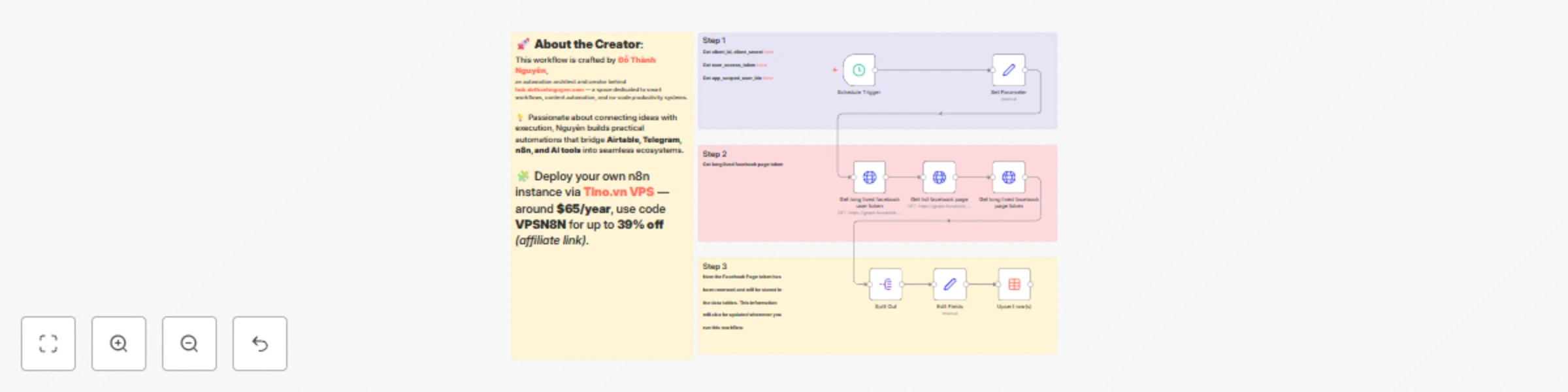
Workflow preview: Automate Facebook page token renewal with data tables storage
Free intermediate

Automate Facebook page token renewal with data tables storage

## **Get Long-Lived Facebook Page Access Token with Data Table** > Set up n8n self-hosted via [Tino.vn VPS](https://tino.vn/vps-n8n?affid=388) — use code **VPSN8N** for up to 39% off *(affiliate link)*. ### **Good to Know** This workflow automatically solves the common issue of **Facebook Page Access Tokens expiring**. It proactively renews your Page Tokens and stores them in an n8n Data Table. It runs **every two months**, ensuring your Page Access Tokens remain valid. This guarantees seamless and uninterrupted automation for all your Facebook API integrations. ### **How It Works** The workflow performs the following steps to keep your tokens up to date: 1. **Schedule Trigger:** The workflow runs on a set schedule — every two months by default. 2. **Set Parameters:** It initializes the required credentials: `client_id`, `client_secret`, a short-lived `user_access_token`, and the `app_scoped_user_id` (all obtained from Facebook Developer Tools). 3. **Get Long-Lived User Token:** It exchanges the short-lived User Access Token for a long-lived one. 4. **Get Page Tokens:** Using the long-lived User Token, it fetches all pages you manage and their corresponding Page Access Tokens. 5. **Update Data Table:** For each page, it extracts the `access_token`, `name`, and `id`, then performs an **Upsert** operation to update or insert rows in your n8n Data Table, ensuring the stored tokens are always current. ### **How to Use** 1. **Import:** Import this JSON file into your **[n8n instance](https://tino.vn/vps-n8n?affid=388)**. 2. **Configure Credentials:** Open the **Set Parameters** node and replace the placeholder values for `client_id`, `client_secret`, `user_access_token`, and `app_scoped_user_id` with your actual credentials from Facebook. 3. **Configure Data Table:** Open the **Upsert row(s)** node. * Select or create an n8n **Data Table** to store your tokens. * Make sure the column mapping (`token`, `name_page`, `id_page`) matches your table schema. 4. **Activate:** Save and activate the workflow. It will now run automatically based on your configured schedule. ### **Requirements** * **n8n instance :** > Set up n8n self-hosted via [Tino.vn VPS](https://tino.vn/vps-n8n?affid=388) — use code **VPSN8N** for up to 39% off *(affiliate link)*. * **Facebook App:** A Facebook Developer App to generate the following credentials: * `client_id` and `client_secret` * A short-lived `user_access_token` * `app_scoped_user_id` * **Data Table:** An n8n Data Table configured with columns to store token information (e.g., `token`, `name_page`, `id_page`). ### **Customizing This Workflow** * **Change Schedule:** To modify how often tokens are renewed, edit the **Schedule Trigger** node. You can change the interval from **2 months** to **1 month**, or schedule it for a specific day. * **Filter Pages:** If you only want to store tokens for specific pages, insert a **Filter** node right after **Split Out**. Use the page name or ID to filter before sending data to **Upsert row(s)**. * **Alternative Storage:** Instead of an n8n Data Table, you can replace the **Upsert row(s)** node with another option (e.g., Google Sheets, a database, or a **Set** node) to store tokens elsewhere.

Đ
Đỗ Thành Nguyên
Social Media
22 Oct 2025
169
0