Block 1 - AI Agent
- Type / Role
- @n8n/n8n-nodes-langchain.agent - agent
- Config choices
- Version 2.2


 Early Deal
This workflow is provided as-is. Please review and test before using in production.
This n8n template from Intuz provides a complete and automated solution for creating an autonomous social media manager. This workflow uses an AI agent to intelligently ge...
@n8n/n8n-nodes-langchain.agent, @n8n/n8n-nodes-langchain.lmchatopenai, @n8n/n8n-nodes-langchain.memorybufferwindow, n8n-nodes-base.twitter, n8n-nodes-base.stickynote, n8n-nodes-base.googlesheetstool, n8n-nodes-base.code, n8n-nodes-base.googlesheets
This workflow is cataloged by N8N Workflows and links back to its original n8n.io source page by Intuz .
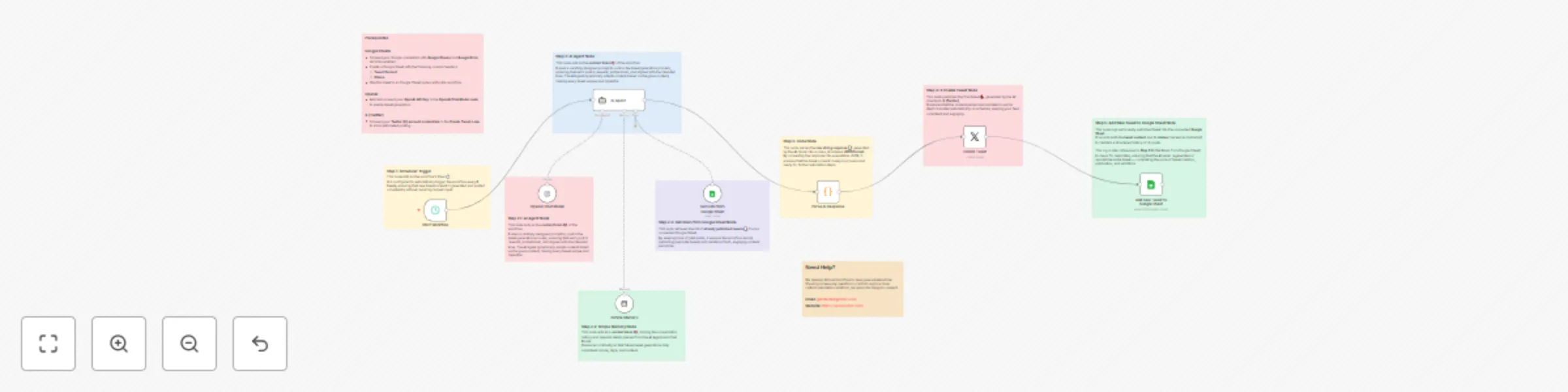
Original n8n.io sourceThis workflow uses an AI agent to intelligently generate unique, high-quality content, check for duplicates, and post it on a consistent schedule to automate your entire Twitter presence.
1. Runs on a Schedule: The workflow automatically starts at a set interval (e.g., every 6 hours), ensuring a consistent posting schedule.
2. AI Generates a New Tweet: An advanced AI Agent, powered by OpenAI, uses a detailed prompt to craft a new, engaging tweet. The prompt defines the tone, topics, character limits, and hashtags.
3. Checks for Duplicates: Before finalizing the tweet, the AI Agent is equipped with a tool to read a Google Sheet containing a log of all previously published posts. This allows it to ensure the new content is always unique.
4. Posts to Twitter (X): The final, unique tweet is automatically posted to your connected Twitter account.
5. Logs the New Post: After posting, the workflow logs the new tweet back into the Google Sheet, updating the history for the next run. This completes the autonomous loop.
Schedule Your Posts: In the Start Workflow (Schedule Trigger) node, set the frequency you want the workflow to run (e.g., every 6 hours).
Connect OpenAI:
Before you start, please ensure you have the following accounts and assets ready:
An n8n Instance: An active n8n account (Cloud or self-hosted) where you can import and run this workflow.
OpenAI Account: An active OpenAI account with an API Key. You will need to have billing enabled to use the language models for tweet generation.
Google Account & Sheet: A Google account and a pre-made Google Sheet. The sheet must have two specific columns: Tweet Content and Status.
Twitter (X) Developer Account: A Twitter (X) account with an approved Developer profile. You need an App created within the Developer Portal with the necessary permissions (v2 API access with Write scopes) to post tweets automatically.
Click here- Get Started
This catalog entry is organized from the workflow JSON. The node-level section below shows the executable blocks available for review before importing the template.
| Workflow | Automate Twitter posting with GPT-4 content generation & Google Sheets tracking |
|---|---|
| Complexity | advanced |
| Nodes | 18 |
| Categories | Social Media, AI Chatbot |
| Author | Intuz |
| Published | 29 Aug 2025 |
Use the JSON export at /data/workflows/8010/8010.json as the source template for this automation.
Open n8n, import the downloaded JSON, and review each node before activating the workflow.
Replace placeholder credentials, API keys, webhook URLs, account IDs, and environment-specific values with your own settings.
Run the workflow manually or in a staging workspace, inspect node output, and confirm downstream systems receive the expected data.
Enable the workflow only after testing, then monitor executions, errors, and rate limits during the first production runs.
Review imported nodes carefully before activation. This catalog entry is intended to help you inspect the workflow structure, understand required services, and find related templates faster.
Node names, credentials, schedules, webhook paths, and external service limits may need adjustment for your workspace.
This n8n template from Intuz provides a complete and automated solution for creating an autonomous social media manager. This workflow uses an AI agent to intelligently ge...
Review the workflow JSON, configure any required credentials in n8n, and test the automation in a safe workspace before using it in production.
Yes. Use the block-by-block analysis and the downloadable JSON to inspect each node, then adjust credentials, prompts, schedules, filters, or destinations for your Social Media, AI Chatbot use case.