Block 1 - When clicking ‘Execute workflow’
- Type / Role
- n8n-nodes-base.manualTrigger - manualTrigger
- Config choices
- Version 1


 Early Deal
This workflow is provided as-is. Please review and test before using in production.
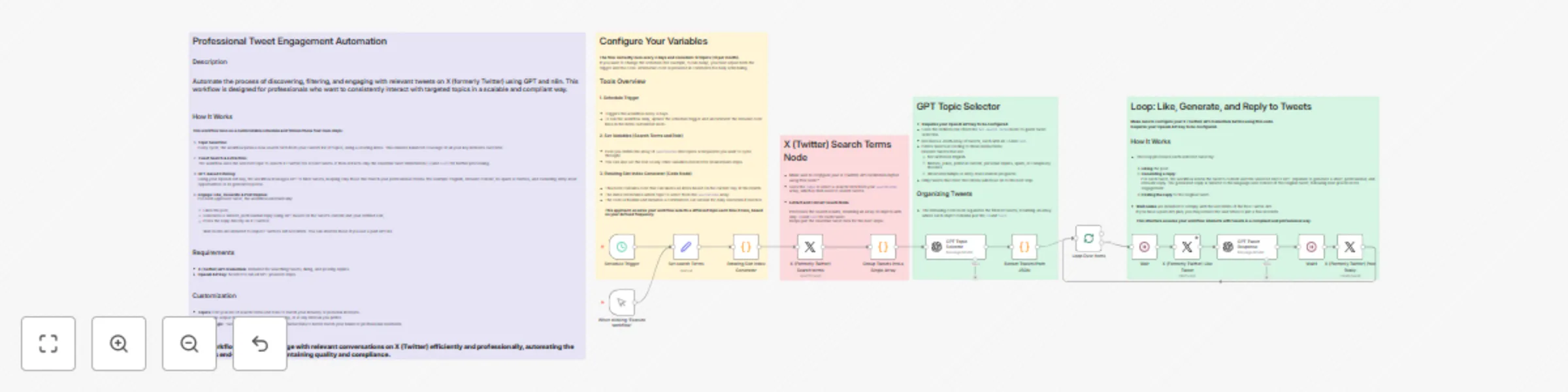
Automate tweet engagement on X (formerly Twitter) Description Automate professional engagement on X (formerly Twitter) by searching for, filtering, liking, and replying to tweets that match your ke...
n8n-nodes-base.manualtrigger, n8n-nodes-base.wait, n8n-nodes-base.splitinbatches, n8n-nodes-base.scheduletrigger, n8n-nodes-base.set, n8n-nodes-base.code, n8n-nodes-base.twitter, @n8n/n8n-nodes-langchain.openai
This workflow is cataloged by N8N Workflows and links back to its original n8n.io source page by Jorge Martínez.
Original n8n.io sourceAutomate professional engagement on X (formerly Twitter) by searching for, filtering, liking, and replying to tweets that match your key topics. This workflow enables you to engage consistently and efficiently with relevant conversations, using your defined professional role and the power of GPT for filtering and replies. Save time and maintain high-quality interactions, while staying focused on your business or personal brand interests.
Rotating Topic Selection The workflow selects one search term from your list on each run, using a rotating index based on the date.
Search Tweets & Extract Essentials
Searches X (formerly Twitter) for tweets matching the chosen topic, then extracts only the tweet id and text for further processing.
GPT‑Based Filtering with Role Context Filters tweets based on your role and strict criteria, removing non-English tweets, memes, spam, Grok-generated content, political posts, internships, and more.
Engagement Loop For every filtered tweet, the workflow likes the post, generates a professional, concise reply with GPT (matching language and context), and posts the reply. Wait nodes ensure compliance with Twitter’s API rate limits (can be adjusted for paid API tiers).
This workflow enables scalable, professional, and targeted engagement on X (formerly Twitter), fully customizable to your audience and objectives.
This catalog entry is organized from the workflow JSON. The node-level section below shows the executable blocks available for review before importing the template.
| Workflow | Automate tweet filtering and replies on X with GPT and scheduled rotation |
|---|---|
| Complexity | advanced |
| Nodes | 19 |
| Categories | Social Media, Multimodal AI |
| Author | Jorge Martínez |
| Published | 05 Aug 2025 |
Use the JSON export at /data/workflows/7027/7027.json as the source template for this automation.
Open n8n, import the downloaded JSON, and review each node before activating the workflow.
Replace placeholder credentials, API keys, webhook URLs, account IDs, and environment-specific values with your own settings.
Run the workflow manually or in a staging workspace, inspect node output, and confirm downstream systems receive the expected data.
Enable the workflow only after testing, then monitor executions, errors, and rate limits during the first production runs.
Review imported nodes carefully before activation. This catalog entry is intended to help you inspect the workflow structure, understand required services, and find related templates faster.
Node names, credentials, schedules, webhook paths, and external service limits may need adjustment for your workspace.
Automate tweet engagement on X (formerly Twitter) Description Automate professional engagement on X (formerly Twitter) by searching for, filtering, liking, and replying to tweets that match your ke...
Review the workflow JSON, configure any required credentials in n8n, and test the automation in a safe workspace before using it in production.
Yes. Use the block-by-block analysis and the downloadable JSON to inspect each node, then adjust credentials, prompts, schedules, filters, or destinations for your Social Media, Multimodal AI use case.