Block 1 - Split Out
- Type / Role
- n8n-nodes-base.splitOut - splitOut
- Config choices
- Version 1


 Early Deal
This workflow is provided as-is. Please review and test before using in production.
Travel Reimbursement OCR & Expense Extraction Workflow Overview This is a lightweight n8n workflow that accepts chat input and uploaded receipts, runs OCR, stores parsed results in Supabase, and us...
n8n-nodes-base.splitout, n8n-nodes-base.merge, n8n-nodes-base.supabasetool, @n8n/n8n-nodes-langchain.chattrigger, @n8n/n8n-nodes-langchain.memorybufferwindow, @n8n/n8n-nodes-langchain.lmchatmistralcloud, @n8n/n8n-nodes-langchain.toolcalculator, n8n-nodes-base.if
This workflow is cataloged by N8N Workflows and links back to its original n8n.io source page by DIGITAL BIZ TECH.
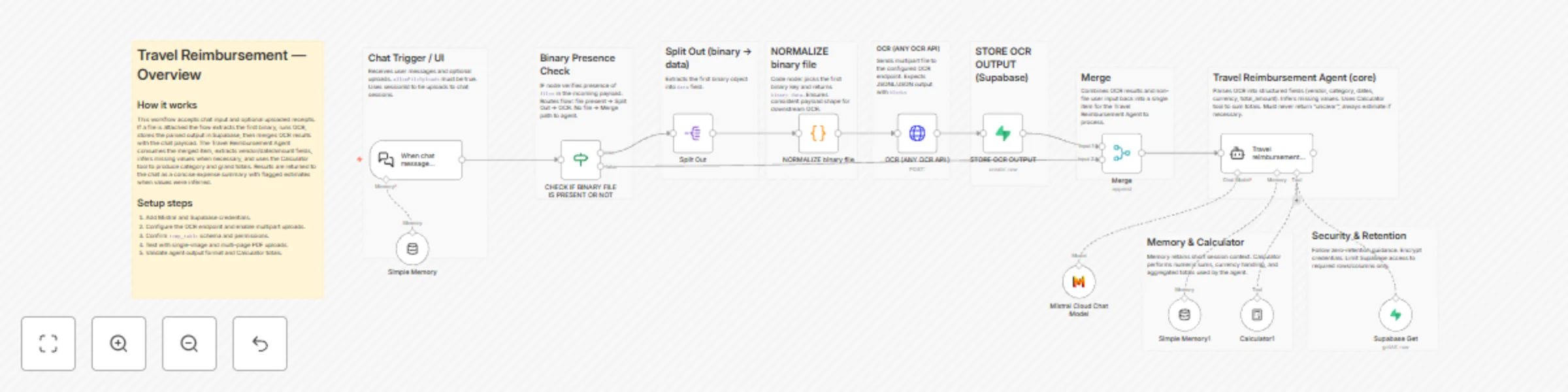
Original n8n.io sourceThis is a lightweight n8n workflow that accepts chat input and uploaded receipts, runs OCR, stores parsed results in Supabase, and uses an AI agent to extract structured travel expense data and compute totals. Designed for zero retention operation and fast integration.
temp_table.When chat message receivedpublic: true, allowFileUploads: true, sessionId used to tie uploads to the chat session.CHECK IF BINARY FILE IS PRESENT OR NOT (IF)files.Split Out -> NORMALIZE binary file -> OCR (ANY OCR API) -> STORE OCR OUTPUT -> Merge.Merge -> Travel reimbursement agent.Split Out and NORMALIZE binary file (Code)Split Out extracts binary entries into a data field.NORMALIZE binary file picks the first binary key and rewrites payload to binary.data for consistent downstream shape.OCR (ANY OCR API ) (HTTP Request)blocks.mode=single, output_type=jsonl, include_images=false.STORE OCR OUTPUT (Supabase)temp_table with session_id, parsed blocks, and file_name.Simple Memory and Simple Memory1 (memoryBufferWindow)Calculator1 (toolCalculator)Travel reimbursement agent (LangChain agent)Mistral Cloud Chat Model (mistral-medium-latest)blocks and non-file chat input.vendor_name, category, invoice_date, checkin_date, checkout_date, time, currency, total_amount, notes, estimated.estimated: true.| Service | Purpose | Credential |
|---|---|---|
| Mistral Cloud | LLM for agent | Mistral account |
| Supabase | Store parsed OCR blocks and session data | Supabase account |
| OCR API | Text extraction from images/PDFs | Configurable HTTP endpoint |
| n8n Core | Flow control, parsing, editing | Native |
> You are a Travel Expense Extraction and Calculation AI. Extract vendor, dates, currency, category, and total amounts from uploaded receipts, invoices, hotel bills, PDFs, and images. Infer values when necessary and mark them as estimated. When asked, fetch session entries from Supabase and compute totals using the Calculator tool. Respond in a concise business professional format with a category wise breakdown and a Grand Total. Never reply "unclear" or ask for a reupload unless explicitly asked.
Required final response format example:
temp_table per session.blocks.temp_table schema with session_id, file, file_name.A practical n8n workflow for travel expense automation: accept receipts, run OCR, store parsed data per session, extract structured fields via an AI agent, compute totals, and return clean expense summaries in chat. Built for reliability and easy integration.
We can integrate this into your environment, tune the agent prompt, or adapt it for different OCR providers.
We can help you set it up for free — from connecting credentials to deploying it live.
Contact: [email protected]
Website: https://www.digitalbiz.tech
LinkedIn: https://www.linkedin.com/company/digital-biz-tech/
You can also DM us on LinkedIn for any help.
This catalog entry is organized from the workflow JSON. The node-level section below shows the executable blocks available for review before importing the template.
| Workflow | Automate travel expense extraction with OCR, Mistral AI and Supabase |
|---|---|
| Complexity | advanced |
| Nodes | 24 |
| Categories | Invoice Processing, AI Chatbot |
| Author | DIGITAL BIZ TECH |
| Published | 17 Nov 2025 |
Use the JSON export at /data/workflows/10901/10901.json as the source template for this automation.
Open n8n, import the downloaded JSON, and review each node before activating the workflow.
Replace placeholder credentials, API keys, webhook URLs, account IDs, and environment-specific values with your own settings.
Run the workflow manually or in a staging workspace, inspect node output, and confirm downstream systems receive the expected data.
Enable the workflow only after testing, then monitor executions, errors, and rate limits during the first production runs.
Review imported nodes carefully before activation. This catalog entry is intended to help you inspect the workflow structure, understand required services, and find related templates faster.
Node names, credentials, schedules, webhook paths, and external service limits may need adjustment for your workspace.
Travel Reimbursement OCR & Expense Extraction Workflow Overview This is a lightweight n8n workflow that accepts chat input and uploaded receipts, runs OCR, stores parsed results in Supabase, and us...
Review the workflow JSON, configure any required credentials in n8n, and test the automation in a safe workspace before using it in production.
Yes. Use the block-by-block analysis and the downloadable JSON to inspect each node, then adjust credentials, prompts, schedules, filters, or destinations for your Invoice Processing, AI Chatbot use case.