Block 1 - Schedule Trigger
- Type / Role
- n8n-nodes-base.scheduleTrigger - scheduleTrigger
- Config choices
- Version 1.2


 Early Deal
This workflow is provided as-is. Please review and test before using in production.
Who it’s for SOC teams, incident responders, or solo defenders who need to automatically act on critical threats without manual triage. Ideal for BlueOps users who’ve already classified alerts v...
n8n-nodes-base.scheduletrigger, n8n-nodes-base.emailsend, n8n-nodes-base.httprequest, n8n-nodes-base.googlesheets, n8n-nodes-base.if, n8n-nodes-base.aggregate, n8n-nodes-base.stickynote
This workflow is cataloged by N8N Workflows and links back to its original n8n.io source page by Adnan Tariq.
Original n8n.io source👤 Who it’s for SOC teams, incident responders, or solo defenders who need to automatically act on critical threats without manual triage.
Ideal for BlueOps users who’ve already classified alerts via GPT (Module 4) and want to auto-execute response steps like email alerts, logging, or EDR isolation.
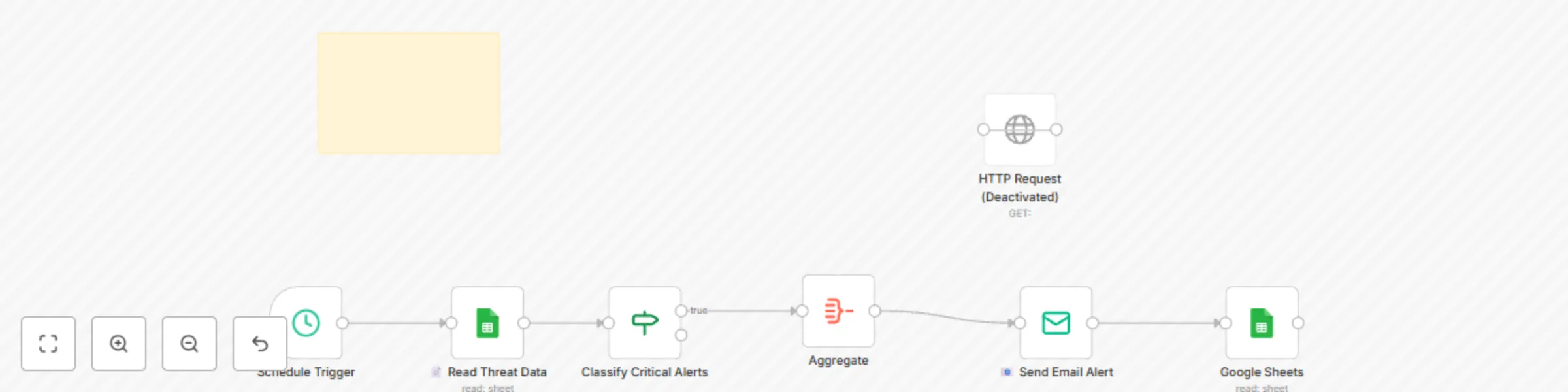
⚙️ How it works / What it does Reads critical alerts from a classified incident log (e.g., Module 4 output)
Filters alerts by severity = Critical
Sends alert summary via email (custom HTML formatting)
Logs all details to a central incident response sheet
Optionally sends a request to your EDR/Isolation API (e.g. CrowdStrike or simulated API)
🛠️ How to set up Replace Placeholder API Key Swap in your secure ISOLATION_API_KEY from your EDR or proxy tool
Update Email Settings Insert your FROM_EMAIL and TO_EMAIL credentials in the Email node
Connect Sheets Authorize access to both your Classified Alerts sheet and Incident Log sheet
Schedule the Run Default trigger is weekly — change it to run hourly, on webhook, or via logic hook
📋 Requirements EDR or endpoint proxy API accepting POST requests
Open or pre-classified incident sheet (Module 4 required)
SMTP email provider or Gmail API access
Google Sheets or internal DB to log actions
🧩 How to customize the workflow Replace Google Sheets with Supabase or your internal SQL
Swap email alerts with ticketing system (e.g., Jira or Slack alerts)
Trigger downstream actions (e.g. auto-pause cloud assets)
Modify aggregation or isolation logic to your threat model
📦 This is a live-fire auto-responder workflow. Make sure to test with dummy data before enabling full EDR triggers. All sensitive variables are clearly marked with placeholders.
🚨 This module is part of the CYBERPULSEBlueOps Pro Incident Response Suite. View the full lineup at 👉 cyberpulsesolutions.com/blueops
This catalog entry is organized from the workflow JSON. The node-level section below shows the executable blocks available for review before importing the template.
| Workflow | Automate security incident response with Google Sheets, email alerts and EDR isolation |
|---|---|
| Complexity | intermediate |
| Nodes | 8 |
| Categories | SecOps |
| Author | Adnan Tariq |
| Published | 25 Jul 2025 |
Use the JSON export at /data/workflows/6413/6413.json as the source template for this automation.
Open n8n, import the downloaded JSON, and review each node before activating the workflow.
Replace placeholder credentials, API keys, webhook URLs, account IDs, and environment-specific values with your own settings.
Run the workflow manually or in a staging workspace, inspect node output, and confirm downstream systems receive the expected data.
Enable the workflow only after testing, then monitor executions, errors, and rate limits during the first production runs.
Review imported nodes carefully before activation. This catalog entry is intended to help you inspect the workflow structure, understand required services, and find related templates faster.
Node names, credentials, schedules, webhook paths, and external service limits may need adjustment for your workspace.
Who it’s for SOC teams, incident responders, or solo defenders who need to automatically act on critical threats without manual triage. Ideal for BlueOps users who’ve already classified alerts v...
Review the workflow JSON, configure any required credentials in n8n, and test the automation in a safe workspace before using it in production.
Yes. Use the block-by-block analysis and the downloadable JSON to inspect each node, then adjust credentials, prompts, schedules, filters, or destinations for your SecOps use case.