Block 1 - Send a text message
- Type / Role
- n8n-nodes-base.telegram - telegram
- Config choices
- Version 1.2


 Early Deal
This workflow is provided as-is. Please review and test before using in production.
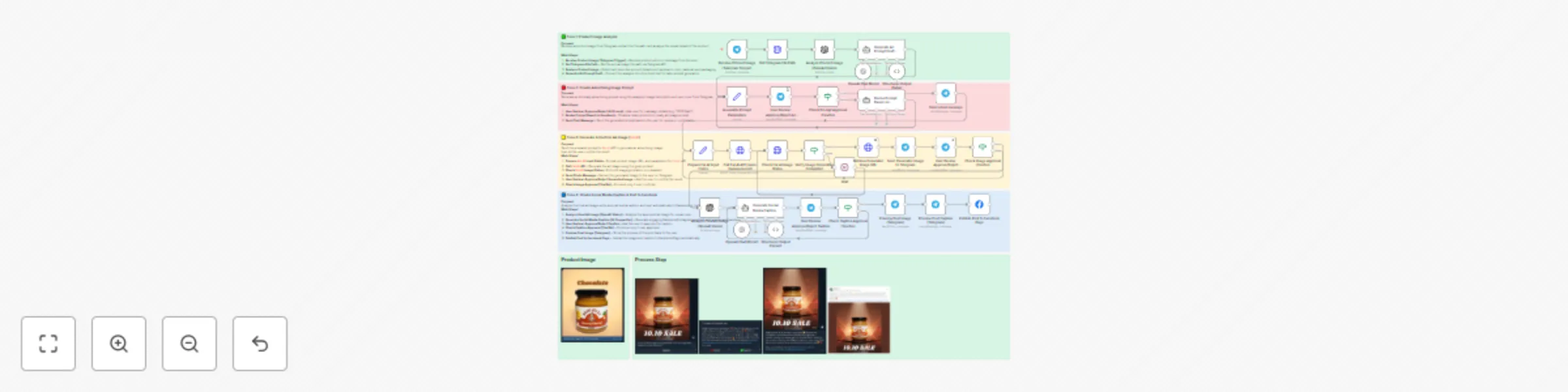
This workflow automates the entire process of creating and publishing social media ads — directly from Telegram. By simply sending a product photo to your Telegram bot, the system analyzes the imag...
n8n-nodes-base.telegram, @n8n/n8n-nodes-langchain.lmchatopenai, @n8n/n8n-nodes-langchain.outputparserstructured, n8n-nodes-base.stickynote, n8n-nodes-base.wait, n8n-nodes-base.telegramtrigger, n8n-nodes-base.httprequest, @n8n/n8n-nodes-langchain.openai
This workflow is cataloged by N8N Workflows and links back to its original n8n.io source page by Jaruphat J..
Original n8n.io sourceThis workflow automates the entire process of creating and publishing social media ads — directly from Telegram.
By simply sending a product photo to your Telegram bot, the system analyzes the image, generates an AI-based advertising prompt, creates a marketing image via Fal.AI, writes an engaging Facebook/Instagram caption, and posts it automatically.
This template saves hours of manual work for marketers and small business owners who constantly need to design, write, and publish product campaigns. It eliminates repetitive steps like prompt writing, AI model switching, and post scheduling — letting you focus on strategy, not execution.
The workflow integrates seamlessly with Fal.AI for image generation, OpenAI Vision for image analysis, and the Facebook Graph API for automated publishing.
Whether you’re launching a 10.10 campaign or promoting a new product line, this template transforms your product photo into a ready-to-publish ad in just minutes.
This workflow is designed for:
Manually creating ad images and captions is time-consuming and repetitive.
You need to:
This workflow combines all five steps into one automation — triggered directly by sending a Telegram message.
It handles AI analysis, image creation, caption writing, and posting, removing human friction while maintaining quality and creative control.
The workflow is divided into four main zones, color-coded inside the canvas:
https://fal.run/fal-ai/nano-banana {
"model": "gpt-4o-mini",
"input": [
{
"role": "user",
"content": [
{ "type": "image_url", "image_url": "{{$json.image_url}}" },
{ "type": "text", "text": "Describe this product in detail for advertising context." }
]
}
]
}
{
  "prompt": {{ JSON.stringify(($json.ad_prompt || '').replace(/\r?\n/g, ' ')) }},
  "image_urls": [{{ JSON.stringify($json.image_url || '') }}],
  "num_images": 1,
  "output_format": "jpeg"
}
{
  "method": "POST",
  "url": "https://graph.facebook.com/v19.0/me/photos",
  "body": {
    "caption": "{{ $json.caption_text }}",
    "url": "{{ $json.final_image_url }}",
    "access_token": "{{ $credentials.facebook.accessToken }}"
  }
}
| Problem | Cause | Solution |
|---|---|---|
| Telegram message not triggering | Webhook misconfigured | Reconnect Telegram Trigger |
| Fal.AI API error | Invalid JSON or token | Use JSON.stringify() in Set node and check credentials |
| Facebook upload fails | Missing permissions | Ensure Page Access Token has pages_manage_posts |
| LLM parser error | Output not valid JSON | Add Structured Output Parser and enforce schema |
.env variables for sensitive keys (OpenAI, Fal.AI, Facebook).#n8n #Automation #AIworkflow #FalAI #FacebookAPI #TelegramBot #nanobanana #NoCode #MarketingAutomation #SocialMediaAI #JaruphatJ #WorkflowTemplate #OpenAI #LLM #ProductAds #CreativeAutomation
This catalog entry is organized from the workflow JSON. The node-level section below shows the executable blocks available for review before importing the template.
Showing the first 24 of 35 workflow blocks. Download the JSON for the full node graph.
| Workflow | Automate product ad creation with Telegram, Fal.AI & Facebook posting |
|---|---|
| Complexity | advanced |
| Nodes | 35 |
| Categories | Social Media, Multimodal AI |
| Author | Jaruphat J. |
| Published | 13 Oct 2025 |
Use the JSON export at /data/workflows/9561/9561.json as the source template for this automation.
Open n8n, import the downloaded JSON, and review each node before activating the workflow.
Replace placeholder credentials, API keys, webhook URLs, account IDs, and environment-specific values with your own settings.
Run the workflow manually or in a staging workspace, inspect node output, and confirm downstream systems receive the expected data.
Enable the workflow only after testing, then monitor executions, errors, and rate limits during the first production runs.
Review imported nodes carefully before activation. This catalog entry is intended to help you inspect the workflow structure, understand required services, and find related templates faster.
Node names, credentials, schedules, webhook paths, and external service limits may need adjustment for your workspace.
This workflow automates the entire process of creating and publishing social media ads — directly from Telegram. By simply sending a product photo to your Telegram bot, the system analyzes the imag...
Review the workflow JSON, configure any required credentials in n8n, and test the automation in a safe workspace before using it in production.
Yes. Use the block-by-block analysis and the downloadable JSON to inspect each node, then adjust credentials, prompts, schedules, filters, or destinations for your Social Media, Multimodal AI use case.