Automate Pokemon card stock monitoring with Apify, AI, and Slack alerts

Workflow preview

Workflow preview
100%
Automate Pokemon card stock monitoring with Apify, AI, and Slack alerts preview
Open on n8n.io

Important notice

This workflow is provided as-is. Please review and test before using in production.

1. Workflow Overview

Pokemon Card Sales & Stock Monitor Workflow Who’s it for This workflow is designed for Pokemon Card Game (Pokéca) players, collectors, or resellers in Japan who want to automate the discovery of ne...

Best for

  • Market Research automation workflows
  • AI Summarization automation workflows
  • advanced n8n builders looking for reusable templates

Tools used

n8n-nodes-base.manualtrigger, @n8n/n8n-nodes-langchain.agent, @n8n/n8n-nodes-langchain.lmchatopenrouter, n8n-nodes-base.httprequesttool, @apify/n8n-nodes-apify.apify, n8n-nodes-base.splitinbatches, n8n-nodes-base.noop, n8n-nodes-base.slack

Source and attribution

This workflow is cataloged by N8N Workflows and links back to its original n8n.io source page by furuidoreandoro.

Original n8n.io source

1.1 Workflow description

Title
Automate Pokemon card stock monitoring with Apify, AI, and Slack alerts
Workflow name
Automate Pokemon card stock monitoring with Apify, AI, and Slack alerts

Pokemon Card Sales & Stock Monitor Workflow

Who’s it for

This workflow is designed for Pokemon Card Game (Pokéca) players, collectors, or resellers in Japan who want to automate the discovery of new card releases and restock information. It is particularly useful for those who want to filter through social media noise and cross-reference rumors with official inventory data.

How it works / What it does

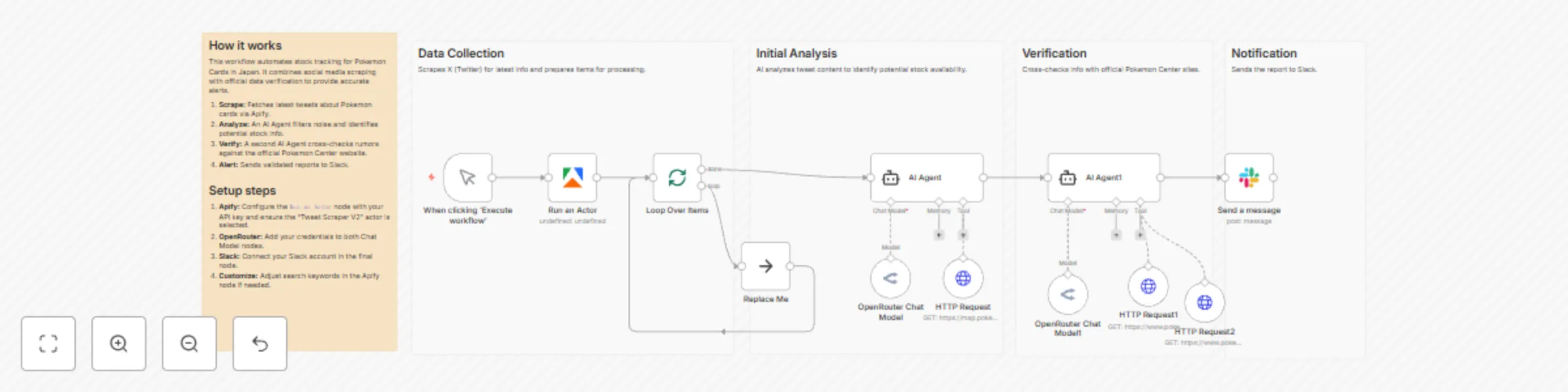
  1. Social Media Scraping: The workflow triggers manually and uses Apify (specifically the "Tweet Scraper V2" actor) to search X (formerly Twitter) for Japanese keywords like "Pokemon Card" (ポケモンカード), "Sales Info", and "Pokeca".
  2. Data Processing: It splits the scraped tweets into batches to process them individually.
  3. AI Analysis (Step 1 - Social Verification): An AI Agent (powered by OpenRouter) analyzes the tweet text to determine if it contains valid sales or stock information. It utilizes an HTTP Request Tool to access the official Pokemon Card Map (map.pokemon-card.com) to identify mentioned retailers.
  4. AI Analysis (Step 2 - Official Stock Check): A second AI Agent takes the filtered information and checks official sources. It uses HTTP Request Tools to browse the official Pokemon Card Product page and the Pokemon Center Online store to verify if products are actually purchasable.
  5. Notification: Finally, the workflow compiles the findings into a "Sales Flash Report" and sends it to a specified Slack channel.

How to set up

  1. Import the Workflow: Copy the JSON code block below and paste it into your n8n editor.
  2. Configure Credentials:
    • Apify: Create an account on Apify, subscribe to the "Tweet Scraper V2" actor, and add your API Token to the n8n credential store.
    • OpenRouter: Add your OpenRouter API key to power the LLM Chat Models.
    • Slack: Connect your Slack account using OAuth2 or a Bot Token.
  3. Configure Apify Node: Ensure the actorId in the "Run an Actor" node matches the ID for the Tweet Scraper you intend to use.
  4. Set Slack Destination: Open the "Send a message" node. You will need to select the Channel where you want the alerts to appear.

Requirements

  • n8n Version: A recent version of n8n that supports the @n8n/n8n-nodes-langchain (AI Agent) nodes.
  • Apify Account: Paid or free tier with enough compute units to run the scraper.
  • OpenRouter Account: To provide the Language Model (LLM) intelligence.
  • Slack Workspace: To receive the notifications.

How to customize the workflow

  • Automate Execution: Currently, the workflow uses a "Manual Trigger". Replace this with a Schedule Trigger node (e.g., set to run every 30 minutes) to make it a fully automated monitoring bot.
  • Adjust Search Terms: In the Apify node, modify the searchTerms array in the JSON input to look for specific sets (e.g., "Shiny Treasure", "151") or other trading card games.
  • Change Notification Channel: If you prefer Discord, Line, or Telegram, remove the Slack node and replace it with the corresponding messaging node.
  • Modify AI Logic: You can adjust the system prompt in the AI Agent nodes to change how strict the AI is about what counts as "stock available" versus just "news".

1.2 Logical Blocks

This catalog entry is organized from the workflow JSON. The node-level section below shows the executable blocks available for review before importing the template.

2. Block-by-Block Analysis

Block 1 - When clicking ‘Execute workflow’

Type / Role
n8n-nodes-base.manualTrigger - manualTrigger
Config choices
Version 1

Block 2 - AI Agent

Type / Role
@n8n/n8n-nodes-langchain.agent - agent
Config choices
Version 3

Block 3 - OpenRouter Chat Model

Type / Role
@n8n/n8n-nodes-langchain.lmChatOpenRouter - lmChatOpenRouter
Config choices
Version 1

Block 4 - HTTP Request

Type / Role
n8n-nodes-base.httpRequestTool - httpRequestTool
Config choices
Version 4.3

Block 5 - Run an Actor

Type / Role
@apify/n8n-nodes-apify.apify - apify
Config choices
Version 1

Block 6 - Loop Over Items

Type / Role
n8n-nodes-base.splitInBatches - splitInBatches
Config choices
Version 3

Block 7 - Replace Me

Type / Role
n8n-nodes-base.noOp - noOp
Config choices
Version 1

Block 8 - AI Agent1

Type / Role
@n8n/n8n-nodes-langchain.agent - agent
Config choices
Version 3

Block 9 - OpenRouter Chat Model1

Type / Role
@n8n/n8n-nodes-langchain.lmChatOpenRouter - lmChatOpenRouter
Config choices
Version 1

Block 10 - HTTP Request1

Type / Role
n8n-nodes-base.httpRequestTool - httpRequestTool
Config choices
Version 4.3

Block 11 - HTTP Request2

Type / Role
n8n-nodes-base.httpRequestTool - httpRequestTool
Config choices
Version 4.3

Block 12 - Send a message

Type / Role
n8n-nodes-base.slack - slack
Config choices
Version 2.3

Block 13 - Main Description

Type / Role
n8n-nodes-base.stickyNote - stickyNote
Config choices
Version 1

Block 14 - Group: Data Collection

Type / Role
n8n-nodes-base.stickyNote - stickyNote
Config choices
Version 1

Block 15 - Group: Analysis

Type / Role
n8n-nodes-base.stickyNote - stickyNote
Config choices
Version 1

Block 16 - Group: Verification

Type / Role
n8n-nodes-base.stickyNote - stickyNote
Config choices
Version 1

Block 17 - Group: Notification

Type / Role
n8n-nodes-base.stickyNote - stickyNote
Config choices
Version 1

3. Summary Table

Workflow Automate Pokemon card stock monitoring with Apify, AI, and Slack alerts
Complexity advanced
Nodes 17
Categories Market Research, AI Summarization
Author furuidoreandoro
Published 21 Nov 2025

4. Reproducing the Workflow from Scratch

  1. 1. Download the workflow JSON

    Use the JSON export at /data/workflows/11095/11095.json as the source template for this automation.

  2. 2. Import the template into n8n

    Open n8n, import the downloaded JSON, and review each node before activating the workflow.

  3. 3. Configure credentials and variables

    Replace placeholder credentials, API keys, webhook URLs, account IDs, and environment-specific values with your own settings.

  4. 4. Test with sample data

    Run the workflow manually or in a staging workspace, inspect node output, and confirm downstream systems receive the expected data.

  5. 5. Activate and monitor

    Enable the workflow only after testing, then monitor executions, errors, and rate limits during the first production runs.

5. General Notes & Resources

Review imported nodes carefully before activation. This catalog entry is intended to help you inspect the workflow structure, understand required services, and find related templates faster.

Node names, credentials, schedules, webhook paths, and external service limits may need adjustment for your workspace.

Frequently asked questions

What does Automate Pokemon card stock monitoring with Apify, AI, and Slack alerts do?

Pokemon Card Sales & Stock Monitor Workflow Who’s it for This workflow is designed for Pokemon Card Game (Pokéca) players, collectors, or resellers in Japan who want to automate the discovery of ne...

What do I need before importing this workflow?

Review the workflow JSON, configure any required credentials in n8n, and test the automation in a safe workspace before using it in production.

Can I customize this workflow?

Yes. Use the block-by-block analysis and the downloadable JSON to inspect each node, then adjust credentials, prompts, schedules, filters, or destinations for your Market Research, AI Summarization use case.