Automate NGO aid request management with Telegram, GPT-4, and Google Sheets

Workflow preview

Workflow preview
100%
Automate NGO aid request management with Telegram, GPT-4, and Google Sheets preview
Open on n8n.io

Important notice

This workflow is provided as-is. Please review and test before using in production.

1. Workflow Overview

NGO TPM Request Management System Benefits For Beneficiaries: 24/7 Accessibility Submit requests anytime via familiar Telegram interface Language Flexibility Communicate in Arabic through text or v...

Best for

  • Ticket Management automation workflows
  • AI Chatbot automation workflows
  • intermediate n8n builders looking for reusable templates

Tools used

n8n-nodes-base.telegramtrigger, n8n-nodes-base.switch, n8n-nodes-base.telegram, @n8n/n8n-nodes-langchain.openai, n8n-nodes-base.set, @n8n/n8n-nodes-langchain.agent, @n8n/n8n-nodes-langchain.lmchatopenai, n8n-nodes-base.googlesheets

Source and attribution

This workflow is cataloged by N8N Workflows and links back to its original n8n.io source page by Abdulrahman Alhalabi.

Original n8n.io source

1.1 Workflow description

Title
Automate NGO aid request management with Telegram, GPT-4, and Google Sheets
Workflow name
Automate NGO aid request management with Telegram, GPT-4, and Google Sheets

NGO TPM Request Management System

Benefits

For Beneficiaries:

  • 24/7 Accessibility - Submit requests anytime via familiar Telegram interface
  • Language Flexibility - Communicate in Arabic through text or voice messages
  • Instant Acknowledgment - Receive immediate confirmation that requests are logged
  • No Technical Barriers - Works on basic smartphones without special apps

For TPM Teams:

  • Centralized Tracking - All requests automatically logged with timestamps and user details
  • Smart Prioritization - AI categorizes issues by urgency and type for efficient response
  • Action Guidance - Specific recommended actions generated for each request type
  • Performance Analytics - Track response patterns and common issues over time

For NGO Operations:

  • Cost Reduction - Automated intake reduces manual processing overhead
  • Data Quality - Standardized categorization ensures consistent reporting
  • Audit Trail - Complete record of all beneficiary interactions for compliance
  • Scalability - Handle high volumes without proportional staff increases

How it Works

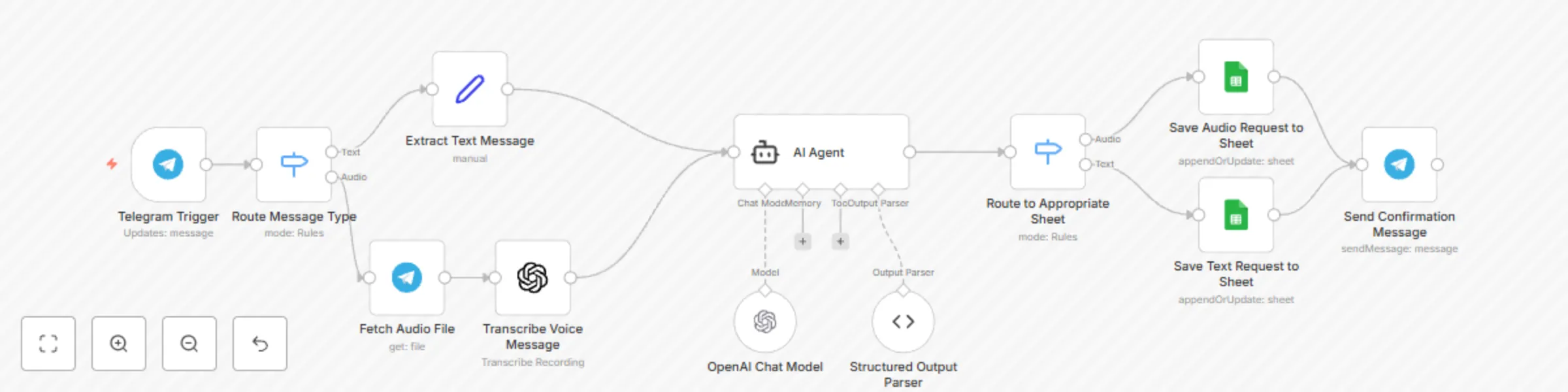
  1. Multi-Input Reception - Accepts both text messages and voice recordings via Telegram
  2. Voice Transcription - Uses OpenAI Whisper to convert Arabic voice messages to text
  3. AI Categorization - GPT-4 analyzes requests and categorizes issues (aid distribution, logistics, etc.)
  4. Action Planning - AI generates specific recommended actions for TPM team in Arabic
  5. Data Logging - Records all requests, categories, and actions in Google Sheets with user details
  6. Confirmation Feedback - Sends acknowledgment message back to users via Telegram

Set up Steps

Setup Time: ~20 minutes

  1. Create Telegram Bot - Get bot token from @BotFather and configure webhook
  2. Configure APIs - Set up OpenAI (transcription + chat) and Google Sheets credentials
  3. Customize AI Prompts - Adjust system messages for your NGO's specific operations
  4. Set Up Spreadsheet - Link Google Sheets for request tracking and reporting
  5. Test Workflows - Verify both text and voice message processing paths

Detailed Arabic language configuration and TPM-specific categorization examples are included as sticky notes within the workflow.


What You'll Need:

  • Telegram Bot Token (free from @BotFather)
  • OpenAI API key (Whisper + GPT-4)
  • Google Sheets API credentials
  • Google Spreadsheet for logging requests
  • Sample Arabic text/voice messages for testing

Key Features:

  • Dual input support (text + voice messages)
  • Arabic language processing and responses
  • Structured data extraction (category + recommended action)
  • Complete audit trail with user information
  • Real-time confirmation messaging
  • TPM team-specific workflow optimization

1.2 Logical Blocks

This catalog entry is organized from the workflow JSON. The node-level section below shows the executable blocks available for review before importing the template.

2. Block-by-Block Analysis

Block 1 - Telegram Trigger

Type / Role
n8n-nodes-base.telegramTrigger - telegramTrigger
Config choices
Version 1.2

Block 2 - Route Message Type

Type / Role
n8n-nodes-base.switch - switch
Config choices
Version 3.2

Block 3 - Fetch Audio File

Type / Role
n8n-nodes-base.telegram - telegram
Config choices
Version 1.2

Block 4 - Transcribe Voice Message

Type / Role
@n8n/n8n-nodes-langchain.openAi - openAi
Config choices
Version 1.8

Block 5 - Extract Text Message

Type / Role
n8n-nodes-base.set - set
Config choices
Version 3.4

Block 6 - AI Agent

Type / Role
@n8n/n8n-nodes-langchain.agent - agent
Config choices
Version 1.9

Block 7 - OpenAI Chat Model

Type / Role
@n8n/n8n-nodes-langchain.lmChatOpenAi - lmChatOpenAi
Config choices
Version 1.2

Block 8 - Send Confirmation Message

Type / Role
n8n-nodes-base.telegram - telegram
Config choices
Version 1.2

Block 9 - Save Audio Request to Sheet

Type / Role
n8n-nodes-base.googleSheets - googleSheets
Config choices
Version 4.5

Block 10 - Structured Output Parser

Type / Role
@n8n/n8n-nodes-langchain.outputParserStructured - outputParserStructured
Config choices
Version 1.2

Block 11 - Route to Appropriate Sheet

Type / Role
n8n-nodes-base.switch - switch
Config choices
Version 3.2

Block 12 - Save Text Request to Sheet

Type / Role
n8n-nodes-base.googleSheets - googleSheets
Config choices
Version 4.5

3. Summary Table

Workflow Automate NGO aid request management with Telegram, GPT-4, and Google Sheets
Complexity intermediate
Nodes 12
Categories Ticket Management, AI Chatbot
Author Abdulrahman Alhalabi
Published 26 Aug 2025

4. Reproducing the Workflow from Scratch

  1. 1. Download the workflow JSON

    Use the JSON export at /data/workflows/7898/7898.json as the source template for this automation.

  2. 2. Import the template into n8n

    Open n8n, import the downloaded JSON, and review each node before activating the workflow.

  3. 3. Configure credentials and variables

    Replace placeholder credentials, API keys, webhook URLs, account IDs, and environment-specific values with your own settings.

  4. 4. Test with sample data

    Run the workflow manually or in a staging workspace, inspect node output, and confirm downstream systems receive the expected data.

  5. 5. Activate and monitor

    Enable the workflow only after testing, then monitor executions, errors, and rate limits during the first production runs.

5. General Notes & Resources

Review imported nodes carefully before activation. This catalog entry is intended to help you inspect the workflow structure, understand required services, and find related templates faster.

Node names, credentials, schedules, webhook paths, and external service limits may need adjustment for your workspace.

Frequently asked questions

What does Automate NGO aid request management with Telegram, GPT-4, and Google Sheets do?

NGO TPM Request Management System Benefits For Beneficiaries: 24/7 Accessibility Submit requests anytime via familiar Telegram interface Language Flexibility Communicate in Arabic through text or v...

What do I need before importing this workflow?

Review the workflow JSON, configure any required credentials in n8n, and test the automation in a safe workspace before using it in production.

Can I customize this workflow?

Yes. Use the block-by-block analysis and the downloadable JSON to inspect each node, then adjust credentials, prompts, schedules, filters, or destinations for your Ticket Management, AI Chatbot use case.