A

Abdulrahman Alhalabi

2
Workflows

Workflows by Abdulrahman Alhalabi
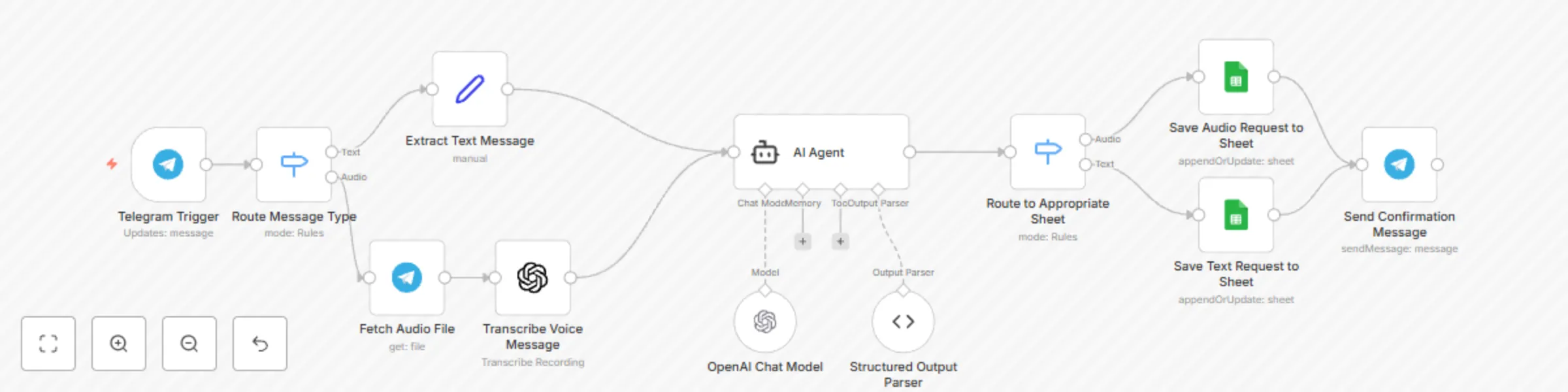
Workflow preview: Automate NGO aid request management with Telegram, GPT-4, and Google Sheets
Free intermediate

Automate NGO aid request management with Telegram, GPT-4, and Google Sheets

# NGO TPM Request Management System ## Benefits **For Beneficiaries:** - **24/7 Accessibility** - Submit requests anytime via familiar Telegram interface - **Language Flexibility** - Communicate in Arabic through text or voice messages - **Instant Acknowledgment** - Receive immediate confirmation that requests are logged - **No Technical Barriers** - Works on basic smartphones without special apps **For TPM Teams:** - **Centralized Tracking** - All requests automatically logged with timestamps and user details - **Smart Prioritization** - AI categorizes issues by urgency and type for efficient response - **Action Guidance** - Specific recommended actions generated for each request type - **Performance Analytics** - Track response patterns and common issues over time **For NGO Operations:** - **Cost Reduction** - Automated intake reduces manual processing overhead - **Data Quality** - Standardized categorization ensures consistent reporting - **Audit Trail** - Complete record of all beneficiary interactions for compliance - **Scalability** - Handle high volumes without proportional staff increases ## How it Works 1. **Multi-Input Reception** - Accepts both text messages and voice recordings via Telegram 2. **Voice Transcription** - Uses OpenAI Whisper to convert Arabic voice messages to text 3. **AI Categorization** - GPT-4 analyzes requests and categorizes issues (aid distribution, logistics, etc.) 4. **Action Planning** - AI generates specific recommended actions for TPM team in Arabic 5. **Data Logging** - Records all requests, categories, and actions in Google Sheets with user details 6. **Confirmation Feedback** - Sends acknowledgment message back to users via Telegram ## Set up Steps **Setup Time: ~20 minutes** 1. **Create Telegram Bot** - Get bot token from @BotFather and configure webhook 2. **Configure APIs** - Set up OpenAI (transcription + chat) and Google Sheets credentials 3. **Customize AI Prompts** - Adjust system messages for your NGO's specific operations 4. **Set Up Spreadsheet** - Link Google Sheets for request tracking and reporting 5. **Test Workflows** - Verify both text and voice message processing paths *Detailed Arabic language configuration and TPM-specific categorization examples are included as sticky notes within the workflow.* --- **What You'll Need:** - Telegram Bot Token (free from @BotFather) - OpenAI API key (Whisper + GPT-4) - Google Sheets API credentials - Google Spreadsheet for logging requests - Sample Arabic text/voice messages for testing **Key Features:** - Dual input support (text + voice messages) - Arabic language processing and responses - Structured data extraction (category + recommended action) - Complete audit trail with user information - Real-time confirmation messaging - TPM team-specific workflow optimization

A
Abdulrahman Alhalabi
Ticket Management
26 Aug 2025
80
0

Workflow preview: Extract Arabic text from PDFs with Mistral OCR, Telegram Bot & Google Docs
Free advanced

Extract Arabic text from PDFs with Mistral OCR, Telegram Bot & Google Docs

# Arabic OCR Telegram Bot ## How it Works 1. **Receive PDF Files** - Users send PDF documents via Telegram to the bot 2. **OCR Processing** - Mistral AI's OCR service extracts Arabic text from document pages 3. **Text Organization** - Processes and formats extracted content with page numbers 4. **Create Google Doc** - Generates a formatted document with all extracted text 5. **Deliver Results** - Sends users a clickable link to their processed document ## Set up Steps **Setup Time: ~20 minutes** 1. **Create Telegram Bot** - Get bot token from @BotFather on Telegram 2. **Configure APIs** - Set up Mistral AI OCR and Google Docs API credentials 3. **Set Folder Permissions** - Create Google Drive folder for storing results 4. **Test Bot** - Send a sample Arabic PDF to verify OCR accuracy 5. **Deploy Webhook** - Activate the Telegram webhook for real-time processing *Detailed API configuration and Arabic text handling notes are included as sticky notes within the workflow.* --- **What You'll Need:** - Telegram Bot Token (free from @BotFather) - Mistral AI API key (OCR service) - Google Docs/Drive API credentials - Google Drive folder for document storage - Sample Arabic PDF files for testing **Key Features:** - Real-time progress updates (5-step process notifications) - Automatic page numbering in Arabic - Direct Google Docs integration - Error handling for non-PDF files

A
Abdulrahman Alhalabi
Document Extraction
26 Aug 2025
347
0