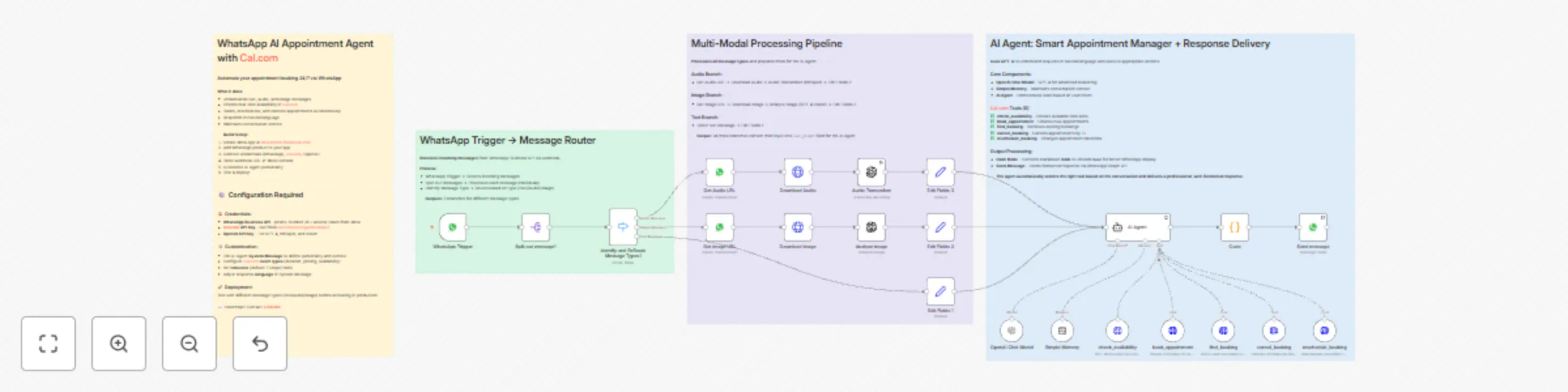
Automate multi-modal appointment booking via WhatsApp using GPT-4 and Cal.com

Workflow preview

Workflow preview
100%
Automate multi-modal appointment booking via WhatsApp using GPT-4 and Cal.com preview
Open on n8n.io

Important notice

This workflow is provided as-is. Please review and test before using in production.

1. Workflow Overview

Who is this for? This workflow is for healthcare professionals, consultants, coaches, and service businesses who want to completely automate their appointment booking system via WhatsApp — without ...

Best for

  • Support Chatbot automation workflows
  • AI Chatbot automation workflows
  • advanced n8n builders looking for reusable templates

Tools used

n8n-nodes-base.code, n8n-nodes-base.splitout, n8n-nodes-base.switch, n8n-nodes-base.whatsapp, @n8n/n8n-nodes-langchain.openai, n8n-nodes-base.httprequest, @n8n/n8n-nodes-langchain.agent, @n8n/n8n-nodes-langchain.lmchatopenai

Source and attribution

This workflow is cataloged by N8N Workflows and links back to its original n8n.io source page by Stéphane Bordas.

Original n8n.io source

1.1 Workflow description

Title
Automate multi-modal appointment booking via WhatsApp using GPT-4 and Cal.com
Workflow name
Automate multi-modal appointment booking via WhatsApp using GPT-4 and Cal.com

Who is this for?

This workflow is for healthcare professionals, consultants, coaches, and service businesses who want to completely automate their appointment booking system via WhatsApp — without manual intervention for reservations, availability checks, or cancellation management.

What problem is this workflow solving? / Use case

Managing appointments manually via WhatsApp is extremely time-consuming: checking availability, confirmations, rescheduling, cancellations. This workflow automates the entire process — from initial request to final confirmation — allowing your clients to book, modify, or cancel appointments 24/7, in natural language, directly via WhatsApp.

What this workflow does

  • Processes multi-modal messages (text, audio, images) from WhatsApp Business API
  • Detects message type and routes to appropriate processing (Whisper for audio, GPT-4 Vision for images)
  • Uses AI Agent with 5 Cal.com tools to manage complete appointment lifecycle
  • Checks real-time availability in your Cal.com calendar
  • Books appointments autonomously without human intervention
  • Handles cancellations and rescheduling requests
  • Maintains conversation context with Simple Memory for natural exchanges
  • Formats responses with Unicode bold for better WhatsApp readability
  • Sends automated replies directly to the client

The result: a fully automated 24/7 appointment management system via WhatsApp.

Setup

1. WhatsApp Business API

  • Connect your WhatsApp Business API account in n8n.
  • Set up the webhook in Facebook Developer Console (Webhook → Messages → Subscribe).
  • Add your phone_number_id and access token credentials.

2. Cal.com

  • Create a Cal.com account and configure your calendar.
  • Generate an API Key from Cal.com settings.
  • Set up your event types (duration, availability, pricing).
  • Add your Cal.com API credentials in n8n.

3. OpenAI

  • Get an OpenAI API key (for GPT-4, Whisper, and Vision).
  • Add your OpenAI credentials in n8n.
  • The workflow uses GPT-4 for conversation, Whisper for audio transcription, and GPT-4 Vision for image analysis.

4. Customize the AI Agent

  • Edit the System Message to define your agent's personality, tone, and business context.
  • Adjust timezone in tool parameters (default: Europe/Paris).
  • Configure event type IDs for different appointment types.

5. Test & activate

  • Test with different message types (text, audio, image) from WhatsApp.
  • Verify appointments are created correctly in Cal.com.
  • Switch to production mode and activate the workflow.

This workflow helps you build a fully autonomous AI booking assistant, transforming WhatsApp into a 24/7 appointment management system.


Need help customizing?

Contact me for consulting and support: LinkedIn / Youtube

1.2 Logical Blocks

This catalog entry is organized from the workflow JSON. The node-level section below shows the executable blocks available for review before importing the template.

2. Block-by-Block Analysis

Block 1 - Code

Type / Role
n8n-nodes-base.code - code
Config choices
Version 2

Block 2 - Split out message1

Type / Role
n8n-nodes-base.splitOut - splitOut
Config choices
Version 1

Block 3 - Identify and ReRoute Message Types1

Type / Role
n8n-nodes-base.switch - switch
Config choices
Version 3.2

Block 4 - Send message

Type / Role
n8n-nodes-base.whatsApp - whatsApp
Config choices
Version 1

Block 5 - Audio Transcriber

Type / Role
@n8n/n8n-nodes-langchain.openAi - openAi
Config choices
Version 1.8

Block 6 - Analyze image

Type / Role
@n8n/n8n-nodes-langchain.openAi - openAi
Config choices
Version 1.8

Block 7 - Get Audio URL

Type / Role
n8n-nodes-base.whatsApp - whatsApp
Config choices
Version 1

Block 8 - Get Image URL

Type / Role
n8n-nodes-base.whatsApp - whatsApp
Config choices
Version 1

Block 9 - Download Image

Type / Role
n8n-nodes-base.httpRequest - httpRequest
Config choices
Version 4.2

Block 10 - Download Audio

Type / Role
n8n-nodes-base.httpRequest - httpRequest
Config choices
Version 4.2

Block 11 - AI Agent

Type / Role
@n8n/n8n-nodes-langchain.agent - agent
Config choices
Version 2.2

Block 12 - OpenAI Chat Model

Type / Role
@n8n/n8n-nodes-langchain.lmChatOpenAi - lmChatOpenAi
Config choices
Version 1.2

Block 13 - Simple Memory

Type / Role
@n8n/n8n-nodes-langchain.memoryBufferWindow - memoryBufferWindow
Config choices
Version 1.3

Block 14 - check_availability

Type / Role
n8n-nodes-base.httpRequestTool - httpRequestTool
Config choices
Version 4.2

Block 15 - book_appointment

Type / Role
@n8n/n8n-nodes-langchain.toolHttpRequest - toolHttpRequest
Config choices
Version 1.1

Block 16 - find_booking

Type / Role
@n8n/n8n-nodes-langchain.toolHttpRequest - toolHttpRequest
Config choices
Version 1.1

Block 17 - cancel_booking

Type / Role
@n8n/n8n-nodes-langchain.toolHttpRequest - toolHttpRequest
Config choices
Version 1.1

Block 18 - reschedule_booking

Type / Role
@n8n/n8n-nodes-langchain.toolHttpRequest - toolHttpRequest
Config choices
Version 1.1

Block 19 - WhatsApp Trigger

Type / Role
n8n-nodes-base.whatsAppTrigger - whatsAppTrigger
Config choices
Version 1

Block 20 - Edit Fields 1

Type / Role
n8n-nodes-base.set - set
Config choices
Version 3.4

Block 21 - Edit Fields 2

Type / Role
n8n-nodes-base.set - set
Config choices
Version 3.4

Block 22 - Edit Fields 3

Type / Role
n8n-nodes-base.set - set
Config choices
Version 3.4

Block 23 - Sticky Note

Type / Role
n8n-nodes-base.stickyNote - stickyNote
Config choices
Version 1

Block 24 - Sticky Note1

Type / Role
n8n-nodes-base.stickyNote - stickyNote
Config choices
Version 1

Showing the first 24 of 26 workflow blocks. Download the JSON for the full node graph.

3. Summary Table

Workflow Automate multi-modal appointment booking via WhatsApp using GPT-4 and Cal.com
Complexity advanced
Nodes 26
Categories Support Chatbot, AI Chatbot
Author Stéphane Bordas
Published 24 Nov 2025

4. Reproducing the Workflow from Scratch

  1. 1. Download the workflow JSON

    Use the JSON export at /data/workflows/11188/11188.json as the source template for this automation.

  2. 2. Import the template into n8n

    Open n8n, import the downloaded JSON, and review each node before activating the workflow.

  3. 3. Configure credentials and variables

    Replace placeholder credentials, API keys, webhook URLs, account IDs, and environment-specific values with your own settings.

  4. 4. Test with sample data

    Run the workflow manually or in a staging workspace, inspect node output, and confirm downstream systems receive the expected data.

  5. 5. Activate and monitor

    Enable the workflow only after testing, then monitor executions, errors, and rate limits during the first production runs.

5. General Notes & Resources

Review imported nodes carefully before activation. This catalog entry is intended to help you inspect the workflow structure, understand required services, and find related templates faster.

Node names, credentials, schedules, webhook paths, and external service limits may need adjustment for your workspace.

Frequently asked questions

What does Automate multi-modal appointment booking via WhatsApp using GPT-4 and Cal.com do?

Who is this for? This workflow is for healthcare professionals, consultants, coaches, and service businesses who want to completely automate their appointment booking system via WhatsApp — without ...

What do I need before importing this workflow?

Review the workflow JSON, configure any required credentials in n8n, and test the automation in a safe workspace before using it in production.

Can I customize this workflow?

Yes. Use the block-by-block analysis and the downloadable JSON to inspect each node, then adjust credentials, prompts, schedules, filters, or destinations for your Support Chatbot, AI Chatbot use case.